Python flush() Function
The flush() function in Python, used to flush the internal buffer. The word flush means clear. Therefore, flushing the internal buffer means clearing the internal buffer.
Note: After the use of close() function, Python automatically flushes the file. But, sometime, in rare case, a programmer may need to flush the file before closing it.
Basically, internal buffers and operating system buffers are the two types of buffer. And the flush() function deals with internal buffer. That is, it flushes the internal buffer.
Buffer can be said as a path to/from the memory to the Input/Output (I/O) devices. Therefore, while reading or writing the data to memory, the buffer is flushed, to prevent any possible garbage values from previous operations, from appearing.
Buffer can also be called as a portion of main memory of a computer system, used to temporarily hold the data that is being transferred into/out of the main storage.
Python flush() Syntax
Here is the syntax to use flush() function in Python:
where fh is file object or file handler.
Python flush() Example
Here is an example program, demonstrates flush() function in Python:
file_object = open("codescracker.txt", "w")
file_object.write("I'm a file.")
file_object.flush()
file_object.write("\n")
file_object.flush()
file_object.write("My name is \"codescracker.txt\"")
file_object.close()

file_object = open("codescracker.txt", "r")
content = file_object.read()
print("Content of File is:")
print(content)
file_object.close()
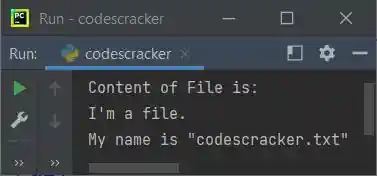
The snapshot given below shows the sample output produced by above Python program:
« Previous Function Next Function »
Liked this post? Share it!