Python object() function
The object() function in Python returns an empty object, which is the base for all classes. For example:
x = object()
print(type(x))
The output will be:
Python's object() function returns a new object with no methods or attributes other than those inherited from the object class.
object() is the base class for all Python classes. This implies that every Python class is a subclass of object().
object() provides no particular functionality or behavior. It is intended to serve as a basis for defining new classes.
Since object() has no attributes or methods, its memory usage is minimal. This makes it an efficient choice when a large number of class instances must be created.
object() is compatible with all Python versions, so it can be used in any Python project without compatibility concerns.
When you subclass object(), you can add your own attributes and methods to create a class that meets your particular requirements.
object() is not intended for standalone use. It is only useful when subclassed and customized by the user.
You can specify the base class when creating a new class in Python by including it in the class definition. If no base class is specified, Python will use object() as the default base class.
Syntax of Python object()
Python's object() function syntax is as follows:
The function object() does not take any arguments. It returns a featureless object.
Example of Python object() Function
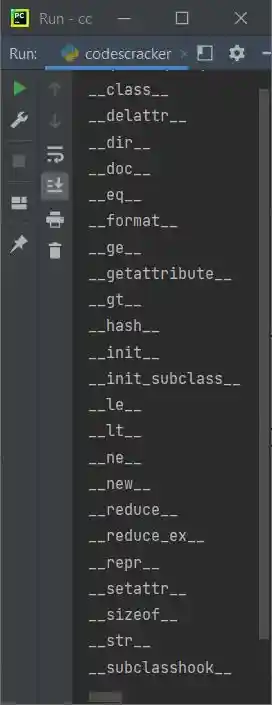
Here is an example of the object() function in Python. This program uses the dir() function to print all the default properties and methods for all the classes:
x = object()
xpm = dir(x)
for x in xpm:
    print(x)
This program's sample output, which shows how the Python object() function works, is shown in the picture below:
Advantages of the object() function in Python
- An inheritance base class: Since object() is the starting point for all classes in Python, it can be used to define new classes. When you want to create a new class without any specific behavior or attributes, this is helpful.
- Since object() is a built-in Python function, it is compatible with all Python releases. This means you don't have to be concerned about compatibility problems when using it in any Python project.
- Efficiency in Memory: Because object() lacks any attributes or methods, it uses very little memory. As a result, it is a practical choice when you need to make lots of instances of a class.
Disadvantages of the object() function in Python
- Limited functionality: object() has no attributes or methods, so it only inherits functionality from the object class. It cannot define class behavior or attributes.
- Not useful alone: object() has no specific behavior or attributes. To make a useful class, subclass and add attributes and methods.
- object() cannot be customized. Subclass object() and customize a class to add specific functionality.
« Previous Function Next Function »
Liked this post? Share it!