Write Amazon EBS snapshots with EBS direct APIs
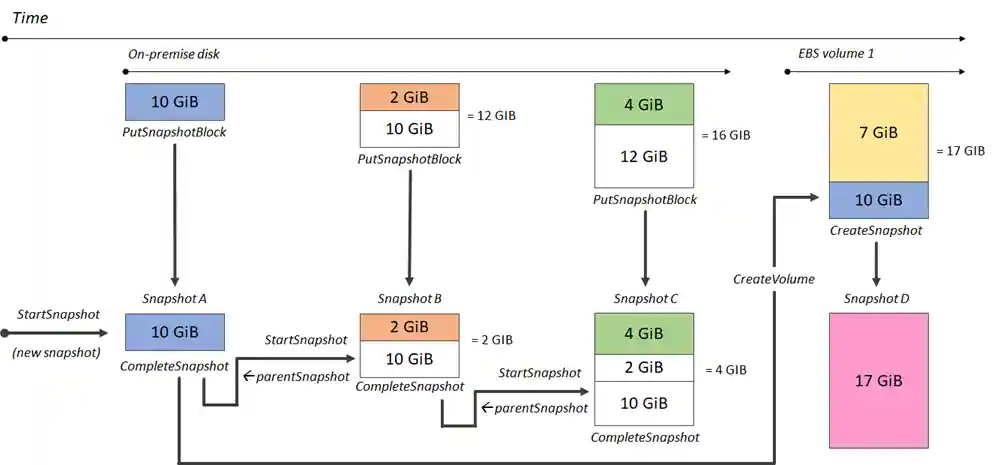
The following steps describe how to use the EBS direct APIs to write incremental snapshots:
-
Use the StartSnapshot action and specify a parent snapshot ID to start a snapshot as an incremental snapshot of an existing one, or omit the parent snapshot ID to start a new snapshot. This action returns the new snapshot ID, which is in a pending state.
-
Use the PutSnapshotBlock action and specify the ID of the pending snapshot to add data to it in the form of individual blocks. You must specify a Base64-encoded SHA256 checksum for the block of data transmitted. The service computes the checksum of the data received and validates it with the checksum that you specified. The action fails if the checksums don't match.
-
When you're done adding data to the pending snapshot, use the CompleteSnapshot action to start an asynchronous workflow that seals the snapshot and moves it to a completed state.
Repeat these steps to create a new, incremental snapshot using the previously created snapshot as the parent.
For example, in the following diagram, snapshot A is the first new snapshot started. Snapshot A is used as the parent snapshot to start snapshot B. Snapshot B is used as the parent snapshot to start and create snapshot C. Snapshots A, B, and C are incremental snapshots. Snapshot A is used to create EBS volume 1. Snapshot D is created from EBS volume 1. Snapshot D is an incremental snapshot of A; it is not an incremental snapshot of B or C.
The following examples show how to write snapshots using the EBS direct APIs.