Examples for common basic tasks are shown here. In all examples, it is assumed that you have a IFC model loaded into model variable like so:
import ifcopenshell

model = ifcopenshell.open('model.ifc')
This is only a small sample of common tasks. To view the full list of available functions, check out the API Reference.
Get all entites (STEP ID items)
IFC file opened through IfcOpenShell is iterable. This means you can get all instance (all STEP ID items) that occurs in the file with a simple loop.
for inst in model:
    # It prints out entire entity as it appears in IFC file, e.g
    print("The STEP entity is: ", inst)
    # You can get info about attributes of an instance as you normally would, e.g. name, type, get_info()
    print(inst.get_info())
    # Get instance type
    print(inst.is_a())
    # Get instance name. To ensure you get instances that have attribute Name, simple IF statement will suffice.
    # For more information check submodule: ifcopenshell.entity_instance
    if hasattr(inst, "Name"):
        print(inst.Name)
Get all wall types
for wall_type in model.by_type("IfcWallType"):
    print("The wall type element is", wall_type)
    print("The name of the wall type is", wall_type.Name)
Get all door occurrences of a type
import ifcopenshell.util.element

for door_type in model.by_type("IfcDoorType"):
    print("The door type is", door_type.Name)
    doors = ifcopenshell.util.element.get_types(door_type)
    print(f"There are {len(doors)} of this type")
    for door in doors:
        print("The door name is", door.Name)
Get the type of a wall
import ifcopenshell.util.element

wall = model.by_type("IfcWall")[0]
wall_type = ifcopenshell.util.element.get_type(wall)
print(f"The wall type of {wall.Name} is {wall_type.Name}")
Get the properties of a wall type
import ifcopenshell.util.element

wall = model.by_type("IfcWall")[0]
wall_type = ifcopenshell.util.element.get_type(wall)

# Get all properties and quantities as a dictionary
# returns {"Pset_WallCommon": {"id": 123, "FireRating": "2HR", ...}}
psets = ifcopenshell.util.element.get_psets(wall_type)
print(psets)

# Get all properties and quantities of the wall, including inherited type properties
psets = ifcopenshell.util.element.get_psets(wall)
print(psets)

# Get only properties and not quantities
print(ifcopenshell.util.element.get_psets(wall, psets_only=True))

# Get only quantities and not properties
print(ifcopenshell.util.element.get_psets(wall, qtos_only=True))
Find the spatial container of an element
import ifcopenshell.util.element

wall = model.by_type("IfcWall")[0]
# Walls are typically located on a storey, equipment might be located in spaces, etc
container = ifcopenshell.util.element.get_container(wall)
# The wall is located on Level 01
print(f"The wall is located on {container.Name}")
Get all elements in a container
import ifcopenshell.util.element

for storey in model.by_type("IfcBuildingStorey"):
    elements = ifcopenshell.util.element.get_decomposition(storey)
    print(f"There are {len(elements)} located on storey {storey.Name}, they are:")
    for element in elements:
        print(element.Name)
Get the XYZ coordinates of a element
import ifcopenshell.util.placement

wall = model.by_type("IfcWall")[0]
# This returns a 4x4 matrix, including the location and rotation. For example:
# array([[ 1.00000000e+00,  0.00000000e+00,  0.00000000e+00, 2.00000000e+00],
#        [ 0.00000000e+00,  1.00000000e+00,  0.00000000e+00, 3.00000000e+00],
#        [ 0.00000000e+00,  0.00000000e+00,  1.00000000e+00, 5.00000000e+00],
#        [ 0.00000000e+00,  0.00000000e+00,  0.00000000e+00, 1.00000000e+00]])
matrix = ifcopenshell.util.placement.get_local_placement(wall.ObjectPlacement)
# The last column holds the XYZ values, such as:
# array([ 2.00000000e+00,  3.00000000e+00,  5.00000000e+00])
print(matrix[:,3][:3])
Get the geometry of an element
See Geometry processing for details.
Get the classification of an element
import ifcopenshell.util.classification

wall = model.by_type("IfcWall")[0]
# Elements may have multiple classification references assigned
references = ifcopenshell.util.classification.get_references(wall)
for reference in references:
    # A reference code might be Pr_30_59_99_02
    print("The wall has a classification reference of", reference[1])
    # A system might be Uniclass 2015
    system = ifcopenshell.util.classification.get_classification(reference)
    print("This reference is part of the system", system.Name)
Convert to and from SI units and project units
import ifcopenshell.util.unit

# Note: ifc_project_length is a value you have extracted from the project,
# just as from a quantity set.
unit_scale = ifcopenshell.util.unit.calculate_unit_scale(model)
# Convert to SI unit:
si_meters = ifc_project_length * unit_scale
# Convert from SI unit:
ifc_project_length = si_meters / unit_scale
Get the distribution system of an element
import ifcopenshell.util.system

pipe = model.by_type("IfcPipeSegment")[0]
# Elements may be assigned to multiple systems simultaneously, such as electrical, hydraulic, etc
systems = ifcopenshell.util.system.get_element_systems(pipe)
for system in systems:
    # For example, it might be part of a Chilled Water system
    print("This pipe is part of the system", system.Name)
Copy an entity instance
Copy an entity instance is possible in different ways, depending on the task.
import ifcopenshell.api.root

wall_copy_class = ifcopenshell.api.root.copy_class(model, product = wall)
This is high level and makes sensible assumptions about copying things like properties and quantities. It does not copy the element’s representation, however.
import ifcopenshell.util.element

wall_shallow_copy = ifcopenshell.util.element.copy(model, wall)
This is for shallow copies. That is, associated things like the element’s type, materials, and properties are not copied. The new element, however, has the same representation and placement as the original.
import ifcopenshell.util.element

wall_deepgraph_copy = ifcopenshell.util.element.copy_deep(model, wall, exclude = None)
This is for deep graph copy. Like shallow copy, it does not copy over things like associated type/properties/quantities, but it does copy the representation and placement.
Also note that ifcopenshell.file.add() can be used to copy instances from one file to the other.
f = ifcopenshell.open(...)
g = ifcopenshell.file(schema=f.schema)
g.add(f.by_type(...)[0])
Note that, in this case, it does copy over recursively, however, it does not make any other attempts at resulting in a valid file. Factor in things like length unit conversion if both files (f and g) have project length unit defined.
Create a simple model from scratch
import ifcopenshell.api.root
import ifcopenshell.api.unit
import ifcopenshell.api.context
import ifcopenshell.api.project
import ifcopenshell.api.spatial
import ifcopenshell.api.geometry
import ifcopenshell.api.aggregate

# Create a blank model
model = ifcopenshell.api.project.create_file()

# All projects must have one IFC Project element
project = ifcopenshell.api.root.create_entity(model, ifc_class="IfcProject", name="My Project")

# Geometry is optional in IFC, but because we want to use geometry in this example, let's define units
# Assigning without arguments defaults to metric units
ifcopenshell.api.unit.assign_unit(model)

# Let's create a modeling geometry context, so we can store 3D geometry (note: IFC supports 2D too!)
context = ifcopenshell.api.context.add_context(model, context_type="Model")

# In particular, in this example we want to store the 3D "body" geometry of objects, i.e. the body shape
body = ifcopenshell.api.context.add_context(model, context_type="Model",
    context_identifier="Body", target_view="MODEL_VIEW", parent=context)

# Create a site, building, and storey. Many hierarchies are possible.
site = ifcopenshell.api.root.create_entity(model, ifc_class="IfcSite", name="My Site")
building = ifcopenshell.api.root.create_entity(model, ifc_class="IfcBuilding", name="Building A")
storey = ifcopenshell.api.root.create_entity(model, ifc_class="IfcBuildingStorey", name="Ground Floor")

# Since the site is our top level location, assign it to the project
# Then place our building on the site, and our storey in the building
ifcopenshell.api.aggregate.assign_object(model, relating_object=project, products=[site])
ifcopenshell.api.aggregate.assign_object(model, relating_object=site, products=[building])
ifcopenshell.api.aggregate.assign_object(model, relating_object=building, products=[storey])

# Let's create a new wall
wall = ifcopenshell.api.root.create_entity(model, ifc_class="IfcWall")

# Give our wall a local origin at (0, 0, 0)
ifcopenshell.api.geometry.edit_object_placement(model, product=wall)

# Add a new wall-like body geometry, 5 meters long, 3 meters high, and 200mm thick
representation = ifcopenshell.api.geometry.add_wall_representation(model, context=body, length=5, height=3, thickness=0.2)
# Assign our new body geometry back to our wall
ifcopenshell.api.geometry.assign_representation(model, product=wall, representation=representation)

# Place our wall in the ground floor
ifcopenshell.api.spatial.assign_container(model, relating_structure=storey, products=[wall])

# Write out to a file
model.write("/home/dion/model.ifc")
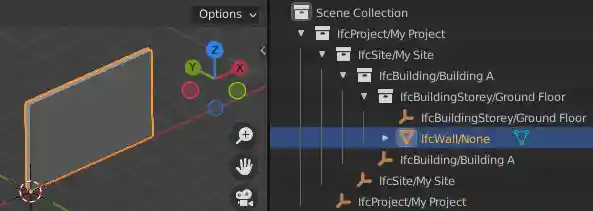
Here is the result:
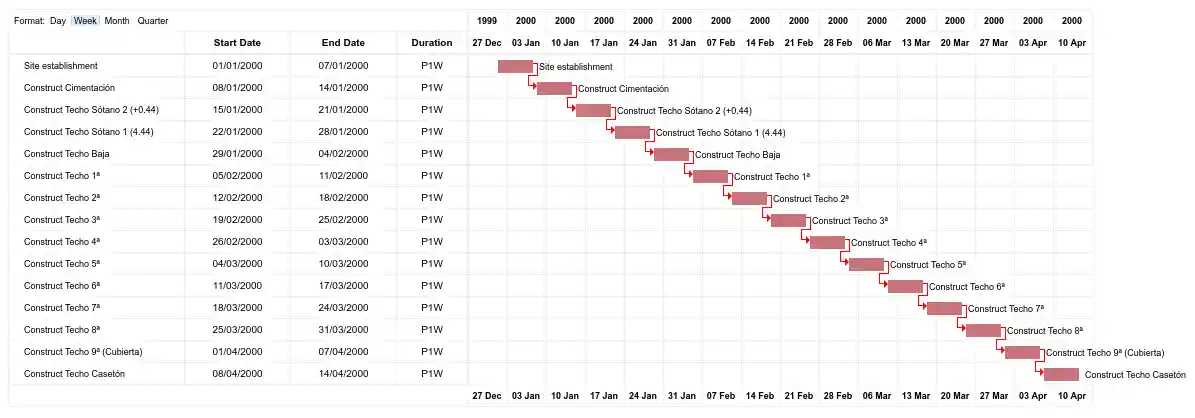
Create a work schedule constructing a building floor by floor
import datetime
import ifcopenshell.api.sequence
from ifcopenshell.util.element import get_decomposition
from ifcopenshell.util.placement import get_storey_elevation

# Define a convenience function to add a task chained to a predecessor
def add_task(model, name, predecessor, work_schedule):
    # Add a construction task
    task = ifcopenshell.api.sequence.add_task(model,
        work_schedule=work_schedule, name=name, predefined_type="CONSTRUCTION")

    # Give it a time
    task_time = ifcopenshell.api.sequence.add_task_time(model, task=task)

    # Arbitrarily set the task's scheduled time duration to be 1 week
    ifcopenshell.api.sequence.edit_task_time(model, task_time=task_time,
        attributes={"ScheduleStart": datetime.date(2000, 1, 1), "ScheduleDuration": "P1W"})

    # If a predecessor exists, create a finish to start relationship
    if predecessor:
        ifcopenshell.api.sequence.assign_sequence(model, relating_process=predecessor, related_process=task)

    return task

# Open an existing IFC4 model you have of a building
model = ifcopenshell.open("/path/to/existing/model.ifc")

# Create a new construction schedule
schedule = ifcopenshell.api.sequence.add_work_schedule(model, name="Construction")

# Let's imagine a starting task for site establishment.
task = add_task(model, "Site establishment", None, schedule)
start_task = task

# Get all our storeys sorted by elevation ascending.
storeys = sorted(model.by_type("IfcBuildingStorey"), key=lambda s: get_storey_elevation(s))

# For each storey ...
for storey in storeys:

    # Add a construction task to construct that storey, using our convenience function
    task = add_task(model, f"Construct {storey.Name}", task, schedule)

    # Assign all the products in that storey to the task as construction outputs.
    for product in get_decomposition(storey):
        ifcopenshell.api.sequence.assign_product(model, relating_product=product, related_object=task)

# Ask the computer to calculate all the dates for us from the start task.
# For example, if the first task started on the 1st of January and took a
# week, the next task will start on the 8th of January. This saves us
# manually doing date calculations.
ifcopenshell.api.sequence.cascade_schedule(model, task=start_task)

# Calculate the critical path and floats.
ifcopenshell.api.sequence.recalculate_schedule(model, work_schedule=schedule)

# Write out to a file
model.write("/home/dion/model.ifc")
Here is the result: