What Is a JavaServer Faces Application?
2. Using the Tutorial Examples
3. Getting Started with Web Applications
4. JavaServer Faces Technology
JavaServer Faces Technology Benefits
Creating a Simple JavaServer Faces Application
Mapping the FacesServlet Instance
The Lifecycle of the hello Application
To Run the hello Application in NetBeans IDE
To Run the hello Example Using Ant
Further Information about JavaServer Faces Technology
7. Using JavaServer Faces Technology in Web Pages
8. Using Converters, Listeners, and Validators
9. Developing with JavaServer Faces Technology
10. JavaServer Faces Technology: Advanced Concepts
11. Using Ajax with JavaServer Faces Technology
12. Composite Components: Advanced Topics and Example
13. Creating Custom UI Components and Other Custom Objects
14. Configuring JavaServer Faces Applications
16. Uploading Files with Java Servlet Technology
17. Internationalizing and Localizing Web Applications
18. Introduction to Web Services
19. Building Web Services with JAX-WS
20. Building RESTful Web Services with JAX-RS
21. JAX-RS: Advanced Topics and Example
23. Getting Started with Enterprise Beans
24. Running the Enterprise Bean Examples
25. A Message-Driven Bean Example
26. Using the Embedded Enterprise Bean Container
27. Using Asynchronous Method Invocation in Session Beans
Part V Contexts and Dependency Injection for the Java EE Platform
28. Introduction to Contexts and Dependency Injection for the Java EE Platform
29. Running the Basic Contexts and Dependency Injection Examples
30. Contexts and Dependency Injection for the Java EE Platform: Advanced Topics
31. Running the Advanced Contexts and Dependency Injection Examples
32. Introduction to the Java Persistence API
33. Running the Persistence Examples
34. The Java Persistence Query Language
35. Using the Criteria API to Create Queries
36. Creating and Using String-Based Criteria Queries
37. Controlling Concurrent Access to Entity Data with Locking
38. Using a Second-Level Cache with Java Persistence API Applications
39. Introduction to Security in the Java EE Platform
40. Getting Started Securing Web Applications
41. Getting Started Securing Enterprise Applications
42. Java EE Security: Advanced Topics
Part VIII Java EE Supporting Technologies
43. Introduction to Java EE Supporting Technologies
45. Resources and Resource Adapters
46. The Resource Adapter Example
47. Java Message Service Concepts
48. Java Message Service Examples
49. Bean Validation: Advanced Topics
50. Using Java EE Interceptors
51. Duke's Bookstore Case Study Example
52. Duke's Tutoring Case Study Example
53. Duke's Forest Case Study Example
The functionality provided by a JavaServer Faces application is similar to that of any other Java web application. A typical JavaServer Faces application includes the following parts:
A set of web pages in which components are laid out
A set of tags to add components to the web page
A set of managed beans, which are lightweight container-managed objects (POJOs) with minimal requirements. They support a small set of basic services, such as resource injection, lifecycle callbacks and interceptors.
A web deployment descriptor (web.xml file)
Optionally, one or more application configuration resource files, such as a faces-config.xml file, which can be used to define page navigation rules and configure beans and other custom objects, such as custom components
Optionally, a set of custom objects, which can include custom components, validators, converters, or listeners, created by the application developer
Optionally, a set of custom tags for representing custom objects on the page
Figure 4-1 shows the interaction between client and server in a typical JavaServer Faces application. In response to a client request, a web page is rendered by the web container that implements JavaServer Faces technology.
Figure 4-1 Responding to a Client Request for a JavaServer Faces Page
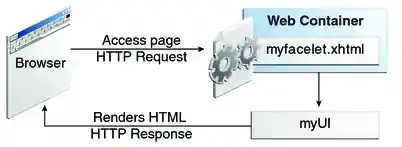
The web page, myfacelet.xhtml, is built using JavaServer Faces component tags. Component tags are used to add components to the view (represented by myUI in the diagram), which is the server-side representation of the page. In addition to components, the web page can also reference objects, such as the following:
Any event listeners, validators, and converters that are registered on the components
The JavaBeans components that capture the data and process the application-specific functionality of the components
On request from the client, the view is rendered as a response. Rendering is the process whereby, based on the server-side view, the web container generates output, such as HTML or XHTML, that can be read by the client, such as a browser.


Copyright © 2013, Oracle and/or its affiliates. All rights reserved. Legal Notices