GroupLayout (Java Platform SE 6)
javax.swing
Class GroupLayout
java.lang.Object
  javax.swing.GroupLayout
- All Implemented Interfaces:
- LayoutManager, LayoutManager2
public class GroupLayout
- extends Object
- implements LayoutManager2
GroupLayout is a LayoutManager that hierarchically
groups components in order to position them in a Container.
GroupLayout is intended for use by builders, but may be
hand-coded as well.
Grouping is done by instances of the Group class. GroupLayout supports two types of groups. A sequential group
positions its child elements sequentially, one after another. A
parallel group aligns its child elements in one of four ways.
Each group may contain any number of elements, where an element is
a Group, Component, or gap. A gap can be thought
of as an invisible component with a minimum, preferred and maximum
size. In addition GroupLayout supports a preferred gap,
whose value comes from LayoutStyle.
Elements are similar to a spring. Each element has a range as
specified by a minimum, preferred and maximum. Gaps have either a
developer-specified range, or a range determined by LayoutStyle. The range for Components is determined from
the Component's getMinimumSize, getPreferredSize and getMaximumSize methods. In addition,
when adding Components you may specify a particular range
to use instead of that from the component. The range for a Group is determined by the type of group. A ParallelGroup's
range is the maximum of the ranges of its elements. A SequentialGroup's range is the sum of the ranges of its elements.
GroupLayout treats each axis independently. That is, there
is a group representing the horizontal axis, and a group
representing the vertical axis. The horizontal group is
responsible for determining the minimum, preferred and maximum size
along the horizontal axis as well as setting the x and width of the
components contained in it. The vertical group is responsible for
determining the minimum, preferred and maximum size along the
vertical axis as well as setting the y and height of the
components contained in it. Each Component must exist in both
a horizontal and vertical group, otherwise an IllegalStateException
is thrown during layout, or when the minimum, preferred or
maximum size is requested.
The following diagram shows a sequential group along the horizontal axis. The sequential group contains three components. A parallel group was used along the vertical axis.
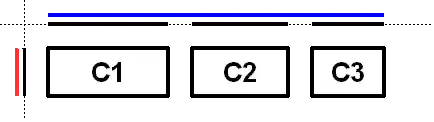
To reinforce that each axis is treated independently the diagram shows the range of each group and element along each axis. The range of each component has been projected onto the axes, and the groups are rendered in blue (horizontal) and red (vertical). For readability there is a gap between each of the elements in the sequential group.
The sequential group along the horizontal axis is rendered as a solid blue line. Notice the sequential group is the sum of the children elements it contains.
Along the vertical axis the parallel group is the maximum of the height of each of the components. As all three components have the same height, the parallel group has the same height.
The following diagram shows the same three components, but with the parallel group along the horizontal axis and the sequential group along the vertical axis.
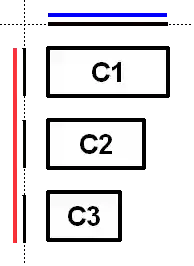
As c1 is the largest of the three components, the parallel
group is sized to c1. As c2 and c3 are smaller
than c1 they are aligned based on the alignment specified
for the component (if specified) or the default alignment of the
parallel group. In the diagram c2 and c3 were created
with an alignment of LEADING. If the component orientation were
right-to-left then c2 and c3 would be positioned on
the opposite side.
The following diagram shows a sequential group along both the horizontal and vertical axis.
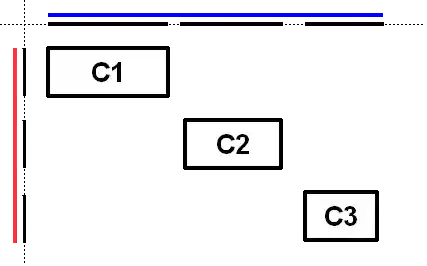
GroupLayout provides the ability to insert gaps between
Components. The size of the gap is determined by an
instance of LayoutStyle. This may be turned on using the
setAutoCreateGaps method. Similarly, you may use
the setAutoCreateContainerGaps method to insert gaps
between components that touch the edge of the parent container and the
container.
The following builds a panel consisting of two labels in one column, followed by two textfields in the next column:
   JComponent panel = ...;
   GroupLayout layout = new GroupLayout(panel);
   panel.setLayout(layout);

   // Turn on automatically adding gaps between components
   layout.setAutoCreateGaps(true);

   // Turn on automatically creating gaps between components that touch
   // the edge of the container and the container.
   layout.setAutoCreateContainerGaps(true);

   // Create a sequential group for the horizontal axis.

   GroupLayout.SequentialGroup hGroup = layout.createSequentialGroup();

   // The sequential group in turn contains two parallel groups.
   // One parallel group contains the labels, the other the text fields.
   // Putting the labels in a parallel group along the horizontal axis
   // positions them at the same x location.
   //
   // Variable indentation is used to reinforce the level of grouping.
   hGroup.addGroup(layout.createParallelGroup().
            addComponent(label1).addComponent(label2));
   hGroup.addGroup(layout.createParallelGroup().
            addComponent(tf1).addComponent(tf2));
   layout.setHorizontalGroup(hGroup);

   // Create a sequential group for the vertical axis.
   GroupLayout.SequentialGroup vGroup = layout.createSequentialGroup();

   // The sequential group contains two parallel groups that align
   // the contents along the baseline. The first parallel group contains
   // the first label and text field, and the second parallel group contains
   // the second label and text field. By using a sequential group
   // the labels and text fields are positioned vertically after one another.
   vGroup.addGroup(layout.createParallelGroup(Alignment.BASELINE).
            addComponent(label1).addComponent(tf1));
   vGroup.addGroup(layout.createParallelGroup(Alignment.BASELINE).
            addComponent(label2).addComponent(tf2));
   layout.setVerticalGroup(vGroup);
When run the following is produced.
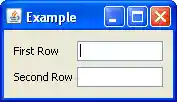
This layout consists of the following.
- The horizontal axis consists of a sequential group containing two parallel groups. The first parallel group contains the labels, and the second parallel group contains the text fields.
- The vertical axis consists of a sequential group containing two parallel groups. The parallel groups are configured to align their components along the baseline. The first parallel group contains the first label and first text field, and the second group consists of the second label and second text field.
- You need not explicitly add the components to the container; this
is indirectly done by using one of the
addmethods ofGroup. - The various
addmethods return the caller. This allows for easy chaining of invocations. For example,group.addComponent(label1).addComponent(label2);is equivalent togroup.addComponent(label1); group.addComponent(label2);. - There are no public constructors for
Groups; instead use the create methods ofGroupLayout.
- Since:
- 1.6
| Nested Class Summary | |
|---|---|
static class |
GroupLayout.Alignment
Enumeration of the possible ways ParallelGroup can align
its children. |
class |
GroupLayout.Group
Group provides the basis for the two types of
operations supported by GroupLayout: laying out
components one after another (SequentialGroup)
or aligned (ParallelGroup). |
class |
GroupLayout.ParallelGroup
A Group that aligns and sizes it's children. |
class |
GroupLayout.SequentialGroup
A Group that positions and sizes its elements
sequentially, one after another. |
| Field Summary | |
|---|---|
static int |
DEFAULT_SIZE
Indicates the size from the component or gap should be used for a particular range value. |
static int |
PREFERRED_SIZE
Indicates the preferred size from the component or gap should be used for a particular range value. |
| Constructor Summary | |
|---|---|
GroupLayout(Container host)
Creates a GroupLayout for the specified Container. |
|
| Method Summary | |
|---|---|
void |
addLayoutComponent(Component component,
                   Object constraints)
Notification that a Component has been added to
the parent container. |
void |
addLayoutComponent(String name,
                   Component component)
Notification that a Component has been added to
the parent container. |
GroupLayout.ParallelGroup |
createBaselineGroup(boolean resizable,
                    boolean anchorBaselineToTop)
Creates and returns a ParallelGroup that aligns it's
elements along the baseline. |
GroupLayout.ParallelGroup |
createParallelGroup()
Creates and returns a ParallelGroup with an alignment of
Alignment.LEADING. |
GroupLayout.ParallelGroup |
createParallelGroup(GroupLayout.Alignment alignment)
Creates and returns a ParallelGroup with the specified
alignment. |
GroupLayout.ParallelGroup |
createParallelGroup(GroupLayout.Alignment alignment,
                    boolean resizable)
Creates and returns a ParallelGroup with the specified
alignment and resize behavior. |
GroupLayout.SequentialGroup |
createSequentialGroup()
Creates and returns a SequentialGroup. |
boolean |
getAutoCreateContainerGaps()
Returns true if gaps between the container and components that
border the container are automatically created. |
boolean |
getAutoCreateGaps()
Returns true if gaps between components are automatically
created. |
boolean |
getHonorsVisibility()
Returns whether component visiblity is considered when sizing and positioning components. |
float |
getLayoutAlignmentX(Container parent)
Returns the alignment along the x axis. |
float |
getLayoutAlignmentY(Container parent)
Returns the alignment along the y axis. |
LayoutStyle |
getLayoutStyle()
Returns the LayoutStyle used for calculating the preferred
gap between components. |
void |
invalidateLayout(Container parent)
Invalidates the layout, indicating that if the layout manager has cached information it should be discarded. |
void |
layoutContainer(Container parent)
Lays out the specified container. |
void |
linkSize(Component... components)
Forces the specified components to have the same size regardless of their preferred, minimum or maximum sizes. |
void |
linkSize(int axis,
         Component... components)
Forces the specified components to have the same size along the specified axis regardless of their preferred, minimum or maximum sizes. |
Dimension |
maximumLayoutSize(Container parent)
Returns the maximum size for the specified container. |
Dimension |
minimumLayoutSize(Container parent)
Returns the minimum size for the specified container. |
Dimension |
preferredLayoutSize(Container parent)
Returns the preferred size for the specified container. |
void |
removeLayoutComponent(Component component)
Notification that a Component has been removed from
the parent container. |
void |
replace(Component existingComponent,
        Component newComponent)
Replaces an existing component with a new one. |
void |
setAutoCreateContainerGaps(boolean autoCreateContainerPadding)
Sets whether a gap between the container and components that touch the border of the container should automatically be created. |
void |
setAutoCreateGaps(boolean autoCreatePadding)
Sets whether a gap between components should automatically be created. |
void |
setHonorsVisibility(boolean honorsVisibility)
Sets whether component visiblity is considered when sizing and positioning components. |
void |
setHonorsVisibility(Component component,
                    Boolean honorsVisibility)
Sets whether the component's visiblity is considered for sizing and positioning. |
void |
setHorizontalGroup(GroupLayout.Group group)
Sets the Group that positions and sizes
components along the horizontal axis. |
void |
setLayoutStyle(LayoutStyle layoutStyle)
Sets the LayoutStyle used to calculate the preferred
gaps between components. |
void |
setVerticalGroup(GroupLayout.Group group)
Sets the Group that positions and sizes
components along the vertical axis. |
String |
toString()
Returns a string representation of this GroupLayout. |
| Methods inherited from class java.lang.Object |
|---|
clone, equals, finalize, getClass, hashCode, notify, notifyAll, wait, wait, wait |
| Field Detail |
|---|
DEFAULT_SIZE
public static final int DEFAULT_SIZE
- Indicates the size from the component or gap should be used for a
particular range value.
- See Also:
GroupLayout.Group, Constant Field Values
PREFERRED_SIZE
public static final int PREFERRED_SIZE
- Indicates the preferred size from the component or gap should
be used for a particular range value.
- See Also:
GroupLayout.Group, Constant Field Values
| Constructor Detail |
|---|
GroupLayout
public GroupLayout(Container host)
- Creates a
GroupLayoutfor the specifiedContainer.- Parameters:
host- theContainertheGroupLayoutis theLayoutManagerfor- Throws:
IllegalArgumentException- if host isnull
| Method Detail |
|---|
setHonorsVisibility
public void setHonorsVisibility(boolean honorsVisibility)
- Sets whether component visiblity is considered when sizing and
positioning components. A value of
trueindicates that non-visible components should not be treated as part of the layout. A value offalseindicates that components should be positioned and sized regardless of visibility.A value of
falseis useful when the visibility of components is dynamically adjusted and you don't want surrounding components and the sizing to change.The specified value is used for components that do not have an explicit visibility specified.
The default is
true. - Parameters:
honorsVisibility- whether component visiblity is considered when sizing and positioning components- See Also:
setHonorsVisibility(Component,Boolean)
getHonorsVisibility
public boolean getHonorsVisibility()
- Returns whether component visiblity is considered when sizing and
positioning components.
- Returns:
- whether component visiblity is considered when sizing and positioning components
setHonorsVisibility
public void setHonorsVisibility(Component component,
                                Boolean honorsVisibility)
- Sets whether the component's visiblity is considered for
sizing and positioning. A value of
Boolean.TRUEindicates that ifcomponentis not visible it should not be treated as part of the layout. A value offalseindicates thatcomponentis positioned and sized regardless of it's visibility. A value ofnullindicates the value specified by the single argument methodsetHonorsVisibilityshould be used.If
componentis not a child of theContainerthisGroupLayoutis managine, it will be added to theContainer. - Parameters:
component- the componenthonorsVisibility- whethercomponent's visiblity should be considered for sizing and positioning- Throws:
IllegalArgumentException- ifcomponentisnull- See Also:
setHonorsVisibility(Component,Boolean)
setAutoCreateGaps
public void setAutoCreateGaps(boolean autoCreatePadding)
- Sets whether a gap between components should automatically be
created. For example, if this is
trueand you add two components to aSequentialGroupa gap between the two components is automatically be created. The default isfalse. - Parameters:
autoCreatePadding- whether a gap between components is automatically created
getAutoCreateGaps
public boolean getAutoCreateGaps()
- Returns
trueif gaps between components are automatically created. - Returns:
trueif gaps between components are automatically created
setAutoCreateContainerGaps
public void setAutoCreateContainerGaps(boolean autoCreateContainerPadding)
- Sets whether a gap between the container and components that
touch the border of the container should automatically be
created. The default is
false. - Parameters:
autoCreateContainerPadding- whether a gap between the container and components that touch the border of the container should automatically be created
getAutoCreateContainerGaps
public boolean getAutoCreateContainerGaps()
- Returns
trueif gaps between the container and components that border the container are automatically created. - Returns:
trueif gaps between the container and components that border the container are automatically created
setHorizontalGroup
public void setHorizontalGroup(GroupLayout.Group group)
- Sets the
Groupthat positions and sizes components along the horizontal axis. - Parameters:
group- theGroupthat positions and sizes components along the horizontal axis- Throws:
IllegalArgumentException- if group isnull
setVerticalGroup
public void setVerticalGroup(GroupLayout.Group group)
- Sets the
Groupthat positions and sizes components along the vertical axis. - Parameters:
group- theGroupthat positions and sizes components along the vertical axis- Throws:
IllegalArgumentException- if group isnull
createSequentialGroup
public GroupLayout.SequentialGroup createSequentialGroup()
- Creates and returns a
SequentialGroup. - Returns:
- a new
SequentialGroup
createParallelGroup
public GroupLayout.ParallelGroup createParallelGroup()
- Creates and returns a
ParallelGroupwith an alignment ofAlignment.LEADING. This is a cover method for the more generalcreateParallelGroup(Alignment)method. - Returns:
- a new
ParallelGroup - See Also:
createParallelGroup(Alignment)
createParallelGroup
public GroupLayout.ParallelGroup createParallelGroup(GroupLayout.Alignment alignment)
- Creates and returns a
ParallelGroupwith the specified alignment. This is a cover method for the more generalcreateParallelGroup(Alignment,boolean)method withtruesupplied for the second argument. - Parameters:
alignment- the alignment for the elements of the group- Returns:
- a new
ParallelGroup - Throws:
IllegalArgumentException- ifalignmentisnull- See Also:
createBaselineGroup(boolean, boolean),GroupLayout.ParallelGroup
createParallelGroup
public GroupLayout.ParallelGroup createParallelGroup(GroupLayout.Alignment alignment,
                                                     boolean resizable)
- Creates and returns a
ParallelGroupwith the specified alignment and resize behavior. Thealignmentargument specifies how children elements are positioned that do not fill the group. For example, if aParallelGroupwith an alignment ofTRAILINGis given 100 and a child only needs 50, the child is positioned at the position 50 (with a component orientation of left-to-right).Baseline alignment is only useful when used along the vertical axis. A
ParallelGroupcreated with a baseline alignment along the horizontal axis is treated asLEADING.Refer to
ParallelGroupfor details on the behavior of baseline groups. - Parameters:
alignment- the alignment for the elements of the groupresizable-trueif the group is resizable; if the group is not resizable the preferred size is used for the minimum and maximum size of the group- Returns:
- a new
ParallelGroup - Throws:
IllegalArgumentException- ifalignmentisnull- See Also:
createBaselineGroup(boolean, boolean),GroupLayout.ParallelGroup
createBaselineGroup
public GroupLayout.ParallelGroup createBaselineGroup(boolean resizable,
                                                     boolean anchorBaselineToTop)
- Creates and returns a
ParallelGroupthat aligns it's elements along the baseline. - Parameters:
resizable- whether the group is resizableanchorBaselineToTop- whether the baseline is anchored to the top or bottom of the group- See Also:
createBaselineGroup(boolean, boolean),GroupLayout.ParallelGroup
linkSize
public void linkSize(Component... components)
- Forces the specified components to have the same size
regardless of their preferred, minimum or maximum sizes. Components that
are linked are given the maximum of the preferred size of each of
the linked components. For example, if you link two components with
a preferred width of 10 and 20, both components are given a width of 20.
This can be used multiple times to force any number of components to share the same size.
Linked Components are not be resizable.
- Parameters:
components- theComponents that are to have the same size- Throws:
IllegalArgumentException- ifcomponentsisnull, or containsnull- See Also:
linkSize(int,Component[])
linkSize
public void linkSize(int axis,
                     Component... components)
- Forces the specified components to have the same size along the
specified axis regardless of their preferred, minimum or
maximum sizes. Components that are linked are given the maximum
of the preferred size of each of the linked components. For
example, if you link two components along the horizontal axis
and the preferred width is 10 and 20, both components are given
a width of 20.
This can be used multiple times to force any number of components to share the same size.
Linked
Components are not be resizable. - Parameters:
components- theComponents that are to have the same sizeaxis- the axis to link the size along; one ofSwingConstants.HORIZONTALorSwingConstans.VERTICAL- Throws:
IllegalArgumentException- ifcomponentsisnull, or containsnull; oraxisis notSwingConstants.HORIZONTALorSwingConstants.VERTICAL
replace
public void replace(Component existingComponent,
                    Component newComponent)
- Replaces an existing component with a new one.
- Parameters:
existingComponent- the component that should be removed and replaced withnewComponentnewComponent- the component to put inexistingComponent's place- Throws:
IllegalArgumentException- if either of the components arenullorexistingComponentis not being managed by this layout manager
setLayoutStyle
public void setLayoutStyle(LayoutStyle layoutStyle)
- Sets the
LayoutStyleused to calculate the preferred gaps between components. A value ofnullindicates the shared instance ofLayoutStyleshould be used. - Parameters:
layoutStyle- theLayoutStyleto use- See Also:
LayoutStyle
getLayoutStyle
public LayoutStyle getLayoutStyle()
- Returns the
LayoutStyleused for calculating the preferred gap between components. This returns the value specified tosetLayoutStyle, which may benull. - Returns:
- the
LayoutStyleused for calculating the preferred gap between components
addLayoutComponent
public void addLayoutComponent(String name,
                               Component component)
- Notification that a
Componenthas been added to the parent container. You should not invoke this method directly, instead you should use one of theGroupmethods to add aComponent. - Specified by:
addLayoutComponentin interfaceLayoutManager
- Parameters:
name- the string to be associated with the componentcomponent- theComponentto be added
removeLayoutComponent
public void removeLayoutComponent(Component component)
- Notification that a
Componenthas been removed from the parent container. You should not invoke this method directly, instead invokeremoveon the parentContainer. - Specified by:
removeLayoutComponentin interfaceLayoutManager
- Parameters:
component- the component to be removed- See Also:
Component.remove(java.awt.MenuComponent)
preferredLayoutSize
public Dimension preferredLayoutSize(Container parent)
- Returns the preferred size for the specified container.
- Specified by:
preferredLayoutSizein interfaceLayoutManager
- Parameters:
parent- the container to return the preferred size for- Returns:
- the preferred size for
parent - Throws:
IllegalArgumentException- ifparentis not the sameContainerthis was created withIllegalStateException- if any of the components added to this layout are not in both a horizontal and vertical group- See Also:
Container.getPreferredSize()
minimumLayoutSize
public Dimension minimumLayoutSize(Container parent)
- Returns the minimum size for the specified container.
- Specified by:
minimumLayoutSizein interfaceLayoutManager
- Parameters:
parent- the container to return the size for- Returns:
- the minimum size for
parent - Throws:
IllegalArgumentException- ifparentis not the sameContainerthat this was created withIllegalStateException- if any of the components added to this layout are not in both a horizontal and vertical group- See Also:
Container.getMinimumSize()
layoutContainer
public void layoutContainer(Container parent)
- Lays out the specified container.
- Specified by:
layoutContainerin interfaceLayoutManager
- Parameters:
parent- the container to be laid out- Throws:
IllegalStateException- if any of the components added to this layout are not in both a horizontal and vertical group
addLayoutComponent
public void addLayoutComponent(Component component,
                               Object constraints)
- Notification that a
Componenthas been added to the parent container. You should not invoke this method directly, instead you should use one of theGroupmethods to add aComponent. - Specified by:
addLayoutComponentin interfaceLayoutManager2
- Parameters:
component- the component addedconstraints- description of where to place the component
maximumLayoutSize
public Dimension maximumLayoutSize(Container parent)
- Returns the maximum size for the specified container.
- Specified by:
maximumLayoutSizein interfaceLayoutManager2
- Parameters:
parent- the container to return the size for- Returns:
- the maximum size for
parent - Throws:
IllegalArgumentException- ifparentis not the sameContainerthat this was created withIllegalStateException- if any of the components added to this layout are not in both a horizontal and vertical group- See Also:
Container.getMaximumSize()
getLayoutAlignmentX
public float getLayoutAlignmentX(Container parent)
- Returns the alignment along the x axis. This specifies how
the component would like to be aligned relative to other
components. The value should be a number between 0 and 1
where 0 represents alignment along the origin, 1 is aligned
the furthest away from the origin, 0.5 is centered, etc.
- Specified by:
getLayoutAlignmentXin interfaceLayoutManager2
- Parameters:
parent- theContainerhosting thisLayoutManager- Returns:
- the alignment; this implementation returns
.5 - Throws:
IllegalArgumentException- ifparentis not the sameContainerthat this was created with
getLayoutAlignmentY
public float getLayoutAlignmentY(Container parent)
- Returns the alignment along the y axis. This specifies how
the component would like to be aligned relative to other
components. The value should be a number between 0 and 1
where 0 represents alignment along the origin, 1 is aligned
the furthest away from the origin, 0.5 is centered, etc.
- Specified by:
getLayoutAlignmentYin interfaceLayoutManager2
- Parameters:
parent- theContainerhosting thisLayoutManager- Returns:
- alignment; this implementation returns
.5 - Throws:
IllegalArgumentException- ifparentis not the sameContainerthat this was created with
invalidateLayout
public void invalidateLayout(Container parent)
- Invalidates the layout, indicating that if the layout manager
has cached information it should be discarded.
- Specified by:
invalidateLayoutin interfaceLayoutManager2
- Parameters:
parent- theContainerhosting this LayoutManager- Throws:
IllegalArgumentException- ifparentis not the sameContainerthat this was created with
toString
public String toString()
- Returns a string representation of this
GroupLayout. This method is intended to be used for debugging purposes, and the content and format of the returned string may vary between implementations. - Returns:
- a string representation of this
GroupLayout
Submit a bug or feature
For further API reference and developer documentation, see Java SE Developer Documentation. That documentation contains more detailed, developer-targeted descriptions, with conceptual overviews, definitions of terms, workarounds, and working code examples.
Copyright © 1993, 2015, Oracle and/or its affiliates. All rights reserved. Use is subject to license terms. Also see the documentation redistribution policy.