Unity - Scripting API: EditorGUI.LayerField
Success!
Thank you for helping us improve the quality of Unity Documentation. Although we cannot accept all submissions, we do read each suggested change from our users and will make updates where applicable.
Submission failed
For some reason your suggested change could not be submitted. Please <a>try again</a> in a few minutes. And thank you for taking the time to help us improve the quality of Unity Documentation.
Declaration
public static int LayerField(Rect position, int layer, GUIStyle style = EditorStyles.popup);
Declaration
public static int LayerField(Rect position, string label, int layer, GUIStyle style = EditorStyles.popup);
Declaration
public static int LayerField(Rect position, GUIContent label, int layer, GUIStyle style = EditorStyles.popup);
Parameters
| Parameter | Description |
|---|---|
| position | Rectangle on the screen to use for the field. |
| label | Optional label in front of the field. |
| layer | The layer shown in the field. |
| style | Optional GUIStyle. |
Returns
int The layer selected by the user.
Description
Makes a layer selection field.
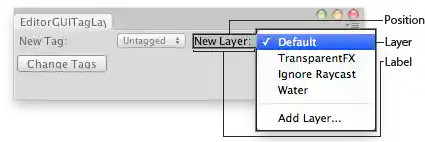
Layer field in an Editor Window.
using UnityEngine; using UnityEditor;// Change the Tag and/or the layer of the selected GameObjects.
class EditorGUITagLayerField : EditorWindow { string selectedTag = ""; int selectedLayer = 0;
[MenuItem("Examples/Tag - Layer for Selection")] static void Init() { var window = GetWindow<EditorGUITagLayerField>(); window.position = new Rect(0, 0, 350, 70); window.Show(); }
void OnGUI() { selectedTag = EditorGUI.TagField( new Rect(3, 3, position.width / 2 - 6, 20), "New Tag:", selectedTag);
selectedLayer = EditorGUI.LayerField( new Rect(position.width / 2 + 3, 3, position.width / 2 - 6, 20), "New Layer:", selectedLayer);
if (Selection.activeGameObject) { if (GUI.Button(new Rect(3, 25, 90, 17), "Change Tags")) { foreach (GameObject go in Selection.gameObjects) { go.tag = selectedTag; } }
if (GUI.Button(new Rect(position.width - 96, 25, 90, 17), "Change Layers")) { foreach (GameObject go in Selection.gameObjects) { go.layer = selectedLayer; } } } }
void OnInspectorUpdate() { Repaint(); } }