Unity - Scripting API: EditorGUILayout.BeginToggleGroup
Success!
Thank you for helping us improve the quality of Unity Documentation. Although we cannot accept all submissions, we do read each suggested change from our users and will make updates where applicable.
Submission failed
For some reason your suggested change could not be submitted. Please <a>try again</a> in a few minutes. And thank you for taking the time to help us improve the quality of Unity Documentation.
Declaration
public static bool BeginToggleGroup(string label, bool toggle);
Declaration
public static bool BeginToggleGroup(GUIContent label, bool toggle);
Parameters
| Parameter | Description |
|---|---|
| label | Label to show above the toggled controls. |
| toggle | Enabled state of the toggle group. |
Returns
bool The enabled state selected by the user.
Description
Begin a vertical group with a toggle to enable or disable all the controls within at once.
Additional resources: EndToggleGroup.
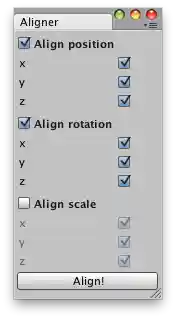
Align position/rotation/scale of the selected GameObjects.
// Simple script that lets you align GameObjects // position/rotation/scale wise with the selected active transformusing UnityEngine; using UnityEditor;
public class Aligner : EditorWindow { bool[] pos = new bool[3] { true, true, true }; bool[] rot = new bool[3] { true, true, true }; bool[] scale = new bool[3] { true, true, true };
bool posGroupEnabled = true; bool rotGroupEnabled = true; bool scaleGroupEnabled = false;
void OnGUI() { posGroupEnabled = EditorGUILayout.BeginToggleGroup("Align position", posGroupEnabled); pos[0] = EditorGUILayout.Toggle("x", pos[0]); pos[1] = EditorGUILayout.Toggle("y", pos[1]); pos[2] = EditorGUILayout.Toggle("z", pos[2]); EditorGUILayout.EndToggleGroup();
rotGroupEnabled = EditorGUILayout.BeginToggleGroup("Align rotation", rotGroupEnabled); rot[0] = EditorGUILayout.Toggle("x", rot[0]); rot[1] = EditorGUILayout.Toggle("y", rot[1]); rot[2] = EditorGUILayout.Toggle("z", rot[2]); EditorGUILayout.EndToggleGroup();
scaleGroupEnabled = EditorGUILayout.BeginToggleGroup("Align scale", scaleGroupEnabled); scale[0] = EditorGUILayout.Toggle("x", scale[0]); scale[1] = EditorGUILayout.Toggle("y", scale[1]); scale[2] = EditorGUILayout.Toggle("z", scale[2]); EditorGUILayout.EndToggleGroup();
GUILayout.Space(30); if (GUILayout.Button("Align!")) Align(); }
void Align() { Transform[] transforms = Selection.transforms; Transform activeTransform = Selection.activeTransform; if (transforms.Length < 2) { Debug.LogWarning("Aligner: select at least two objects."); return; } for (int i = 0; i < transforms.Length; i++) { if (posGroupEnabled) { Vector3 newPos; newPos.x = pos[0] ? activeTransform.position.x : transforms[i].position.x; newPos.y = pos[1] ? activeTransform.position.y : transforms[i].position.y; newPos.z = pos[2] ? activeTransform.position.z : transforms[i].position.z; transforms[i].position = newPos; } if (rotGroupEnabled) { Vector3 newRot; newRot.x = rot[0] ? activeTransform.rotation.eulerAngles.x : transforms[i].rotation.eulerAngles.x; newRot.y = rot[1] ? activeTransform.rotation.eulerAngles.y : transforms[i].rotation.eulerAngles.y; newRot.z = rot[2] ? activeTransform.rotation.eulerAngles.z : transforms[i].rotation.eulerAngles.z; transforms[i].rotation = Quaternion.Euler(newRot); } if (scaleGroupEnabled) { Vector3 newScale; newScale.x = scale[0] ? activeTransform.localScale.x : transforms[i].localScale.x; newScale.y = scale[1] ? activeTransform.localScale.y : transforms[i].localScale.y; newScale.z = scale[2] ? activeTransform.localScale.z : transforms[i].localScale.z; transforms[i].localScale = newScale; } } }
[MenuItem("Examples/Position-Rotation-Scale Aligner")] static void Init() { Aligner window = (Aligner)EditorWindow.GetWindow(typeof(Aligner)); window.Show(); } }