Unity - Scripting API: Handles.DrawSolidArc
Success!
Thank you for helping us improve the quality of Unity Documentation. Although we cannot accept all submissions, we do read each suggested change from our users and will make updates where applicable.
Submission failed
For some reason your suggested change could not be submitted. Please <a>try again</a> in a few minutes. And thank you for taking the time to help us improve the quality of Unity Documentation.
Declaration
public static void DrawSolidArc(Vector3 center, Vector3 normal, Vector3 from, float angle, float radius);
Parameters
| Parameter | Description |
|---|---|
| center | The center of the circle. |
| normal | The normal of the circle. |
| from | The direction of the point on the circumference, relative to the center, where the sector begins. |
| angle | The angle of the sector, in degrees. |
| radius | The radius of the circle Note: Use HandleUtility.GetHandleSize where you might want to have constant screen-sized handles. |
Description
Draw a circular sector (pie piece) in 3D space.
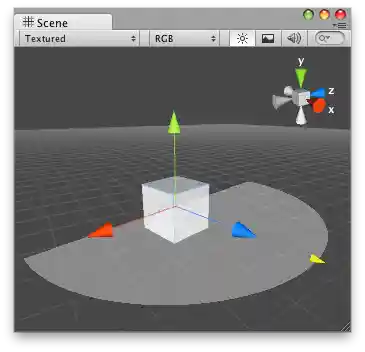
Solid Arc in the Scene View.
using UnityEditor;
using UnityEngine;static class ArcExample
{
    static Vector3 m_Angle = new Vector3(1.5f, .66f, 0f);    // Create an arc at 0, 0, 0 in the Scene view and a slider that changes thes angle of the arc.
    [InitializeOnLoadMethod]
    static void Init() => SceneView.duringSceneGui += view =>
    {
        Handles.DrawLine(new Vector3(1.5f, 0f, 0f), new Vector3(1.5f, 1f, 0f));
        var handleSize = HandleUtility.GetHandleSize(m_Angle) * .1f;
        m_Angle = Handles.Slider(m_Angle, Vector3.up, handleSize, Handles.DotHandleCap, EditorSnapSettings.move.x);
        m_Angle.y = Mathf.Clamp(m_Angle.y, 0f, 1f);
        Handles.Label(m_Angle + Vector3.right * handleSize * 2f, $"Angle {m_Angle.y * 360f}");        Handles.DrawSolidArc(Vector3.zero, Vector3.forward, Vector3.up, m_Angle.y * -360f, 1f);
    };
}