Unity - Scripting API: Handles.SphereHandleCap
Success!
Thank you for helping us improve the quality of Unity Documentation. Although we cannot accept all submissions, we do read each suggested change from our users and will make updates where applicable.
Submission failed
For some reason your suggested change could not be submitted. Please <a>try again</a> in a few minutes. And thank you for taking the time to help us improve the quality of Unity Documentation.
Declaration
public static void SphereHandleCap(int controlID, Vector3 position, Quaternion rotation, float size, EventType eventType);
Description
Draw a sphere handle. Pass this into handle functions.
On EventType.Layout event, calculates handle distance to mouse and calls HandleUtility.AddControl accordingly.
On EventType.Repaint event, draws the handle shape.
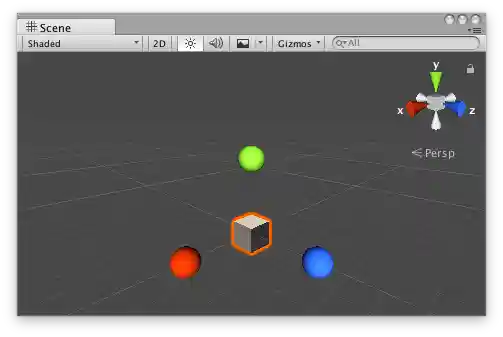 Sphere Handle Cap in the Scene View.
Add the following script to your Assets folder as SphereExample.cs and add the SphereExample component to an object in a Scene.
Add the following script to Assets/Editor as SphereExampleEditor.cs and select the object with the SphereExample component.
using UnityEditor;
using UnityEngine;[CustomEditor(typeof(SphereExample))]
public class SphereExampleEditor : Editor
{
    float size = 1f;    protected virtual void OnSceneGUI()
    {
        if (Event.current.type == EventType.Repaint)
        {
            Transform transform = ((SphereExample)target).transform;
            Handles.color = Handles.xAxisColor;
            Handles.SphereHandleCap(
                0,
                transform.position + new Vector3(3f, 0f, 0f),
                transform.rotation * Quaternion.LookRotation(Vector3.right),
                size,
                EventType.Repaint
            );
            Handles.color = Handles.yAxisColor;
            Handles.SphereHandleCap(
                0,
                transform.position + new Vector3(0f, 3f, 0f),
                transform.rotation * Quaternion.LookRotation(Vector3.up),
                size,
                EventType.Repaint
            );
            Handles.color = Handles.zAxisColor;
            Handles.SphereHandleCap(
                0,
                transform.position + new Vector3(0f, 0f, 3f),
                transform.rotation * Quaternion.LookRotation(Vector3.forward),
                size,
                EventType.Repaint
            );
        }
    }
}