pieInnerText of ui.chart, Properties Webix Docs
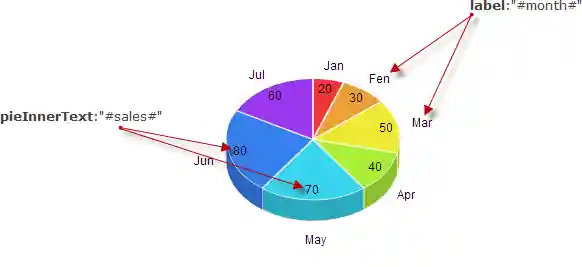
sets the template for the pie inner labels
string|function pieInnerText;
Example
webix.ui({
    view:"chart",
    type:"pie",
    label:"#month#",
    pieInnerText:"#sales#",
    ...
})
Related samples
Details
The property is applicable only to pie charts
As a function, the property accepts a data object and is called for each data item:
webix.ui({
    view:"chart",
    type:"pie",
    pieInnerText:function(obj){ return obj.sales;},
    ...
})
pieInnerText template function takes 3 parameters:
- item {object} - item data object
- totalValue {number} - sum of all values
- levelindex {number} - level index (for multilevel charts)
pieInnerText: (item, totalValue, levelIndex)=>{
     const percent = Math.round(item.sales/totalValue*100) + "%";
     if(!levelIndex)
          return `<span class="group">${item.country}<br/>${percent}<span>`;
     return percent;
}
See also