registerMathMethod of ui.spreadsheet, Methods Webix Docs
Example
$$("ss1").registerMathMethod("NEW", function(value){
    // function's logic
});
Related samples
Details
The handler function can receive a set of parameters for your function. For example, you can pass one value (a cell reference) or an array of values (a range of cell values), etc.
You can use the new method as =NEW(H3:H5);
For the added math method you can add suggestions for its parameters by updating the webix.i18n.spreadsheet.liveEditor["functions-syntax"] locale.
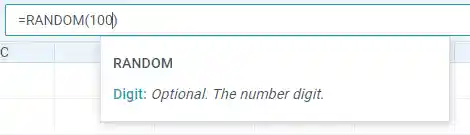
Check the example below:
const ssheet = webix.ui({
  view: "spreadsheet",
  toolbar: "full"
});

ssheet.registerMathMethod("RANDOM", function(value){   value = value || 100;    return Math.round(Math.random()*value); });
webix.i18n.spreadsheet.liveEditor["functions-syntax"].RANDOM = [      ["Digit", "Optional. The number digit."]  ];
ssheet.setCellValue(1,1,"=RANDOM(100)")
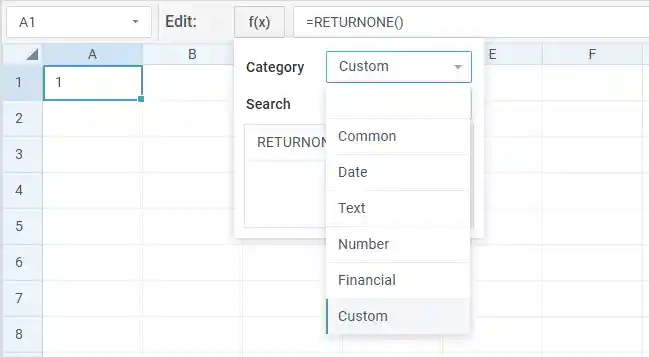
It is also possible to specify a custom category while adding a new math method:
webix.ui({
  view:"spreadsheet",
  id: "sheets",
  methods:"all",
  toolbar:"full",
});

webix.i18n.spreadsheet.liveEditor.custom = "Custom";
$$("sheets").registerMathMethod("returnone", () => 1, "custom");
$$("sheets").setCellValue(1, 1, "=RETURNONE()")
If you need to allow a custom method to generate HTML, while the xssSafe property is enabled, set the generateHTML parameter of the registerMathMethod() method to true. Check the example below:
const spreadsheet = webix.ui({
    view: "spreadsheet",
    xssSafe: true
});

spreadsheet.registerMathMethod("bold", v => `<b>${v}</b>`, null, true);
spreadsheet.setCellValue(1, 1, '=bold("text")');
Note that while using the method with allowed HTML generation in math formulas, you should specify only the method in the formula. For example: =IMAGE(...) will generate an image, but =IMAGE(...)&"text" will be escaped.
See also
Back to topIf you have not checked yet, be sure to visit site of our main product Webix ui component library and page of spreadsheet product.