UnitList, UI Widgets Webix Docs
API Reference
Overview
UnitList presents data in groups derived from initial non-hierarchical dataset. Data items are sorted and then united by common values.
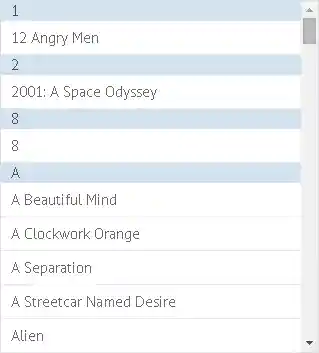
Initialization
List items are grouped by title
webix.ui({
    view:"unitlist",
    uniteBy:function(obj){
        return obj.title.substr(0,1);
    },
    type:{//setting item properties, optional
        height:50,
        headerHeight:30,
    },
    template:"#title#</br>#year#<br/>#votes#",
    data: set
});
- The uniteBy property groups data according to the specified criterion, the unit value (here it's the first letter to the data item title);
- In addition it sets unit headers (unit values) and, additionally, sets template for them.
Unit header template
view:"unitlist",
uniteBy:function(obj){
    return "<span style='background-color:"+obj.color+";'>"+
        obj.title.substr(0,1)+"</span>";
}
Working with UnitList
Working with Unit Values
UnitList API makes it possible to get text values of unit headers (unit values) as well as get data items that comply with this or that unit criterion.
- getUnits() - returns JS array of unit values defined by the uniteBy property. The values are arranged in the alphabetical order, numbers first;
- getUnitList(id) - returns the ID (or, more often, IDs) of data records united by "unit" criterion.
var units = $$('list').getUnits(); // -> // -> [1, C, M, T]

var unit = $$('unit').getInputNode().value; //getting value of the combo box text field
var id = $$("list").getUnitList(unit);
Related sample: Working with UnitList Items
If you know the ID of any data item, you can easily get to all its properties:
var title = $$("list").getItem(id).title;
If there are several data items that comply to the unit value criterion, they are returned in a JS array, and should be treated accordingly.
Common Functionality:
- Data Loading
- Defining Data Template
- Adding/Deleting Items
- Editing Data
- Data Filtering and Sorting
- Selection
- Paging
- Components Export to PNG
- Data Components Export to Excel
Note that there's no built-in possibility to edit data with UnitList. You should create a prototype editlist object beforehand.