GParted
Not to be confused with GNU Parted, the backend behind GParted.
 | |
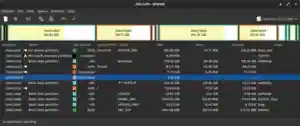 GParted 1.0 showing a GPT-partitioned hard disk | |
| Developer(s) | GParted developers |
|---|---|
| Initial release | August 26, 2004 |
| Stable release | 1.2.0-1 / January 28, 2021[1] |
| Repository | GParted Repository |
| Written in | C++ (gtkmm), C[2] |
| Operating system | Linux |
| Type | Partition editor |
| License | GNU General Public License |
| Website | gparted gparted |
GParted (acronym of GNOME Partition Editor) is a GTK front-end to GNU Parted and an official GNOME partition-editing application (alongside Disks). GParted is used for creating, deleting, resizing, moving, checking, and copying disk partitions and their file systems. This is useful for creating space for new operating systems, reorganizing disk usage, copying data residing on hard disks, and mirroring one partition with another (disk imaging).
Background
GParted uses libparted to detect and manipulate devices and partition tables while several (optional) file system tools provide support for file systems not included in libparted. These optional packages will be detected at runtime and do not require a rebuild of GParted.
GParted is written in C++ and uses gtkmm to interface with GTK. The general approach is to keep the GUI as simple as possible and in conformity with the GNOME Human Interface Guidelines.
The GParted project provides a live operating system including GParted which can be written to a Live CD, a Live USB and other media.[3][4] The operating system is based on Debian GNU/Linux. GParted is also available on other GNU/Linux live CDs, including recent versions of Puppy, Knoppix, SystemRescueCd and Parted Magic. GParted is preinstalled when booting from "Try Ubuntu" mode on an Ubuntu installation media.
An alternative to this software is GNOME Disks.
Supported features
GParted supports the following operations on file systems (provided that all features were enabled at compile-time and all required tools are present on the system). The 'copy' field indicates whether GParted is capable of cloning the mentioned filesystem.[5]
| Detect | Read | Create | Grow | Shrink | Move | Copy | Check | Label | UUID | |
|---|---|---|---|---|---|---|---|---|---|---|
| BitLocker | Yes | No | No | No | No | No | No | No | No | No |
| Btrfs | Yes | Yes | Yes | Yes | Yes | Yes | Yes | Yes | Yes | Yes |
| crypt / LUKS[6] | Yes | Yes | No | Yes | Yes | Yes | Yes | No | No | No |
| exFAT[7][8] | Yes | No | No | No | No | Yes | Yes | No | No | No |
| ext2 | Yes | Yes | Yes | Yes | Yes | Yes | Yes | Yes | Yes | Yes |
| ext3 | Yes | Yes | Yes | Yes | Yes | Yes | Yes | Yes | Yes | Yes |
| ext4 | Yes | Yes | Yes | Yes | Yes | Yes | Yes | Yes | Yes | Yes |
| F2FS | Yes | Yes | Yes | Yes | No | Yes | Yes | Yes | No | No |
| FAT16 | Yes | Yes | Yes | Yes | Yes | Yes | Yes | Yes | Yes | Yes |
| FAT32 | Yes | Yes | Yes | Yes | Yes | Yes | Yes | Yes | Yes | Yes |
| HFS | Yes | Yes | Yes | No | Yes | Yes | Yes | No | No | No |
| HFS+ | Yes | Yes | Yes | No | Yes | Yes | Yes | Yes | No | No |
| JFS | Yes | Yes | Yes | Yes | No | Yes | Yes | Yes | Yes | Yes |
| swap | Yes | Yes | Yes | Yes | Yes | Yes | Yes | No | Yes | Yes |
| LVM2 PV | Yes | Yes | Yes | Yes | Yes | Yes | No | Yes | No | No |
| NILFS2 | Yes | Yes | Yes | Yes | Yes | Yes | Yes | No | Yes | Yes |
| NTFS | Yes | Yes | Yes | Yes | Yes | Yes | Yes | Yes | Yes | Yes |
| ReFS | Yes | No | No | No | No | No | No | No | No | No |
| Reiser4 | Yes | Yes | Yes | No | No | Yes | Yes | Yes | No | No |
| ReiserFS | Yes | Yes | Yes | Yes | Yes | Yes | Yes | Yes | Yes | Yes |
| UDF | Yes | Yes | Yes | No | No | Yes | Yes | No | Yes | Yes |
| UFS | Yes | No | No | No | No | Yes | Yes | No | No | No |
| XFS | Yes | Yes | Yes | Yes | No | Yes | Yes | Yes | Yes | Yes |
| ZFS | Yes | No | No | No | No | No | No | No | No | No |
Cloning with GParted
GParted is capable of cloning by using the mouse gesture of copy and paste. GParted is not capable of cloning an entire disk, but only one partition at a time. The file system being cloned should not be mounted. GParted clones partitions at the filesystem-level, and as a result is capable of cloning different target-size partitions for the same source, as long as the size of the source filesystem does not exceed the size of the target partition.[9]
See also
- Comparison of disk cloning software
- GNU Parted
- GNU GRUB
- KDE Partition Manager
- List of disk partitioning software
- Partition (computing)
References
- ^ "GParted Live 1.2.0-1 Stable Release". 28 January 2021. Retrieved 29 January 2021.
- ^ http://www.ohloh.net/p/32097
- ^ "Gparted Live CD". Retrieved 6 April 2013.
- ^ A quick look at the GParted live CD | Linux.com | The source of Linux information
- ^ "GParted Features". Retrieved 2018-03-21.
- ^ GParted — News Item 207
- ^ Feature Requests: exFAT (aka FAT64)
- ^ Bug / Enhancement 639760 - exfat / fat64 support?
- ^ "Gparted Manual: Copying and Pasting a Partition".
External links
This article is copied from an article on Wikipedia® - the free encyclopedia created and edited by its online user community. The text was not checked or edited by anyone on our staff. Although the vast majority of Wikipedia® encyclopedia articles provide accurate and timely information, please do not assume the accuracy of any particular article. This article is distributed under the terms of GNU Free Documentation License.