
Table of Contents
Getting Started
Basic Usage
To display your GitHub stats in your profile README, simply copy and paste the following Markdown snippet. Replace FajarKim with your own GitHub username. The card will automatically fetch your latest public statistics and render them as a clean SVG image.
[](https://github.com/FajarKim/github-readme-profile)
Themes
The appearance of the card can be changed instantly by selecting one of the built-in themes. Themes control the color palette for backgrounds, text, icons, and borders. To apply a theme, add the &theme=THEME_NAME parameter to the image URL.

Show Example
Available Built-in Themes
The project includes several pre-defined themes. You can see a preview of each below. For a complete list, refer to themes/README.md.
| Themes | Preview |
|---|---|
default |
|
transparent |
|
dark |
|
highcontrast |
If you would like to contribute a new theme, please see our contribution guidelines.
Customization
Beyond the built-in themes, you have fine-grained control over every visual aspect of the card using URL parameters. Each parameter is optional and can be combined freely.
Options
The following table lists all available customization parameters, their descriptions, data types, and default values.
Name |
Description |
Type |
Default value |
|
Defines the color of the card title. |
|
|
|
Sets the color for all body text inside the card, including stat labels and numbers. |
|
|
|
Controls the color of the icons displayed next to each stat. |
|
|
|
Specifies the color of the card border. This parameter is ignored if |
|
|
|
Background color of the card. Can be a solid hex color or a gradient defined as angle,start,end (e.g., |
|
|
|
Determines the color of the border around the profile image. Does not apply when |
|
|
|
Color for the username text displayed under the photo profile. |
|
|
|
Name of a pre-defined theme. Overrides individual color parameters if set. Choose from all available themes. |
|
|
|
Custom title text for the card. Must be URL-encoded (use a tool like URL Encoder). |
|
|
|
Sets the language of the card text. Full list of available locales can be found here. |
|
|
|
Explicitly sets the width of the card border in pixels. |
|
|
|
Controls the rounding of the card corners, measured in pixels. |
|
|
|
Comma-separated list of stats to hide. Options: |
|
|
|
Comma-separated list of additional stats to show. Options: |
|
|
|
Output format of the card. Available options: |
|
|
|
If set to |
|
|
|
Removes the outer border of the card when set to |
|
|
|
Removes the stroke around the profile image when set to |
|
|
|
Flips the layout: the stats column moves to the left, and the profile image moves to the right. |
|
|
|
Quality of the profile image, expressed as a percentage (1–100). Lower values reduce file size but may decrease sharpness. |
|
|
|
Resizes the profile image to the specified width in pixels. Minimum allowed value is 10px. |
|
|
Advanced Usage
Gradient Backgrounds
You can create a smooth gradient background by using the bg_color parameter with the format angle,start,end. The angle is in degrees (0–360), and the colors are given as hex codes without the #. For example:

Show Example
Transparent Theme & Alpha Channel
The transparent theme removes the background entirely, making the card blend with any page background. This is especially useful if you want to embed the card in a GitHub README without a white box.

Show Example
You can also achieve a transparent background with any theme by setting bg_color to a fully transparent hex code (e.g., bg_color=00000000). This leaves the theme’s other colors intact.

Show Example
GitHub Theme Context
GitHub allows you to specify different images for light and dark themes using the #gh-dark-mode-only and #gh-light-mode-only tags. This lets you serve a card that automatically adapts to the viewer’s theme preference.
[](https://github.com/FajarKim/github-readme-profile#gh-dark-mode-only) [](https://github.com/FajarKim/github-readme-profile#gh-light-mode-only)
Show Example
Hiding Individual Stats
If you want to keep the card compact or focus on specific metrics, you can hide certain stats using the hide parameter. The value is a comma-separated list without spaces.

Show Example
Available values for hide: repos, stars, forks, commits, prs, prs_merged, issues, contributed.
Showing Additional Stats
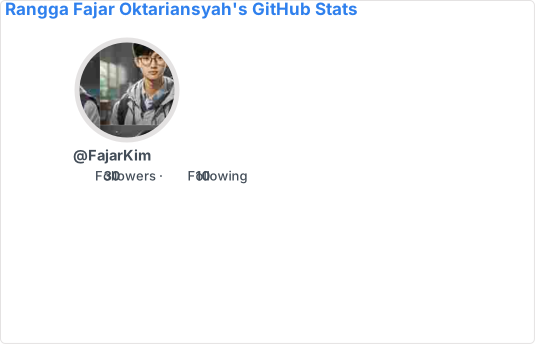
Beyond the default stats, you can enable extra metrics like code reviews, closed issues, or discussions using the show parameter.
Show Example
Available values for show: reviews, issues_closed, discussions_started, discussions_answered.
Available Locales
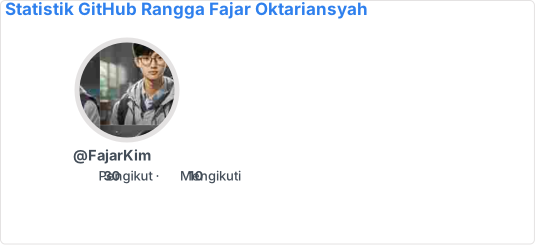
The card can display text in multiple languages. Use the locale parameter to change the language. Below are some of the supported locales; for a complete list, see i18n/README.md.
Code |
Locale |
|
English |
|
Arabic (العربية) |
|
French (Français) |
|
Indonesian (Bahasa Indonesia) |
|
Japanese (日本語) |
|
Korean (한국어) |
If your language is missing, you can contribute a new translation by following the guidelines.
Show Example
License
This project is open-source and distributed under the MIT License. You are free to use, modify, and distribute it, subject to the terms of the license. For more details, see the LICENSE file.
Deploy on Vercel
You can host your own instance of the GitHub Readme Profile API on Vercel. This gives you full control over the endpoint and allows you to customize the behavior or add new features.
- Sign up / log in at vercel.com using your GitHub account.
- Fork this repository to your GitHub account.
- Create a personal access token from GitHub Settings. Enable the
repoanduserpermissions. This token allows the API to fetch your private and public repository data. - Import the project in Vercel:
- Click “Add New…” → “Project”.
- Import your forked repository.
- Add an environment variable named
GH_TOKENwith your personal access token as its value. - In the Build & Output Settings, enable the install command and add
npm install typescript(this ensures TypeScript dependencies are installed).
- Deploy – Vercel will automatically build and deploy your instance. Once finished, you will get a unique URL (e.g.,
https://your-project.vercel.app) that you can use in place ofgh-readme-profile.vercel.app.

Credits
This project is a fork of tuhinpal/readme-stats-github. Many design ideas and additional features were inspired by anuraghazra/github-readme-stats. We thank the original authors and all contributors who have helped improve this tool.
Donate
If this project has been helpful to you, please consider supporting humanitarian causes instead of donating to the author. Every contribution, no matter how small, can make a real difference.


Alternatively, you can star this repository and share it with others. That helps the project gain visibility and motivates further development.
Contributions
Contributions of all kinds are welcome! Whether you want to fix a bug, add a new theme, improve translations, or suggest a feature, please read our contribution guidelines to get started.


Made with ❤️ and TypeScript
Copyright © 2023–present Rangga Fajar Oktariansyah