Nodeclipse - Node.js support in Eclipse IDE

We have released version 0.4. Enjoy!
Table of Contents generated with DocToc
- Nodeclipse - Node.js support in Eclipse IDE
Moved from https://github.com/tomotaro1065/nodeclipse to https://github.com/Nodeclipse/nodeclipse-1 .
Nodeclipse or Nodeclipse-1 v0.4 is Eclipse plugin for the Node.js. The purpose of Nodeclipse is to create environment in which Node.js development is easy for any user from beginner to professional.
Check news
Vision
One-stop shop for Node.js tools.
We can't develop everything at once, but we let you know what are the best things around for Node.js development with Eclipse.
Features
- Creating default structure for New Node Project and New Node Source File
- JavaScript Syntax highlighting
- Content Assistant
- NPM support
- Debugging - Breakpoint, Trace, etc... via Eclipse debugger plugin for V8
- Generating Express project
- Support for JSHint.
Download site:http://github.eclipsesource.com/jshint-eclipse/updates/ - Support for Juno
Installing
Drag and drop 
or use Download site : http://www.nodeclipse.org/updates
Usage
Check out great article and watch video.
For debugging check Using-Eclipse-as-Node-Applications-Debugger
For Markdown:
-
Window -> Show View -> Other... -> Markdown
-
Click inside "Markdown HTML Preview" view to refresh rendering
-
(Optional, may be useful because double whitespace is hard line break) Show whitespace character via Preferences > General > Editors > Text Editors : checkbox labeled "Show whitespace characters"
If [Node Express Project] menu does not appear under File->New, reset [Node] perspective by right-clicking on the [Node] button, which is located perspective switching area.
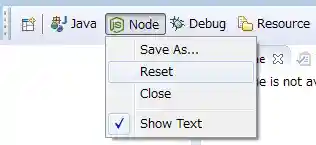

What's new
See Changelong.md
and also Changelong.md & History.md at www.nodeclipse.org repository.
Roadmap
Check also news.
We use Semantic Versioning. Version is MAJOR.MINOR.PATCH, where
- MAJOR indicates substantially new release, possibly with API change
- MINOR indicates updates, that are fully backward-compatible
- PATCH indicates that is bug-fix
Please participate in discussion and vote on features on https://github.com/Nodeclipse/nodeclipse-1/issues
0.5 (June-July 2013)
- #1 Kepler 4.3 support
- Improving Code Assist (new ideas needed)
- #26 Add CoffeeFileWizard
- Nodeclipse/www.nodeclipse.org#2 [Task] merge enide solution (hints, roadmap) and nodeclipse-blog into www.nodeclipse.org
- resource for developers Nodeclipse.github.io
- (Optional) Support for Sublime Text
- Improving Code Assist with convention-based
completions.json
0.6
- JSquared Editor
1.0
Is expected together with Node.js 1.0
Next
Ideas, proposals, work-in-progress etc.
-
Improving Code Assist
-
Debugging features without Chrome developer tools. In other words, debugging on Node Editor
-
Obfuscation and source-level debugging features using Source Maps
-
Unit test support (how?)
-
Easily deployment to Heroku (possibly via Heroku Eclipse plugin)
Download site: https://eclipse-plugin.herokuapp.com/install
-
Add Jade support (http://blog.wookets.com/2011/10/how-to-compile-coffeescript-jade-stylus.html Posted 30th October 2011 by Sean Wesenberg)
-
Integrate console window (library unknown) -> currently can use StartExplorer (bundled with Enide)
-
Add CoffeeScript support via coffeescript-eclipse plugin
Download site: http://coffeescript-editor.eclipselabs.org.codespot.com/hg/
(also requires XText. See CoffeeScriptSet.p2f in Enide for quick install)
Shelved
- Eclipse Json Editor Plugin Last Update: 2012-11-07
(The JSON Editor is a simple plugin for the Eclipse IDE that provides:
- Color text highlighting
- An Outline Tree view
- JSON validation
- Text formatting - Text folding for the JSON data format.)
No Update site.
Developing
First tiny steps
- Register & login within GitHub
- Add stars to the projects, that you like
- Fork to your account, play with code
Before starting development, please do
- Carefully read materials
- Install and give thorough try
- Contact developers, make friends
- Say what you are going to do, before you head in. Share and discuss ideas.
Preparing environment
Recommended way
In Eclipse for Java or RCP developers
- Copy to clipboard git repository URL:
https://github.com/Nodeclipse/nodeclipse-1.git
- File -> Import.. -> Git / Project from git
Other way, not recommended way
git clone https://github.com/Nodeclipse/nodeclipse-1.git- File -> Import -> Existing Projects into Workspace
- Enter cloned folder path to [Select root directory].
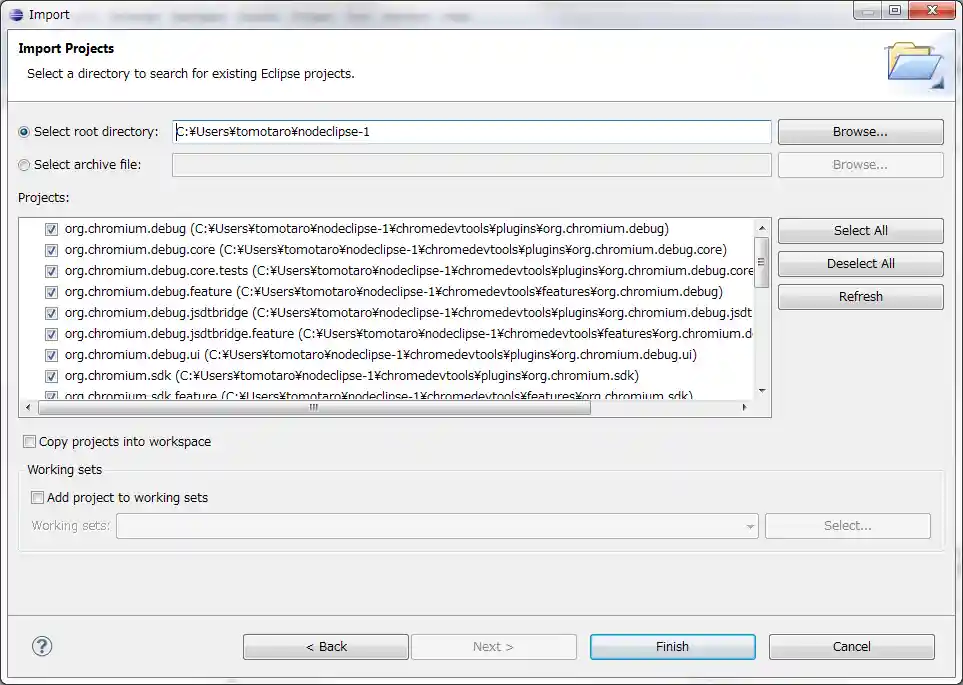
- Push [Finish] button.
How to build it
It will be started building automatically when you import it into your workspace and whenever you save code which is changed.
If you got build error, probably you don't have installed JSDT yet. Try as follows.
- Select [Help]-[Install New Software...].
- Select [Juno - http://download.eclipse.org/releases/juno] in [Work with] drop-down list.
- Check [Web, XML, Java EE and OSGi Enterprise Development]-[JavaScript Development Tools].
How to Run or Debug it
- Select project folder, for instance org.nodeclipse.ui, on Package Explorer.
- Open context menu by right-clicking.
- Select [Run As / Debug As]-[Eclipse Application].
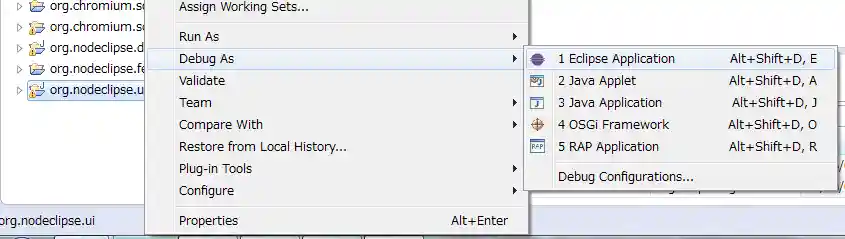
A new Eclipse workbench starts. Nodeclipse which you started to run or debug has been installed into this runtime Eclipse.
Code standard
- If you edited or created file, add yourself as @author in JavaDoc or comments
- Import
CodeStyle_codetemplates.xml from
Nodeclipse.github.io
Instructions are inside the xml file.
This will add @author in new files automatically. Use Ctrl+Alt+J to quickly insert in existing files.
Update forked project
If you forked into your account, after a while it is possible that code at original repository was updated.
With git command line you need to open project base folder, then
git remote add upstream https://github.com/Nodeclipse/project-you-forked.git
git fetch upstream
git merge upstream/master
git push origin master
With EGit you should do the same steps but within GUI.
Send Pull Request steps
- Push to your remote
origin (your account)
- Open GitHub page for your fork
- Press Pull Request
- Review Commits on Commits tab
- Write description, press Send pull request
Testing
Developers may try latest unreleased version at update URL:
http://www.tomotaro1065.com/nodeclipse/staging/
Contributors
LambGao 魔都 https://github.com/Nodeclipse (original creator v0.1.8)
Scott Elcomb https://github.com/psema4
Tomoyuki Inagaki https://github.com/tomotaro1065 (debugging integration v0.2) blog
Paul Verest https://github.com/PaulVI/ (Vision, readme, reference to plugings) blog
Pushkar Gupte https://github.com/pushkar85 (together for 0.4)
Contacts
Do not hesitate to contact developers.
Create issue or send email to dev group.
Or skype by ID pverest, QQ 908781544.
Visit Nodeclipse Google Group.
For Bloggers and Users of Twitter, Flickr, LinkedIn, Weibo etc.
In case you plan to blog or tweet about the Nodeclipse plugin, please use the tag "#nodeclipse"
in order to make it easier to find all the comments and pictures. Thanks a lot for telling the world about the project!
| 隸キ用#nodeclipse#譬・ュセ微博一下。
| Por favor, utilizar etiqueta #nodeclipse
| ツイートする時は、#nodeclipseタグを使用してください。
| Bitte benutzen Sie tag #nodeclipse um zu twiten.
Spread the words
Please let others know about this effort. Add links below:
Sites that reference this project
http://www.oschina.net/p/nodeclipse
http://stackoverflow.com/questions/8025825/is-there-a-nodejs-plugin-for-aptana-studio
http://stackoverflow.com/questions/8179369/debugging-node-js-with-eclipse
http://stackoverflow.com/questions/7038961/node-js-in-eclipse-which-plugins-are-most-people-using
https://groups.google.com/forum/#!msg/nodejs/ayLUeUOanzA/et6EEZppVjMJ
http://stackoverflow.com/questions/15407334/eclipse-rcp-add-optional-dependencies
http://stackoverflow.com/questions/12641679/nodejs-a-step-by-step-debugger-for-nodejs/15296275#15296275
http://cnodejs.org/topic/5149c795069911196df84af7
Hot requests
http://stackoverflow.com/questions/14533885/which-ide-supports-coffeescript-debugging-source-mapping-breakpoints-call-st
http://stackoverflow.com/questions/10286364/coffeescript-editor-plugin-for-eclipse
http://stackoverflow.com/questions/7057466/how-to-use-coffeescript-and-eclipse-together-in-windows
http://stackoverflow.com/questions/3919977/what-ide-to-use-for-node-js-javascript asked Oct 13 '10 [closed] -> Vim, Cloud9 IDE, editors
http://www.iteye.com/news/23933
Interesting and useful Links
Other Node IDEs
- Nide http://coreh.github.com/nide/ v0.2 Last update 2012-04
- JetBrains WebStorm or IntelliJ IDEA (commercial products)
- Microsoft WebMatrix (free) or Visual Studio (commercial product)
- CloudIDE c9.io (cloud service)
- Scripted https://github.com/scripted-editor/scripted
- Eclipse Orion
- komodo-ide http://www.activestate.com/komodo-ide (commercial product)
- Netbeans have a NodeJS plugin
Other Eclipse-based IDEs
- Adobe Flash Builder
- ADT (Android Development Tools)
- Aptana Studio (PHP, Python, Rubi)
- Erlang IDE
- Groovy & Grails Tool Suite (GGTS)
- IBM Rational product line
- JBoss Developer Studio
- MyEclipse, from Genuitec is a commercial IDE
- PyDev Python IDE
- SAP NetWeaver Developer Studio
- Scala IDE
- Spring Tool Suite
- Zend Studio (PHP) Commercial
Hints & Notes
http://wiki.eclipse.org/Tycho/Reference_Card
http://stackoverflow.com/questions/10352089/how-do-i-build-an-eclipse-rcp-app-so-that-its-features-can-be-updated-automatica?rq=1
http://stackoverflow.com/questions/14591472/installing-an-additional-feature-during-product-build-for-some-eclipse-versions
http://stackoverflow.com/questions/10529859/how-to-include-video-in-jekyll-markdown-blog
http://stackoverflow.com/questions/2330620/eclipse-i-turned-on-hidden-characters-now-i-cant-turn-off
Eclipse JavaScript Development Tools (JSDT) has only JS web support.
add interesting stuff here...

