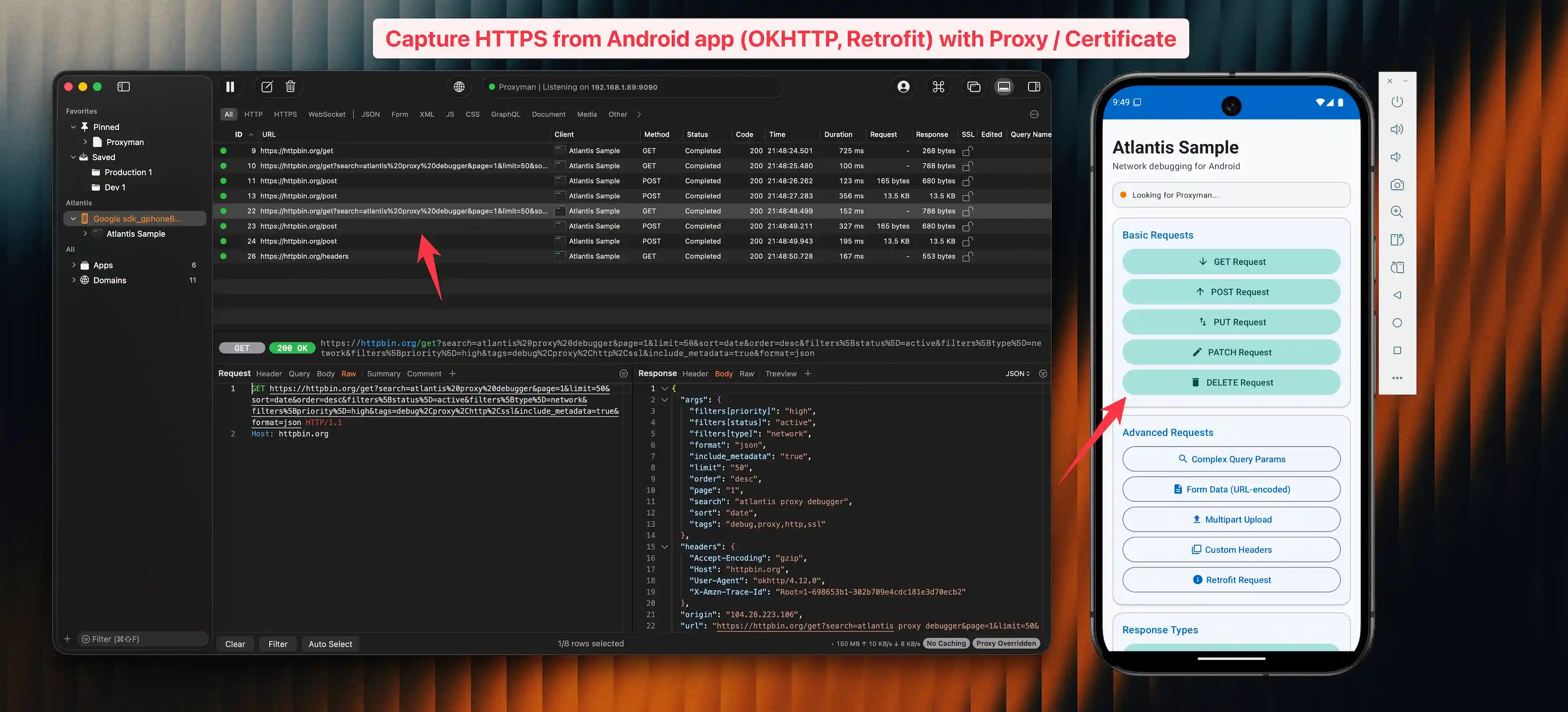
Capture HTTP/HTTPS traffic from Android apps and send to Proxyman for debugging.
Overview
Atlantis Android is a companion library to Proxyman that allows you to capture and inspect network traffic from your Android applications without configuring a proxy or installing certificates.
Features
- Automatic OkHttp traffic interception
- WebSocket message capture (send, receive, close)
- Works with Retrofit 2.9+ and Apollo Kotlin 3.x/4.x
- Network Service Discovery (NSD) for automatic Proxyman detection
- Direct connection support for emulators
- GZIP compression for efficient data transfer
- Minimal configuration required
Requirements
- Android API 26+ (Android 8.0 Oreo)
- OkHttp 4.x or 5.x
- Kotlin 1.9+
Installation
Option 1: JitPack (Recommended)
Add the JitPack repository to your settings.gradle.kts:
dependencyResolutionManagement {
    repositories {
        maven { url = uri("https://jitpack.io") }
    }
}
Then add the dependency in your module's build.gradle.kts:
dependencies {
    debugImplementation("com.github.ProxymanApp:atlantis-android:v1.0.0")
}
Or with Groovy (build.gradle):
dependencies {
    debugImplementation 'com.github.ProxymanApp:atlantis-android:v1.0.0'
}
Option 2: Maven Central
Add the dependency in your module's build.gradle.kts:
dependencies {
    debugImplementation("com.proxyman:atlantis-android:1.0.0")
}
Or with Groovy (build.gradle):
dependencies {
    debugImplementation 'com.proxyman:atlantis-android:1.0.0'
}
Quick Start
1. Initialize in Application
class MyApplication : Application() {
    override fun onCreate() {
        super.onCreate()

        if (BuildConfig.DEBUG) {
            Atlantis.start(this)
        }
    }
}
2. Add Interceptor to OkHttpClient
val okHttpClient = OkHttpClient.Builder()
    .addInterceptor(Atlantis.getInterceptor())
    .build()
3. Capture WebSocket Traffic (Optional)
Wrap your WebSocketListener with Atlantis.wrapWebSocketListener() to capture WebSocket messages:
val listener = Atlantis.wrapWebSocketListener(object : WebSocketListener() {
    override fun onOpen(webSocket: WebSocket, response: Response) {
        // your logic
    }
    override fun onMessage(webSocket: WebSocket, text: String) {
        // your logic
    }
    // ...
})

okHttpClient.newWebSocket(request, listener)
4. Run Your App
Open Proxyman on your Mac, run your Android app, and watch the traffic appear!
Project Structure
atlantis-android/
├── atlantis/              # Library module
│   └── src/
│       ├── main/kotlin/
│       │   └── com/proxyman/atlantis/
│       │       ├── Atlantis.kt                  # Main entry point
│       │       ├── AtlantisInterceptor.kt        # OkHttp interceptor
│       │       ├── AtlantisWebSocketListener.kt  # WebSocket capture
│       │       ├── Base64Utils.kt                # Base64 encoding
│       │       ├── Configuration.kt              # Config model
│       │       ├── GzipCompression.kt            # Compression
│       │       ├── Message.kt                    # Message types
│       │       ├── NsdServiceDiscovery.kt        # mDNS discovery
│       │       ├── Packages.kt                   # Data models
│       │       └── Transporter.kt                # TCP connection
│       └── test/kotlin/                          # Unit tests
├── sample/                # Sample app
├── PUBLISHING.md          # Publishing guide
└── README.md
Setup
Option 1: Open in Android Studio (Recommended)
Simply open the atlantis-android folder in Android Studio. It will automatically download the Gradle wrapper and sync the project.
Option 2: Generate Gradle Wrapper Manually
If you have Gradle installed locally:
cd atlantis-android
gradle wrapper --gradle-version 8.7
Building
# Build the library
./gradlew :atlantis:build

# Run tests
./gradlew :atlantis:test

# Build sample app
./gradlew :sample:assembleDebug
Testing
Publishing
See PUBLISHING.md for instructions on publishing to Maven Central or JitPack.
License
Apache License 2.0