Learn Svelte – Full Course for Beginners
https://youtu.be/UGBJHYpHPvA?si=qiYKVn9ztESf6NV5
Contents
내가 들은 유료($) 코스
-
초급
-
코코아클론(HTML, CSS, Flex, Animations, Github) https://nomadcoders.co/kokoa-clone
-
CSS Layout마스터 클래스SCSS, Flexbox, CSS Grid https://nomadcoders.co/css-layout-masterclass
-
[풀스택] 유튜브 클론코딩(유튜브 백엔드 + 프런트엔드 + 배포) https://nomadcoders.co/wetube
-
-
중급
- ES6의 정석(ES6, ES7, ES8) https://nomadcoders.co/es6-once-and-for-all
당신이 모르는 자바스크립트의 메모리 누수의 비밀
- 크롬 개발자도구로 하는 디버깅과 해결책을 찾아서!
ESLint
- 연구 중
https://eslint.org/docs/latest/use/command-line-interface
HTTP response status codes
https://developer.mozilla.org/en-US/docs/Web/HTTP/Status
Vim(Surround)
- 교체 change
cst<h1>
 in normal mode, type cst<div> (change surrounding tag to <div>).

 cst 하고<h1>

 감싸고 있는 태그 교체됨
 <li>test</li>
 cst<h1>
 하면
<h1>test</h1>

변신 !!!
- 태그 삭제delete
dst
- ysiw<h1> Add 태그 추가 +
ysiw<h1>
test

ysiw<h1>

<h1>test</h1>
- yss<h1> Add 태그 추가 +
yss<h1>
test

yss<h1>

<h1>test</h1>
https://unix.stackexchange.com/questions/168169/how-to-change-the-pair-of-a-changed-html-tag-in-vim
https://github.com/tpope/vim-surround
surround.vim
Surround.vim is all about "surroundings": parentheses, brackets, quotes, XML tags, and more. The plugin provides mappings to easily delete, change and add such surroundings in pairs.

It's easiest to explain with examples. Press cs"' inside

"Hello world!"
to change it to

'Hello world!'
Now press cs'<q> to change it to

<q>Hello world!</q>
To go full circle, press cst" to get

"Hello world!"
To remove the delimiters entirely, press ds".

Hello world!
Now with the cursor on "Hello", press ysiw] (iw is a text object).

[Hello] world!
Let's make that braces and add some space (use } instead of { for no space): cs]{

{ Hello } world!
Now wrap the entire line in parentheses with yssb or yss).

({ Hello } world!)
Revert to the original text: ds{ds)

Hello world!
Emphasize hello: ysiw<em>

<em>Hello</em> world!
Finally, let's try out visual mode. Press a capital V (for linewise visual mode) followed by S<p class="important">.

<p class="important">
  <em>Hello</em> world!
</p>
This plugin is very powerful for HTML and XML editing, a niche which currently seems underfilled in Vim land. (As opposed to HTML/XML inserting, for which many plugins are available). Adding, changing, and removing pairs of tags simultaneously is a breeze.
NeoVim-Surround
https://github.com/kylechui/nvim-surround
    Old text                    Command         New text
--------------------------------------------------------------------------------
    surr*ound_words             ysiw)           (surround_words)
    *make strings               ys$"            "make strings"
    [delete ar*ound me!]        ds]             delete around me!
    remove <b>HTML t*ags</b>    dst             remove HTML tags
    'change quot*es'            cs'"            "change quotes"
    <b>or tag* types</b>        csth1<CR>       <h1>or tag types</h1>
    delete(functi*on calls)     dsf             function calls
NeoVim Plug-in(emmet)
https://github.com/neoclide/coc-emmet
Emmet in Visual Studio Code
(div.status-bar__column>span)*3
emmet
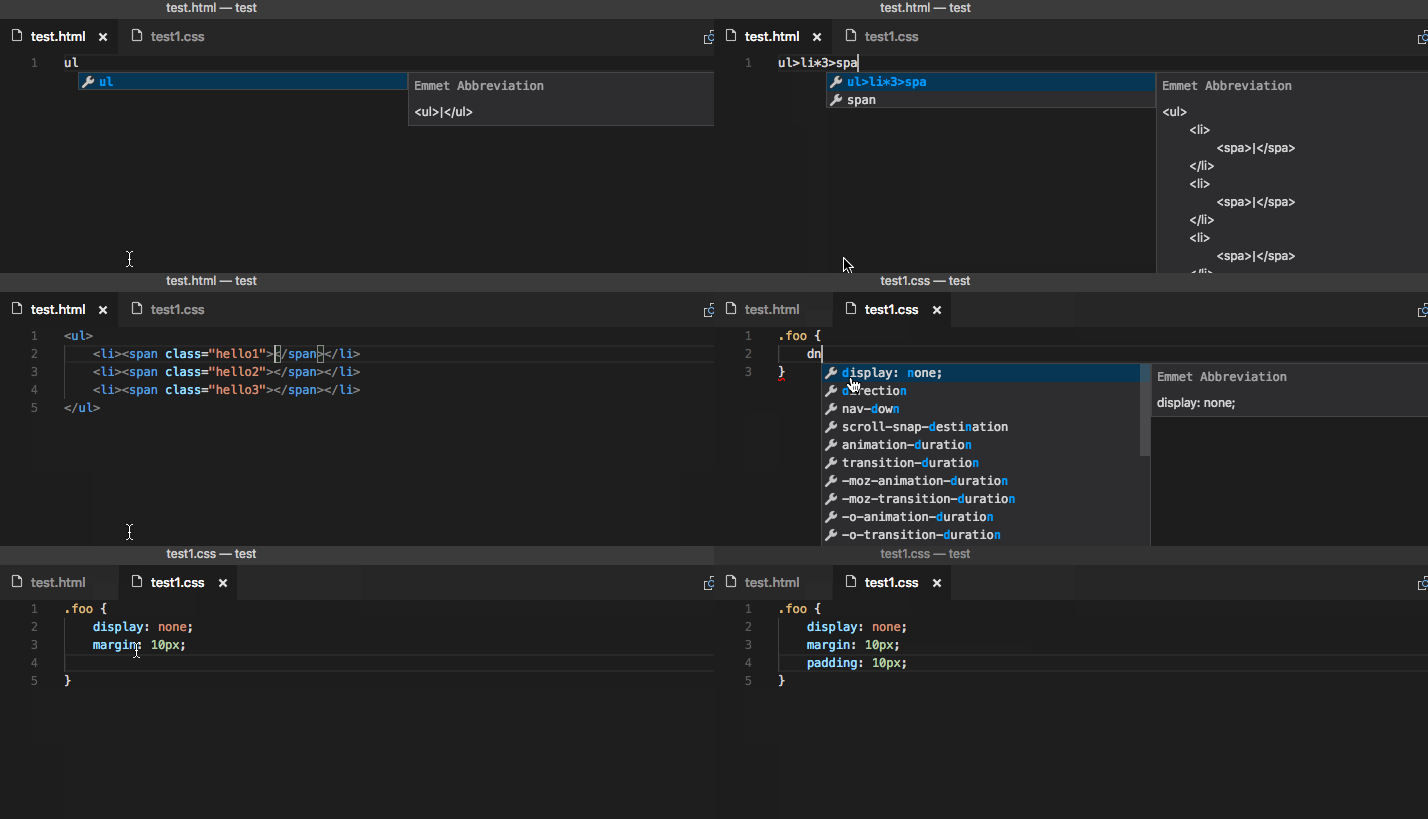
- settings.JSON
"emmet.triggerExpansionOnTab": true
https://developer.mozilla.org/en-US/docs/Glossary/Semantics
출처 : Nomad Coders https://nomadcoders.co/
MDN Document
https://developer.mozilla.org/en-US/docs/Web/HTML
https://github.com/thedaviddias/Front-End-Checklist
https://github.com/AllThingsSmitty/css-protips
selector {
  background:red;
}

/* Using a <background-color> */
background: green;

/* Using a <bg-image> and <repeat-style> */
background: url("test.jpg") repeat-y;

/* Using a <box> and <background-color> */
background: border-box red;

/* A single image, centered and scaled */
background: no-repeat center/80% url("../img/image.png");

/* Global values */
background: inherit;
background: initial;
background: revert;
background: revert-layer;
background: unset;
https://developer.mozilla.org/en-US/docs/Web/CSS/background
-
Block(CSS)

-
main axis vs cross axis(Flexbox)


BEM
-
The Block, Element, Modifier methodology (commonly referred to as BEM) is a popular naming convention for classes in HTML and CSS.
CSS MDN 정리
-
part1
-
part2
-
part3
JavaScript style guide [🔝]
[🔝]

https://github.com/tipjs/javascript-style-guide
원문:https://github.com/airbnb/javascript
- JavaScript: Understanding the Weird Parts - The First 3.5 Hours
Angle bracket (<) without triggering html code [duplicate]
https://stackoverflow.com/questions/14659240/angle-bracket-without-triggering-html-code
-
BEM정리 잘된 사이트
-
Frontend 자료 정리한 동기(총 정리 잘됨. 웹 구동원리까지 👍😍)
https://frosted-manchego-ca2.notion.site/45302f0dea7c4a7ab54b23670f5ca832
-
CSS Diner - Full Game - All Levels (1-32) - Explanation
-
Flex Box Froggy (1-24) Solved
다른 사람의 <CSS> MDN 정리1
-
[CSS] MDN 정리 part1
-
[CSS] MDN 정리 prat2
http://ccomrung-programming.tistory.com/38
CSS 작업시 필수 사이트 모음 [🔝]
[🔝]

-
CSS 최신기술 2023년 https://news.hada.io/topic?id=9926&utm_source=weekly&utm_medium=email&utm_campaign=202330
-
apple font불러와서 편하다.
font-family: -apple-system;
- CSS Tools: Reset CSS https://meyerweb.com/eric/tools/css/reset/
Audio CSS
https://blog.shahednasser.com/how-to-style-an-audio-element/
Google Font
fontAwesome
https://fontawesome.com/search?o=r&m=free
Webpack
Yahoo New API
MongoDB (Windows , Choco) [🔝]
[🔝]
-
MongoDB(These documents provide instructions to install MongoDB Community Edition.)무료버젼
-
MongDB(6.3.1 ver)C:\Program Files\MongoDB\Server\6.3
-
MongoDB Shell Download
Route와 Express Nodejs 그림으로 [🔝]
https://developer.mozilla.org/en-US/docs/Learn/Server-side/Express_Nodejs/routes
배포 관련 Publishing your Website[🔝]
-
Dev. Mozilla
-
How to deploy a static website for free in just 3 minutes straight from your Google Drive, using Fast.io