Week 1
Creating a Dynamic Website with PHP & MySQL
You will learn all of the steps to build a product website for a business, using open-source tools that are robust, reliable and free. You will learn how to set up a database, build forms to maintain contents, and build interactive pages that make it easy for your customers to find your products. The code and techniques used here are equally useful for companies with many products, as well as artisans, craftspeople, small retailers, and others with just a few products. They can also be used to create dynamic websites allowing user logins, personalization, processing of forms and email, and much more. Bring a 2 Gig flash drive to class.
Prerequisite: The HTML/JavaScript courses OR a general understanding of programming is suggested. Course # WITAC 3000, Text: Beginning PHP and MySQL: From Novice to Professional, Fourth Edition by W. Jason Gilmore, ISBN # 978-1-4302-3114-1.
Get ahead of the game (and be able to load this page on your computer) by creating an account on GitHub.com.
Who am I?
- My name is Ken Mickles.
- I taught this class a couple times in 2007 and 2012.
- I'm a partner at a small consulting company called Fancy Rabbit Software Co..
- Before that, I worked for TripAdvisor and Where I've Been.
- I'm on LinkedIn and GitHub.
Who are you?
- What's your name?
- What do you do?
- What do you hope to accomplish by taking this course?
Class Overview
- The primary goal is for you to understand how a modern dynamic website is put together.
- I'm here to help you build the thing you said you wanted to build.
- In class, we're going to code a web store together.
- Weekly class structure
- 2-3 hours of working on the class project (web store)
- 30 minute lunch break
- Lab time / individual projects / Q&A til we get bored
Anatomy of a Dynamic Website
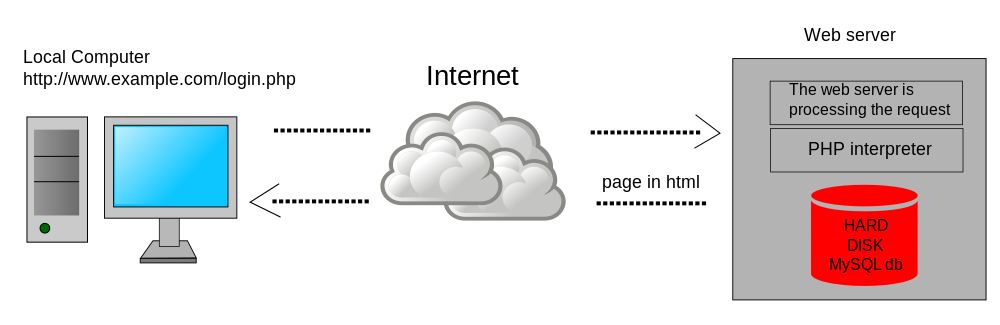
Website = HTML5 + CSS + JavaScript + Server-side scripting language + Database
Client-side / Front-end (the parts that run on the user's computer)
- HTML5 (HyperText Markup Language) is a markup language. It describes what will appear on the page, and how important each element will be.
- CSS (Cascading Style Sheets) is a stylesheet language used to describe the presentation of a document written in a markup language. It defines how the site will look.
- JavaScript is a (usually) client side scripting language. It runs on the computer of the user connecting to your website and is most often used to provide user-interface niceties.
Server-side / Back-end (the parts that run on your web server)
- PHP is a server-side scripting language, as are Ruby, Python, Java, Perl, ASP.NET, ColdFusion, and (sometimes) Javascript. Server-side scripts determine what will be presented to a user by running code on the web server to generate dynamic HTML pages.
- MySQL, Microsoft SQL Server, Oracle, PostgreSQL, SQLite, etc. are relational database management systems (RDBMS). RDBMSs hold the actual content or data of the website (page text, news articles, usernames, etc). This information can be accessed from a server-side scripting language by using SQL (structured query language) statements. SQL is used to create, retrieve, update and delete data from database management systems. It is very concise and relatively easy to learn.
The Parts We Care About
- PHP
- MySQL
- HTML5/CSS/JavaScript (a little)
What is PHP?
- History
- Where does it fit in (vs. Ruby, JavaScript, Python, etc.)?
- Who uses it in 2015?
OK. Let's Install Some Tools
<?php echo 'hello, world!'; ?>
PHP Basics
- Variables
- string
- integer
- float
- boolean
- Control flow: if/else
- Control flow: switch
- Arrays
- Loops: for and foreach
- Loops: while and do-while
- Functions
Web Hosting
Version Control
- Git (vs. CVS, SVN, etc.)
- GitHub (as resume)
- Create GitHub account
- Install software
Bonus Topics
Related Chapters in the Book
- 1-5
This week's code
Lab Time
- Pick your project
- website for your business
- ecommerce site
- social network for cats
- API for mobile app
- blog
- And/or, do this
- Q&A