🔥🔥🔥 An intelligent and versatile general-purpose SQL client and reporting tool for databases which integrates ChatGPT capabilities.
Share Chat2DB Repository



License Notation: Chat2DB is constructed and distributed for personal and non-commercial use only. For commercial use of this project, please contact corresponding authors.
Languages: English | 中文
📖 Introduction
Chat2DB is a multi-database client tool that is open-source and free. It supports local installation on Windows and Mac, as well as server-side deployment and web page access. Compared to traditional database client software such as Navicat and DBeaver, Chat2DB integrates AIGC's capabilities and is able to convert natural language into SQL. It can also convert SQL into natural language and provide optimization suggestions for SQL to greatly enhance the efficiency of developers. It is a tool for database developers in the AI era, and even non-SQL business operators in the future can use it to quickly query business data and generate reports.
✨ Features
- 🌈 AI intelligent assistant, supporting natural language to SQL conversion, SQL to natural language conversion, and SQL optimization suggestions
- 👭 Support team collaboration, developers do not need to know the online database password, solving the problem of enterprise database account security
- ⚙️ Powerful data management capability, supporting management of data tables, views, stored procedures, functions, triggers, indexes, sequences, users, roles, authorizations, etc.
- 🔌 Powerful extension capability, currently supporting MySQL, PostgreSQL, Oracle, SQLServer, ClickHouse, OceanBase, H2, SQLite, etc., and more databases will be supported in the future
- 🛡 Front-end development using Electron, providing a solution that integrates Windows, Mac, Linux clients, and web versions
- 🎁 Support environment isolation, online, and daily data permission separation
⏬ Download and Install
🚀 Supported databases
| Databases | Status |
|---|---|
| Mysql | ✅ |
| H2 | ✅ |
| Oracle | ✅ |
| PostgreSQL | ✅ |
| SQLServer | ✅ |
| SQLLite | ✅ |
| MariaDB | ✅ |
| ClickHouse | ✅ |
| DM | ✅ |
| Presto | ✅ |
| DB2 | ✅ |
| OceanBase | ✅ |
| Redis | ✅ |
| Hive | ✅ |
| KingBase | ✅ |
| MongoDB | ✅ |
| Hbase | Planning |
| Elasticsearch | Planning |
| openGauss | Planning |
| TiDB | Planning |
| InfluxDB | Planning |
🌰 Demo
Create data source

Data source management

SQL console

AI intelligent assistant

🔥 AI Configuration
CONFIGURE OPENAI
Option 1 (recommended): To use the ChatSql function of OPENAI, two conditions must be met:
- You need an OPENAI_API_KEY.
- The client's network can connect to the OPENAI website, and for users in China, a VPN is required. Note: If the local VPN is not fully effective, the network connectivity can be ensured by setting the network proxy HOST and PORT in the client.
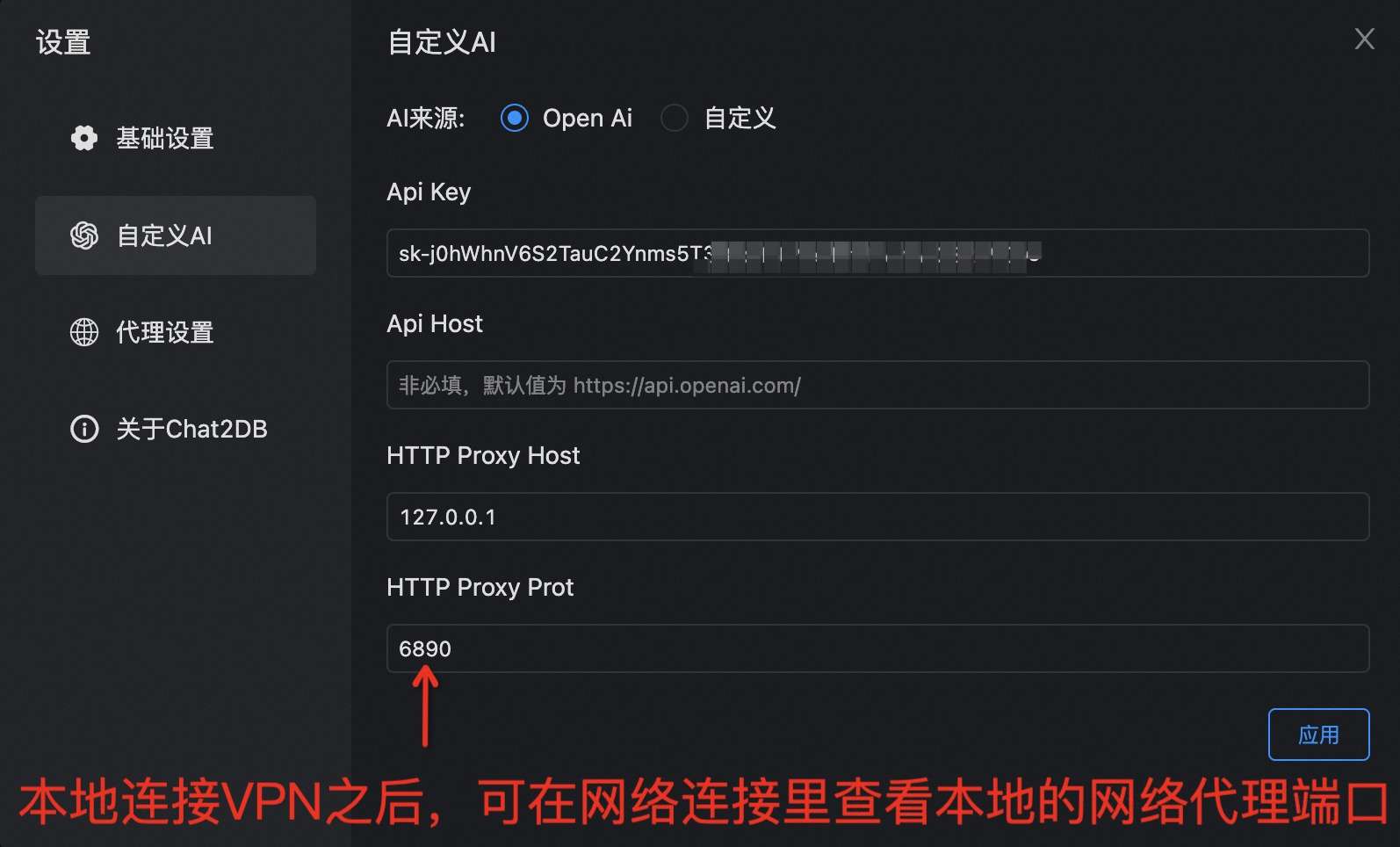
Option 2 (recommended): We provide a unified proxy service.
- No OPENAI_API_KEY is required.
- No proxy or VPN is required, as long as the network is connected.
To facilitate users' quick use of AI capabilities, you can scan the QR code below to follow our WeChat public account and apply for our custom API_KEY.

After the application is completed, refer to the following figure for configuration and usage. Config Api Host as http://test.sqlgpt.cn/gateway/api/.

CONFIGURE CUSTOM AI
📦 Docker installation
docker pull chat2db/chat2db:latest
🎯 Operating Environment
Note: If local debugging is required
- Java runtime Open JDK 17
- JRE reference packaging and deployment method of jre.
- Node runtime environment Node16 Node.js.
💻 Local Debugging
- git clone to local
$ git clone git@github.com:chat2db/Chat2DB.git
- Front-End installation
$ cd Chat2DB/ali-dbhub-client
$ npm install # Mounting front-end dependency
$ npm run build:prod # Package js to the source directory on the back end
- Backend debug
$ cd ../ali-dbhub-server
$ mvn clean install # maven 3.8 or later needs to be installed
$ cd ali-dbhub-server/ali-dbhub-server-start/target/
$ java -jar -Dchatgpt.apiKey=xxxxx ali-dbhub-server-start.jar  # To launch the chat application, you need to enter the ChatGPT key for the chatgpt.apiKey. Without entering it, you won't be able to use the AIGC function.
$ # open http://127.0.0.1:10821 to start debug Note: Front-end installation is required
- Front-End debug
$ cd Chat2DB/ali-dbhub-client
$ npm install
$ npm run start
$ # open http://127.0.0.1:10821  to start Front-End debug
$ # Note Front-end page completely depends on the service, so front-end students need to debug the back-end project
But front debugging need mapping of resources, you can download XSwitch, add the following configuration file
{
  "proxy": [
    [
      "http://127.0.0.1:10821/(.*).js$",
      "http://127.0.0.1:8001/$1.js",
    ],
    [
      "http://127.0.0.1:10821/(.*).css$",
      "http://127.0.0.1:8001/$1.css",
    ],
    [
      "http://127.0.0.1:10821/static/front/(.*)",
      "http://127.0.0.1:8001/$1",
    ],
    [
      "http://127.0.0.1:10821/static/(.*)$",
      "http://127.0.0.1:8001/static/$1",
    ],
  ],
}
📑 Documentation
Stargazers
Forkers
☎️ Contact Us
Please star and fork on GitHub before joining the group.
Follow our WeChat public account


Ding Talk:9135032392
QQ:863576619
❤️ Acknowledgements
Thanks to all the students who contributed to Chat2DB~