


TrustKit is an open source framework that makes it easy to deploy SSL public key pinning in any iOS or OS X App.
iOS 9 FAQ
Does TrustKit work on iOS 9?
- Explicit pinning validation using the
TSKPinningValidatorclass in your authentication handlers will work fine. - Implicit pinning validation, where TrustKit automatically "hooks" and validates the App's 'outgoing SSL connections does not work with the current version (1.1.3) on iOS 9, on some devices (including the iPhone 6). This means that the App will still work fine but the pinning validation will not be performed automatically.
What should I do?
For pinning to work right now on iOS 9 devices, you can use the
TSKPinningValidator class to manually check the server's certificate chain
against your App's pinning policy.
Apple has made changes in how function calls happen within and across Apple frameworks, which break the technique we used in TrustKit to intercept outgoing SSL connections. The next release of TrustKit (1.2.0) will address this as much as technically possible, and a blog post with technical details on what has changed will be available shortly.
Overview
At a high level, TrustKit intercepts all outgoing SSL connections initiated by SecureTransport in order to perform additional validation against the server's certificate chain, based on an App-wide SSL pinning policy. This novel approach to SSL pinning gives us the following benefits:
- Easy to use: TrustKit can be deployed in minutes in any App. For iOS8+ and OS X Apps, TrustKit can be used without even modifying the App's source code.
- API-independent pinning by directly hooking Apple's SecureTransport: TrustKit
works on
NSURLSession,UIWebView,NSStream, etc. all the way down to BSD sockets.
Additionally, TrustKit provides the following features:
- Subject Public Key Info pinning, as opposed to certificate pinning or pinning the public key bits.
- Mechanism to report pinning failures, which allows Apps to send reports when an unexpected certificate chain is detected, similarly to the report-uri directive described in the HTTP Public Key Pinning specification.
TrustKit was open-sourced at Black Hat 2015 USA.
Getting Started
- Have a look at the Black Hat USA 2015 presentation.
- Read the Getting Started guide.
- Check out the API documentation.
Sample Usage
TrustKit can be deployed using CocoaPods, by adding the following line to your Podfile:
Then run:
Then, enabling SSL pinning globally in the App only requires initializing TrustKit with a pinning policy (domains, Subject Public Key Info hashes, and additional settings).
The policy can be configured within the App's Info.plist:
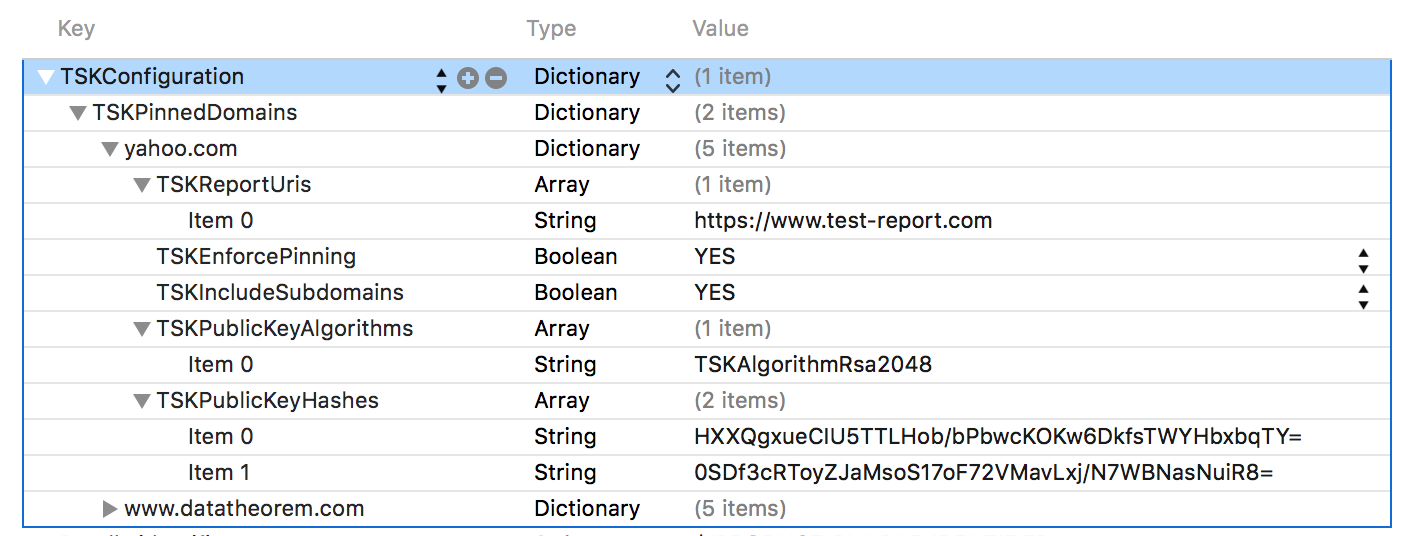
Alternatively, the pinning policy can be set programmatically:
NSDictionary *trustKitConfig;
trustKitConfig = @{
                   @"www.datatheorem.com" : @{
                           kTSKPublicKeyAlgorithms : @[kTSKAlgorithmRsa2048],
                           kTSKPublicKeyHashes : @[
                                   @"HXXQgxueCIU5TTLHob/bPbwcKOKw6DkfsTWYHbxbqTY=",
                                   @"0SDf3cRToyZJaMsoS17oF72VMavLxj/N7WBNasNuiR8="
                                   ],
                           kTSKEnforcePinning : @NO,
                           kTSKReportUris : @[@"http://report.datatheorem.com/log_report"],
                           },
                   @"yahoo.com" : @{
                           kTSKPublicKeyAlgorithms : @[kTSKAlgorithmRsa4096],
                           kTSKPublicKeyHashes : @[
                                   @"TQEtdMbmwFgYUifM4LDF+xgEtd0z69mPGmkp014d6ZY=",
                                   @"rFjc3wG7lTZe43zeYTvPq8k4xdDEutCmIhI5dn4oCeE=",
                                   ],
                           kTSKIncludeSubdomains : @YES
                           }
                   };

[TrustKit initializeWithConfiguration:trustKitConfig];
Once TrustKit has been initialized, all SSL connections initiated by Apple frameworks within the App will verify the server' certificate chains against the supplied pinning policy. If report URIs have been configured, the App will also send reports to the specified URIs whenever a pin validation failure occurred.
For more information, see the Getting Started guide.
Credits
TrustKit is a joint-effort between the security teams at Data Theorem and Yahoo.
See AUTHORS for details.
License
TrustKit is released under the MIT license. See LICENSE for details.