SQLModel, SQL databases in Python, designed for simplicity, compatibility, and robustness.




Documentation: https://sqlmodel.tiangolo.com
Source Code: https://github.com/tiangolo/sqlmodel
SQLModel is a library for interacting with SQL databases from Python code, with Python objects. It is designed to be intuitive, easy to use, highly compatible, and robust.
SQLModel is based on Python type annotations, and powered by Pydantic and SQLAlchemy.
The key features are:
- Intuitive to write: Great editor support. Completion everywhere. Less time debugging. Designed to be easy to use and learn. Less time reading docs.
- Easy to use: It has sensible defaults and does a lot of work underneath to simplify the code you write.
- Compatible: It is designed to be compatible with FastAPI, Pydantic, and SQLAlchemy.
- Extensible: You have all the power of SQLAlchemy and Pydantic underneath.
- Short: Minimize code duplication. A single type annotation does a lot of work. No need to duplicate models in SQLAlchemy and Pydantic.
SQL Databases in FastAPI

SQLModel is designed to simplify interacting with SQL databases in FastAPI applications. It was created by the same author. 😁
SQLModel is a thin layer on top of Pydantic and SQLAlchemy, carefully designed to be compatible with both.
SQLModel helps you simplify your code and reduce code duplication with the best developer experience possible.
Requirements
A currently supported version of Python (right now, SQLModel supports versions 3.6 and above).
As SQLModel is based on Pydantic and SQLAlchemy, it requires them. They will be automatically installed when you install SQLModel.
Installation
$ pip install sqlmodel
---> 100%
Successfully installed sqlmodel
Example
For an introduction to databases, SQL, and everything else, see the SQLModel documentation.
Here's a quick example. ✨
A SQL Table
Imagine you have a SQL table called hero with:
idnamesecret_nameage
columns and the following data:
| id | name | secret_name | age |
|---|---|---|---|
| 1 | Deadpond | Dive Wilson | null |
| 2 | Spider-Boy | Pedro Parqueador | null |
| 3 | Rusty-Man | Tommy Sharp | 48 |
Create a SQLModel Model
Then you could create a SQLModel model like this:
from typing import Optional

from sqlmodel import Field, SQLModel


class Hero(SQLModel, table=True):
    id: Optional[int] = Field(default=None, primary_key=True)
    name: str
    secret_name: str
    age: Optional[int] = None
That class Hero is a SQLModel model, the equivalent of a SQL table in Python code.
Each class attribute is equivalent to a table column.
Create Rows
Next you coan create each row of the table as an instance of the Hero class:
hero_1 = Hero(name="Deadpond", secret_name="Dive Wilson")
hero_2 = Hero(name="Spider-Boy", secret_name="Pedro Parqueador")
hero_3 = Hero(name="Rusty-Man", secret_name="Tommy Sharp", age=48)
With this pattern you can use conventional Python code with classes and instances that represent tables and rows, and that way communicate with the SQL database.
Editor Support
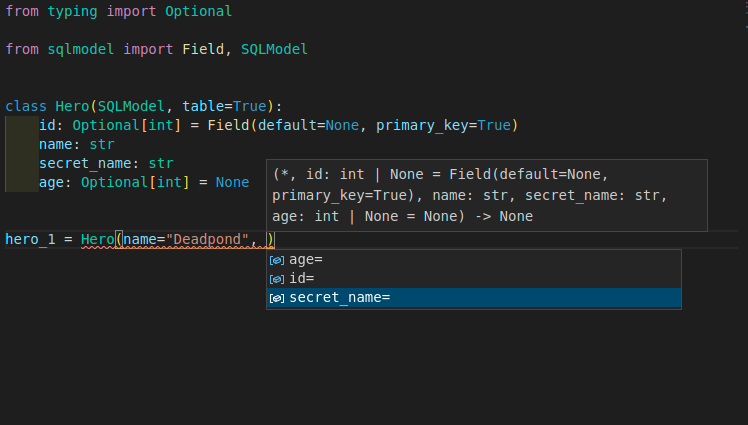
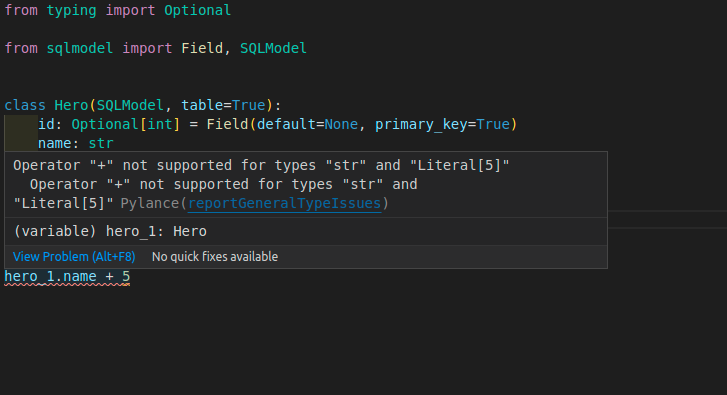
SQLModel is designed for the best developer experience possible. Editor support incudes the following:
Autocompletion:
Inline errors:
Write to the Database
You can learn a lot more about SQLModel by following the tutorial, but if you want a taste of how to put all that together and save to the database, you can do this:
from typing import Optional

from sqlmodel import Field, Session, SQLModel, create_engine


class Hero(SQLModel, table=True):
    id: Optional[int] = Field(default=None, primary_key=True)
    name: str
    secret_name: str
    age: Optional[int] = None


hero_1 = Hero(name="Deadpond", secret_name="Dive Wilson")
hero_2 = Hero(name="Spider-Boy", secret_name="Pedro Parqueador")
hero_3 = Hero(name="Rusty-Man", secret_name="Tommy Sharp", age=48)


engine = create_engine("sqlite:///database.db")


SQLModel.metadata.create_all(engine)

with Session(engine) as session:
    session.add(hero_1)
    session.add(hero_2)
    session.add(hero_3)
    session.commit()
This code will save a SQLite database with the 3 heroes.
Select from the Database
Then you can write queries to select from that same database. For example:
from typing import Optional

from sqlmodel import Field, Session, SQLModel, create_engine, select


class Hero(SQLModel, table=True):
    id: Optional[int] = Field(default=None, primary_key=True)
    name: str
    secret_name: str
    age: Optional[int] = None


engine = create_engine("sqlite:///database.db")

with Session(engine) as session:
    statement = select(Hero).where(Hero.name == "Spider-Boy")
    hero = session.exec(statement).first()
    print(hero)
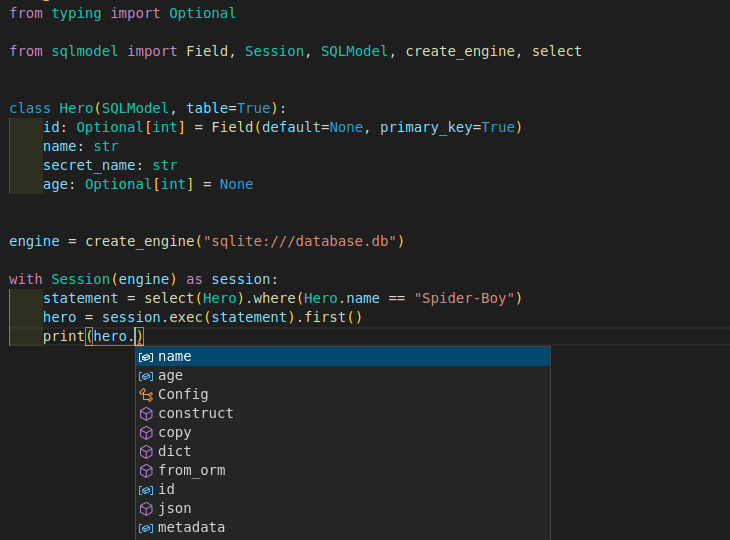
Editor Support Everywhere
SQLModel was designed to give you the best developer experience and editor support, even after selecting data from the database:
SQLAlchemy and Pydantic
That class Hero is a SQLModel model.
At the same time, ✨ the class is a SQLAlchemy model ✨. You can use it with other SQLAlchemy models. Alternatively, you could migrate applications that use SQLAlchemy to SQLModel quickly.
And at the same time, ✨ the class is also a Pydantic model ✨. You can use inheritance with it to define all your data models while avoiding code duplication. This characteristic makes it easy to use with FastAPI.
License
This project is licensed under the terms of the MIT license.