⚠️ NOTE: Do not use the obsolete tags and branches to reference the package. They will be removed in near future. ⚠️
UI Soft Mask is a smooth masking component for Unity UI (uGUI) elements.








<< Description | WebGL Demo | Installation | Usage | For Your Custom Shader | Contributing >>
Description
By using SoftMask instead of the default Mask component, you can beautifully represent the rounded edges of UI elements.

Features
Components
| Component | Description | Screenshot |
|---|---|---|
| SoftMask | Use instead of Mask for smooth masking. Show Mask Graphic: Show the graphic that is associated with the Mask render area. |
 |
| SoftMaskable | Add this component to Graphic under SoftMask for smooth masking. Use Stencil: Use stencil buffer to mask. If disabled, the stencil buffer is ignored. |
 |
Demo
Installation
Requirement
- Unity 2017.1 or later (2018.x, 2019.x and 2020.x are included)
- No other SDK are required
Using OpenUPM (for Unity 2018.3 or later)
This package is available on OpenUPM. You can install it via openupm-cli.
openupm add com.coffee.softmask-for-ugui
Using Git (for Unity 2018.3 or later)
Find the manifest.json file in the Packages folder of your project and edit it to look like this:
{
  "dependencies": {
    "com.coffee.softmask-for-ugui": "https://github.com/mob-sakai/SoftMaskForUGUI.git",
    ...
  },
}
To update the package, change suffix #{version} to the target version.
- e.g.
"com.coffee.softmask-for-ugui": "https://github.com/mob-sakai/SoftMaskForUGUI.git#1.0.0",
Or, use UpmGitExtension to install and update the package.
For Unity 2018.2 or earlier
- Download a source code zip file from Releases page
- Extract it
- Import it into the following directory in your Unity project
Packages(It works as an embedded package. For Unity 2018.1 or later)Assets(Legacy way. For Unity 2017.1 or later)
How to play demo
- For Unity 2019.1 or later
- Open
Package Managerwindow and selectUI Soft Maskpackage in package list and clickDemo > Import in projectbutton
- Open
- For Unity 2018.4 or earlier
- Click
Assets/Samples/UISoftMask/Import Demofrom menu
- Click
The assets will be imported into Assets/Samples/UI Soft Mask/{version}/Demo.
Open UISoftMask_Demo scene and play it.
Usage
- Add a SoftMask component instead of Mask component.
Or, convert an existing Mask component to SoftMask component from the context menu.

- Add a SoftMaskable components to the child UI elements of the SoftMask component.

Or, add a SoftMaskable components from the inspector of the SoftMask component.

- Adjust softness setting of SoftMask.
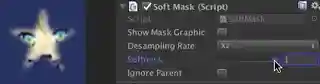
- Enjoy!


Usage with TextMeshPro
To use SoftMask with TextMeshPro, import a sample asset.
- For Unity 2019.1 or later
- Open
Package Managerwindow and selectUI Soft Maskpackage in package list and clickTextMeshPro Support > Import in projectbutton
- Open
- For Unity 2018.4 or earlier
- Click
Assets/Samples/UISoftMask/Import TextMeshPro Supportfrom menu
- Click
The assets will be imported into Assets/Samples/UI Soft Mask/{version}/TextMeshPro Support.
NOTE: You must import TMP Essential Resources before using. They include shaders, fonts, etc.

NOTE: If the shader error is not resolved, reimport the shader. Or, import the TextMeshPro Support again.
Support soft masks with your custom shaders
Only a few steps are needed to support soft mask in your custom shaders!
- Duplicate your shader file and add the
(SoftMaskable)suffix to the file name.
Your_Custom_Shader.shader
-> Your_Custom_Shader (SoftMaskable).shader
- Modify the shader name (defined at the beginning of the shader file) as follows:
- Add
Hidden/prefix - Add
(SoftMaskable)suffix
Shader "UI/Your_Custom_Shader"
-> Shader "Hidden/UI/Your_Custom_Shader (SoftMaskable)"
- Add
#pragmaand#includedirectives, whereSOFTMASK_EDITORis an editor-only keyword and is not included in the build. If you didn't use package manager to install, includeSoftMask.cgincin the appropriate path instead.
#include "Packages/com.coffee.softmask-for-ugui/Shaders/SoftMask.cginc"
#pragma shader_feature __ SOFTMASK_EDITOR
- Apply a soft mask in the fragment shader.
This operation determines the final alpha according to the soft mask buffer.
IN.vertex: the clip positionIN.worldPosition: the world position
color.a *= SoftMask(IN.vertex, IN.worldPosition);
As an example of implementation, please see UI-Default-SoftMask.shader.
Contributing
Issues
Issues are very valuable to this project.
- Ideas are a valuable source of contributions others can make
- Problems show where this project is lacking
- With a question you show where contributors can improve the user experience
Pull Requests
Pull requests are, a great way to get your ideas into this repository.
See CONTRIBUTING.md.
Support
This is an open source project that I am developing in my spare time.
If you like it, please support me.
With your support, I can spend more time on development. :)


License
- MIT
- © UTJ/UCL
Author
See Also
- GitHub page : https://github.com/mob-sakai/SoftMaskForUGUI
- Releases : https://github.com/mob-sakai/SoftMaskForUGUI/releases
- Issue tracker : https://github.com/mob-sakai/SoftMaskForUGUI/issues
- Change log : https://github.com/mob-sakai/SoftMaskForUGUI/blob/main/CHANGELOG.md