Running Feast Python / Go Feature Server with Redis on Kubernetes
For this tutorial, we set up Feast with Redis.
We use the Feast CLI to register and materialize features from the current machine, and then retrieving via a Feast Python feature server deployed in Kubernetes
First, let's set up a Redis cluster
-
Start minikube (
minikube start) -
Use helm to install a default Redis cluster
helm repo add bitnami https://charts.bitnami.com/bitnami
helm repo update
helm install my-redis bitnami/redis
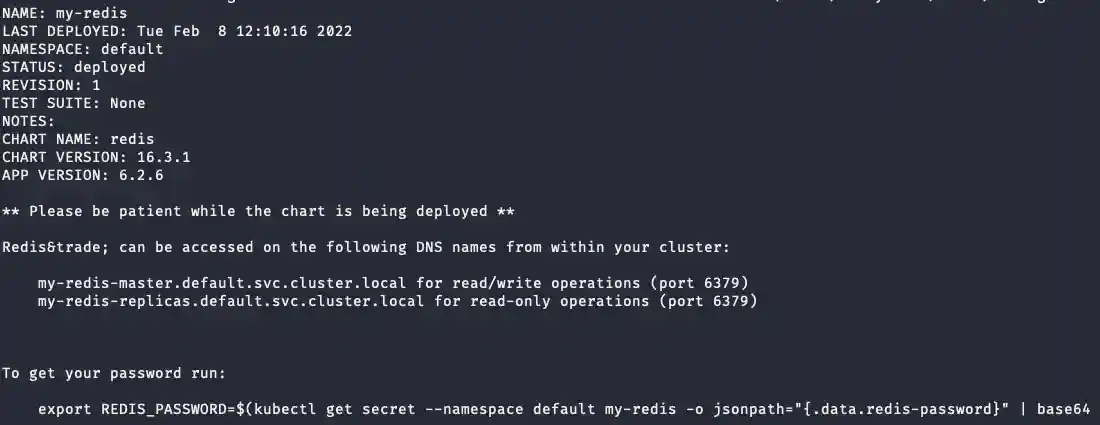
-
Port forward Redis so we can materialize features to it
kubectl port-forward --namespace default svc/my-redis-master 6379:6379
-
Get your Redis password using the command (pasted below for convenience). We'll need this to tell Feast how to communicate with the cluster.
 export REDIS_PASSWORD=$(kubectl get secret --namespace default my-redis -o jsonpath="{.data.redis-password}" | base64 --decode)
 echo $REDIS_PASSWORD

Then, let's set up a MinIO S3 store
Manifests have been taken from Deploy Minio in your project.
-
Deploy MinIO instance:
kubectl apply -f minio-dev.yaml -
Forward the UI port:
kubectl port-forward svc/minio-service 9090:9090 -
Login to (localhost:9090)[http://localhost:9090] as
minio/minio123and create bucket calledfeast-demo. -
Stop previous port forwarding and forward the API port instead:
kubectl port-forward svc/minio-service 9000:9000
Next, we setup a local Feast repo
-
Install Feast with Redis dependencies
pip install "feast[redis,aws]" -
The feature repo is already setup here, so you just need to swap in your Redis credentials. We need to modify the
feature_store.yaml, which has one field for you to replace:sed "s/_REDIS_PASSWORD_/${REDIS_PASSWORD}/" feature_repo/feature_store.yaml.template > feature_repo/feature_store.yaml cat feature_repo/feature_store.yaml
Example repo:
registry: s3://localhost:9000/feast-demo/registry.db
project: feast_python_demo
provider: local
online_store:
  type: redis
  connection_string: localhost:6379,password=****
offline_store:
  type: file
entity_key_serialization_version: 3
-
To run
feast applyfrom the current machine we need to define the AWS credentials to connect the MinIO S3 store, which are defined in minio.env:source minio.env cd feature_repo feast apply
-
Let's validate the setup by running some queries
feast entities list
feast feature-views list
-
Materialize features to the online store:
cd  feature_repo
CURRENT_TIME=$(date -u +"%Y-%m-%dT%H:%M:%S")
feast materialize-incremental $CURRENT_TIME
Now let's setup the Feast Server
-
Add Feast's Python feature server chart repo
helm repo add feast-charts https://feast-helm-charts.storage.googleapis.com
helm repo update
-
For this tutorial, we'll use a predefined configuration where we just needs to inject the Redis service password:
sed "s/_REDIS_PASSWORD_/$REDIS_PASSWORD/" online_feature_store.yaml.template > online_feature_store.yaml
cat online_feature_store.yaml
As you see, the connection points to
my-redis-master:6379instead oflocalhost:6379. -
Install the Feast helm chart:
helm upgrade --install feast-online feast-charts/feast-feature-server \
--set fullnameOverride=online-server --set feast_mode=online \
--set feature_store_yaml_base64=$(base64 -i 'online_feature_store.yaml')
-
Patch the deployment to include MinIO settings:
kubectl patch deployment online-server --type='json' -p='[
  {
    "op": "add",
    "path": "/spec/template/spec/containers/0/env/-",
    "value": {
      "name": "AWS_ACCESS_KEY_ID",
      "value": "minio"
    }
  },
  {
    "op": "add",
    "path": "/spec/template/spec/containers/0/env/-",
    "value": {
      "name": "AWS_SECRET_ACCESS_KEY",
      "value": "minio123"
    }
  },
  {
    "op": "add",
    "path": "/spec/template/spec/containers/0/env/-",
    "value": {
      "name": "AWS_DEFAULT_REGION",
      "value": "default"
    }
  },
  {
    "op": "add",
    "path": "/spec/template/spec/containers/0/env/-",
    "value": {
      "name": "FEAST_S3_ENDPOINT_URL",
      "value": "http://minio-service:9000"
    }
  }
]'
kubectl wait --for=condition=available deployment/online-server --timeout=2m
-
(Optional): check logs of the server to make sure it's working
kubectl logs svc/online-server
-
Port forward to expose the grpc endpoint:
kubectl port-forward svc/online-server 6566:80
-
Run test fetches for online features:8.
source minio.env
cd test
python test_python_fetch.py
Output example:
--- Online features with SDK ---
WARNING:root:_list_feature_views will make breaking changes. Please use _list_batch_feature_views instead. _list_feature_views will behave like _list_all_feature_views in the future.
conv_rate  :  [0.6799587607383728, 0.9761165976524353]
driver_id  :  [1001, 1002]

--- Online features with HTTP endpoint ---
conv_rate  :  [0.67995876 0.9761166 ]
driver_id  :  [1001 1002]