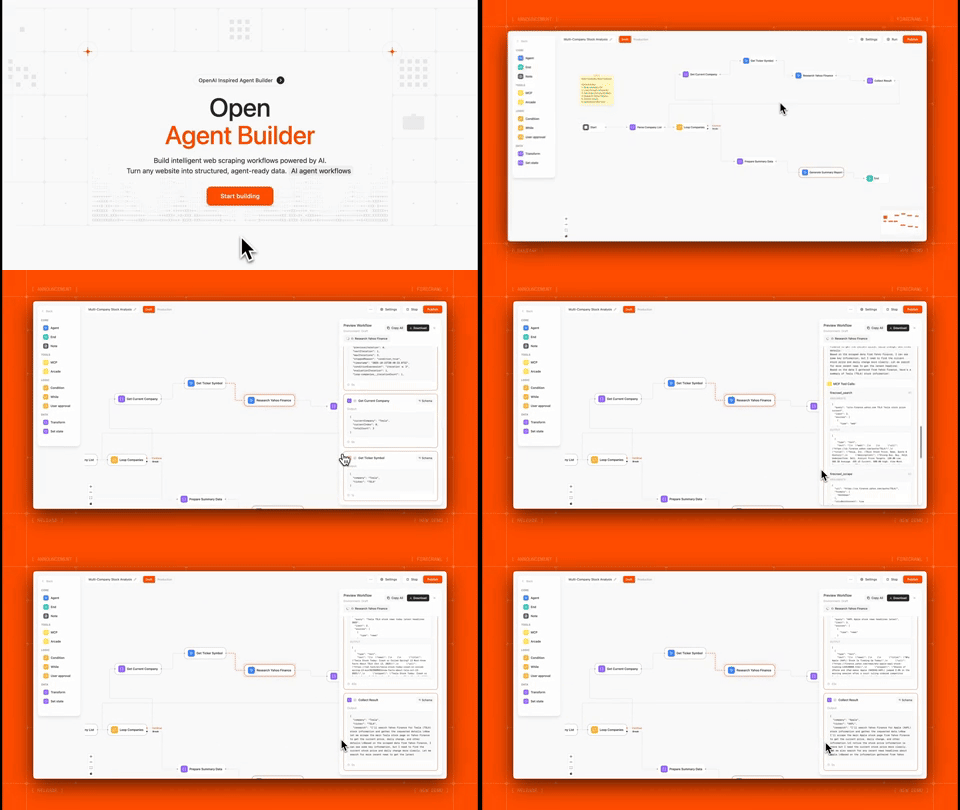


What is Open Agent Builder?
Open Agent Builder is a visual workflow builder for creating AI agent pipelines powered by Firecrawl. Design complex agent workflows with a drag-and-drop interface, then execute them with real-time streaming updates.
Perfect for:
- Web scraping and data extraction workflows
- Multi-step AI agent pipelines
- Automated research and content generation
- Data transformation and analysis
- Web automation with human-in-the-loop approvals
Note: This project is actively under development. Some features are still in progress and we welcome contributions and PRs!
Key Features
Visual Workflow Builder
- Drag-and-drop interface for building agent workflows
- Real-time execution with streaming updates
- 8 core node types: Start, Agent, MCP Tools, Transform, If/Else, While Loop, User Approval, End
- Template library with pre-built workflows
- MCP protocol support for extensible tool integration
Powered by Firecrawl
- Native Firecrawl integration for web scraping and searching
Enterprise Features
- LangGraph execution engine for reliable state management
- Clerk authentication for secure multi-user access
- Convex database for persistent storage
- API endpoints for programmatic execution
- Human-in-the-loop approvals for sensitive operations
Tech Stack
| Technology | Purpose |
|---|---|
| Firecrawl | Web scraping API for converting websites into LLM-ready data |
| Next.js 16 (canary) | React framework with App Router for frontend and API routes |
| TypeScript | Type-safe development across the stack |
| LangGraph | Workflow orchestration engine with state management, conditional routing, and human-in-the-loop support |
| Convex | Real-time database with automatic reactivity for workflows, executions, and user data |
| Clerk | Authentication and user management with JWT integration |
| Tailwind CSS | Utility-first CSS framework for responsive UI |
| React Flow | Visual workflow builder canvas with drag-and-drop nodes |
| Anthropic | Claude AI integration with native MCP support (Claude Haiku 4.5 & Sonnet 4.5) |
| OpenAI | gpt-5 integration (MCP support coming soon) |
| Groq | Fast inference for open models (MCP support coming soon) |
| E2B | Sandboxed code execution for secure transform nodes |
| Vercel | Deployment platform with edge functions |
Prerequisites
Before you begin, you'll need:
- Node.js 18+ installed on your machine
- Firecrawl API key (Required for web scraping) - Get one here
- Convex account - Sign up free
- Clerk account - Sign up free
Note: LLM API keys can be added directly in the UI via Settings → API Keys after setup. For MCP tool support, Anthropic Claude (Haiku 4.5 or Sonnet 4.5) is currently recommended as the default option.
Installation & Setup
1. Clone the Repository
git clone https://github.com/firecrawl/open-agent-builder.git
cd open-agent-builder
npm install
2. Set Up Convex (Database)
Convex handles all workflow and execution data persistence.
# Install Convex CLI globally
npm install -g convex

# Initialize Convex project
npx convex dev
This will:
- Open your browser to create/link a Convex project
- Generate a
NEXT_PUBLIC_CONVEX_URLin your.env.local - Start the Convex development server
Keep the Convex dev server running in a separate terminal.
3. Set Up Clerk (Authentication)
Clerk provides secure user authentication and management.
- Go to clerk.com and create a new application
- In your Clerk dashboard:
- Go to API Keys
- Copy your keys
- Go to JWT Templates → Convex:
- Click "Apply"
- Copy the issuer URL
Add to your .env.local:
# Clerk Authentication
NEXT_PUBLIC_CLERK_PUBLISHABLE_KEY=pk_test_...
CLERK_SECRET_KEY=sk_test_...

# Clerk + Convex Integration
CLERK_JWT_ISSUER_DOMAIN=https://your-clerk-domain.clerk.accounts.dev
4. Configure Convex Authentication
Edit convex/auth.config.ts and update the domain:
export default {
  providers: [
    {
      domain: "https://your-clerk-domain.clerk.accounts.dev", // Your Clerk issuer URL
      applicationID: "convex",
    },
  ],
};
Then push the auth config to Convex:
5. Set Up Firecrawl (Required)
Firecrawl is the core web scraping engine that powers most workflows.
- Get your API key at firecrawl.dev
- Add to
.env.local:
# Firecrawl API (REQUIRED)
FIRECRAWL_API_KEY=fc-...
Note: Users can also add their own Firecrawl keys in Settings → API Keys, but having a default key in
.env.localenables the template workflows.
6. Optional: Configure Default LLM Provider
While users can add their own LLM API keys through the UI (Settings → API Keys), you can optionally set a default provider in .env.local:
# Optional: Choose one as default

# Anthropic Claude (Recommended - Native MCP support with Haiku 4.5 & Sonnet 4.5)
ANTHROPIC_API_KEY=sk-ant-...

# OpenAI GPT-5 (MCP support coming soon)
OPENAI_API_KEY=sk-...

# Groq (MCP support coming soon)
GROQ_API_KEY=gsk_...
Important: For workflows using MCP tools (like Firecrawl integration), Anthropic Claude is currently the recommended provider as it has native MCP support. OpenAI and Groq MCP support is coming soon.
7. Optional: E2B Code Interpreter
For advanced transform nodes with sandboxed code execution:
# E2B Code Interpreter (Optional)
E2B_API_KEY=e2b_...
Get your key at e2b.dev
Running the Application
Development Mode
# Terminal 1: Convex dev server
npx convex dev

# Terminal 2: Next.js dev server
npm run dev
Or run both with one command:
Visit http://localhost:3000
Production Build
Quick Start Guide
Your First Workflow
- Sign Up/Login at
http://localhost:3000 - Add your LLM API key in Settings → API Keys
- For MCP tool support: Use Anthropic Claude (Haiku 4.5 or Sonnet 4.5)
- For basic workflows: OpenAI or Groq also work
- Click "New Workflow" or select a template
- Try the "Simple Web Scraper" template:
- Pre-configured to scrape any website
- Uses Firecrawl for extraction
- AI agent summarizes the content
- Click "Run" and enter a URL
- Watch real-time execution with streaming updates
Understanding Node Types
| Node Type | Purpose | Example Use |
|---|---|---|
| Start | Workflow entry point | Define input variables |
| Agent | AI reasoning with LLMs | Analyze data, make decisions |
| MCP Tool | External tool calls | Firecrawl scraping, APIs |
| Transform | Data manipulation | Parse JSON, filter arrays |
| If/Else | Conditional logic | Route based on conditions |
| While Loop | Iteration | Process multiple pages |
| User Approval | Human-in-the-loop | Review before posting |
| End | Workflow completion | Return final output |
MCP Tool Support
Current Support
Anthropic Claude - Full native MCP support
- Claude Sonnet 4.5 (Recommended)
- Claude Haiku 4.5
Anthropic's MCP implementation provides MCP support, other providers are currently in progress.
Coming Soon
- OpenAI - MCP support in development
- Gemini - MCP support in development
- Open Router - coming soon...
Using MCP Tools
MCP tools enable agents to interact with external services like Firecrawl:
- Add an Agent node to your workflow
- In the node settings, select MCP Tools
- Choose Firecrawl or add a custom MCP server
- The agent can now call Firecrawl tools like
scrape,search,crawl
Example workflow with MCP:
Start → Agent (with Firecrawl MCP) → End
The agent can intelligently decide when to scrape pages, search the web, or crawl sites based on your instructions.
Example Workflows
1. Simple Web Scraper
What it does: Scrape any website and get an AI summary
Nodes: Start → Firecrawl Scrape → Agent Summary → End
Try it:
Input: https://firecrawl.dev
Output: "Firecrawl is a web scraping API that converts websites into LLM-ready markdown..."
2. Multi-Page Research
What it does: Search web, scrape top results, synthesize findings
Nodes: Start → Firecrawl Search → Loop (Scrape Each) → Agent Synthesis → End
3. Competitive Analysis
What it does: Research companies, extract structured data, generate report
Nodes: Start → Parse Companies → Loop (Research + Extract) → Approval → Export → End
Features used:
- Firecrawl web search
- Structured JSON extraction
- While loops for iteration
- Human approval gates
- Conditional routing
4. Price Monitoring
What it does: Track product prices across multiple sites
Nodes: Start → Loop (Scrape + Extract Price) → Compare → Notify → End
Configuration
User-Level API Keys
Users can add their own API keys via Settings → API Keys:
- LLM Providers: Anthropic (Recommended for MCP), OpenAI, Groq (Required - add at least one)
- Firecrawl: Personal API key (Optional - falls back to environment variable)
- Custom MCP Servers: Authentication tokens
This allows:
- Each user to use their own API quotas
- Fallback to environment variables if not set
- Easy key rotation and management
MCP Server Registry
Add custom MCP servers in Settings → MCP Registry:
- Click "Add MCP Server"
- Enter server URL and authentication
- Test connection to discover available tools
- Use in Agent nodes by selecting from MCP tools dropdown
Supported MCP Servers:
- Firecrawl (built-in)
- Custom HTTP endpoints
- Environment variable substitution:
{API_KEY}
Deployment
Deploying to Vercel
-
Push your code to GitHub
-
Deploy to Vercel:
# Install Vercel CLI
npm i -g vercel

# Deploy
vercel
-
Set environment variables in Vercel dashboard:
NEXT_PUBLIC_CONVEX_URL(from Convex)- Clerk keys
FIRECRAWL_API_KEY(Required)- Optional: Default LLM provider keys
-
Deploy Convex to production:
-
Update Clerk settings:
- Add your Vercel domain to allowed origins
- Update redirect URLs
Environment Variables Checklist
Required:
NEXT_PUBLIC_CONVEX_URL- Convex databaseNEXT_PUBLIC_CLERK_PUBLISHABLE_KEY- Clerk authCLERK_SECRET_KEY- Clerk authCLERK_JWT_ISSUER_DOMAIN- Clerk + Convex integrationFIRECRAWL_API_KEY- Web scraping
Optional (can be added in UI instead):
ANTHROPIC_API_KEY- Default Claude provider (Recommended for MCP)OPENAI_API_KEY- Default gpt-5 provider (MCP coming soon)GROQ_API_KEY- Default Groq provider (MCP coming soon)E2B_API_KEY- Sandboxed code execution
API Usage
Programmatic Execution
Generate an API key in Settings → API Keys, then:
curl -X POST https://your-domain.com/api/workflows/my-workflow-id/execute-stream \
  -H "Authorization: Bearer sk_live_..." \
  -H "Content-Type: application/json" \
  -d '{"url": "https://example.com"}'
Response: Server-Sent Events (SSE) stream with real-time updates
Architecture
%%{init: {'flowchart': {'htmlLabels': false}} }%%
flowchart TD
  subgraph Frontend
    A["Next.js Frontend\n(React + Tailwind)"]
    A_desc["Visual workflow builder, real-time execution display, user settings and API key management"]
    A --> A_desc
  end

  subgraph Backend
    B["API Routes (Next.js)"]
    B_desc["Workflow execution, authentication middleware, streaming SSE responses"]
    C["LangGraph Executor (Server-side only)"]
    C_desc["StateGraph orchestration, conditional routing, loop handling, human-in-the-loop interrupts"]
    B --> B_desc
    C --> C_desc
    A_desc --> B
    B_desc --> C
  end

  subgraph Integrations
    D1["Firecrawl API"]
    D2["LLMs (Claude, gpt-5, Groq)"]
    D3["MCP Servers"]
    C_desc --> D1
    C_desc --> D2
    C_desc --> D3
  end

  D_common["Convex Database"]
  D_common_desc["Workflows, executions, user settings, MCP configurations"]
  D1 --> D_common
  D2 --> D_common
  D3 --> D_common
  D_common --> D_common_desc
Project Status & Roadmap
In Progress
- MCP Support for OpenAI & Groq - Adding native MCP protocol support
- OAuth MCP Authentication - Support for OAuth-based MCP servers
- Additional MCP Integrations - More pre-built MCP server connections
- Workflow Sharing - Public template marketplace
- Scheduled Executions - Cron-based workflow triggers
Partial Support
- E2B Code Interpreter - Transform node sandboxing (requires E2B API key)
- Complex Loop Patterns - Nested loops and advanced iteration
- Custom Node Types - Plugin system for community nodes
Coming Soon
- Full MCP support for all LLM providers
- OAuth authentication for MCP servers
We welcome contributions and PRs to help build these features!
License
This project is licensed under the MIT License