A beautiful leanback port for Smartphones and Tablets

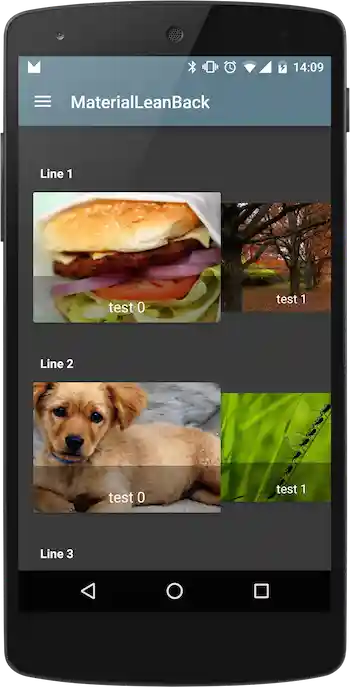
Sample
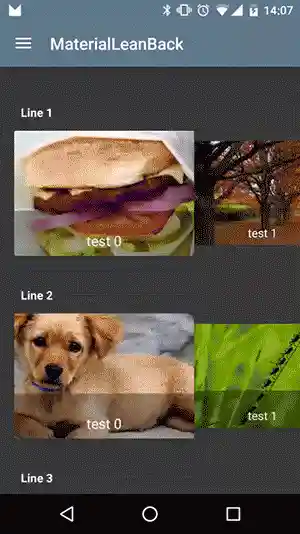
Usage
In your layout
<com.github.florent37.materialleanback.MaterialLeanBack
        android:id="@+id/materialLeanBack"
        android:layout_width="match_parent"
        android:layout_height="match_parent"

        app:mlb_background="@color/background"
        app:mlb_lineSpacing="30dp"

        app:mlb_paddingBottom="30dp"
        app:mlb_paddingLeft="30dp"
        app:mlb_paddingRight="30dp"
        app:mlb_paddingTop="40dp"

        app:mlb_titleColor="@android:color/white" />
And in your activity/fragment
materialLeanBack.setAdapter(new MaterialLeanBack.Adapter<TestViewHolder>() {
            @Override
            public int getLineCount() {
                return 10;
            }

            @Override
            public int getCellsCount(int line) {
                return 10;
            }

            @Override
            public TestViewHolder onCreateViewHolder(ViewGroup viewGroup, int line) {
                View view = LayoutInflater.from(viewGroup.getContext()).inflate(R.layout.cell_test, viewGroup, false);
                return new TestViewHolder(view);
            }

            @Override
            public void onBindViewHolder(TestViewHolder viewHolder, int i) {
                viewHolder.textView.setText("test " + i);

                String url = "http://www.lorempixel.com/40" + viewHolder.row + "/40" + viewHolder.cell + "/";
                Picasso.with(viewHolder.imageView.getContext()).load(url).into(viewHolder.imageView);
            }

            @Override
            public String getTitleForRow(int row) {
                return "Line " + row;
            }

            @Override
            public int getEnlargedItemPosition(int position) {

                Toast.makeText(MainActivity.this,String.valueOf(position),Toast.LENGTH_LONG).show();

                return super.getEnlargedItemPosition(position);
            }

        });
Available attributes
<com.github.florent37.materialleanback.MaterialLeanBack
        android:id="@+id/materialLeanBack"
        android:layout_width="match_parent"
        android:layout_height="match_parent"

        app:mlb_lineSpacing="30dp"

        app:mlb_paddingTop="40dp"
        app:mlb_paddingBottom="30dp"
        app:mlb_paddingLeft="30dp"
        app:mlb_paddingRight="30dp"

        app:mlb_background="@color/background"
        app:mlb_backgroundOverlay="0.5"
        app:mlb_backgroundOverlayColor="#333"

        app:mlb_titleColor="@android:color/white"
        app:mlb_titleSize="15sp"

        app:mlb_overlapCards="true"
        app:mlb_animateCards="true"
        app:mlb_cardElevationEnlarged="10"
        app:mlb_cardElevationReduced="5"
        />
Add custom views
materialLeanBack.setAdapter(new MaterialLeanBack.Adapter<TestViewHolder>() {

    ...usual methods...

    public RecyclerView.ViewHolder getCustomViewForRow(ViewGroup viewgroup, int row) {
        if (row == 3) {
            View view = LayoutInflater.from(viewgroup.getContext()).inflate(R.layout.header, viewgroup, false);
            return new RecyclerView.ViewHolder(view) {
            };
        } else
            return null;
    }

    @Override
    public boolean isCustomView(int row) {
        return row == 3;
    }

    @Override
    public void onBindCustomView(RecyclerView.ViewHolder viewHolder, int row) {
        super.onBindCustomView(viewHolder, row);
    }
}
Download

In your module

compile 'com.github.florent37:materialleanback:1.0.2'

compile 'com.android.support:cardview-v7:22.2.1'
compile 'com.android.support:recyclerview-v7:22.2.1'
compile 'com.nineoldandroids:library:2.4.0'
Credits
Author: Florent Champigny


License
Copyright 2015 florent37, Inc.

Licensed under the Apache License, Version 2.0 (the "License");
you may not use this file except in compliance with the License.
You may obtain a copy of the License at

   http://www.apache.org/licenses/LICENSE-2.0

Unless required by applicable law or agreed to in writing, software
distributed under the License is distributed on an "AS IS" BASIS,
WITHOUT WARRANTIES OR CONDITIONS OF ANY KIND, either express or implied.
See the License for the specific language governing permissions and
limitations under the License.