reactable


Interactive data tables for R, based on the React Table library and made with reactR.
Features
- Sorting, filtering, pagination
- Grouping and aggregation
- Built-in column formatting
- Custom rendering via R or JavaScript — use Shiny HTML tags and HTML widgets in tables
- Expandable rows and nested tables
- Conditional styling
- Virtual scrolling for large tables
- Works seamlessly within R Markdown documents and Shiny apps
Demos
- Twitter Followers
- Women's World Cup Predictions
- NBA Box Score
- CRAN Packages
- Spotify Charts
- Popular Movies
- Demo Cookbook
- 100k Rows
- 100k Rows (Virtualized)
- Shiny Demo
Installation
You can install reactable from CRAN with:
install.packages("reactable")Or install the development version from GitHub with:
# install.packages("devtools")
devtools::install_github("glin/reactable")
Usage
To create a table, use reactable() on a data frame or matrix:
library(reactable)

reactable(iris)
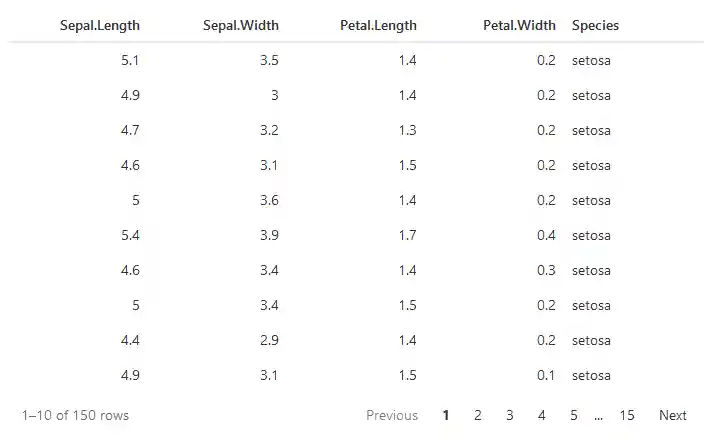
You can embed tables in R Markdown or Quarto documents:
```{r}
library(reactable)

reactable(iris)
```
Or use them in Shiny applications:
library(shiny)
library(reactable)

ui <- fluidPage(
  reactableOutput("table")
)

server <- function(input, output) {
  output$table <- renderReactable({
    reactable(iris)
  })
}

shinyApp(ui, server)
To learn more about using reactable, check out the examples below.
Examples
- Basic Usage
- Sorting
- Filtering
- Searching
- Pagination
- Virtual Scrolling
- Grouping and Aggregation
- Column Formatting
- Custom Rendering
- Embedding HTML Widgets
- Footers and Total Rows
- Expandable Rows and Nested Tables
- Conditional Styling
- Table Styling
- Theming
- Column Groups
- Column Resizing
- Sticky Columns
- Row Names and Row Headers
- Cell Click Actions
- Language Options
- Shiny
- Cross-Widget Interactions with Crosstalk
- JavaScript API
Browser Support
 Edge |
 Firefox |
 Chrome |
 Safari |
 Opera |
|---|---|---|---|---|
| Edge | last 2 versions | last 2 versions | last 2 versions | last 2 versions |
License
MIT