
AgileConfig









English | 中文看这里
This is a lightweight configuration center based on .net core . It is easy to deploy , easy to learn , easy to use .
😍Features
- easy to deploy (docker or IIS)
- support distributed deploy
- multiple environments support
- configuration changes takes effect in real time
- support IConfiguration , IOptions patten to read configurations
- restful api
- version management and easy to rollback
- client fault tolerance
- support OIDC/SSO
- support OpenTelemetry
- also can be use as a simple service register center
🔆🔆🔆Demo Project :AgileConfig Server Demo name.pwd= admin/123456🔆🔆🔆
client project :AgileConfig_Client
samples :
AgileConfigMVCSample
AgileConfig WPFSample
AgileConfig ConsoleSample
Q&A:
https://github.com/kklldog/AgileConfig/wiki
API:
restful api
ChangeLog
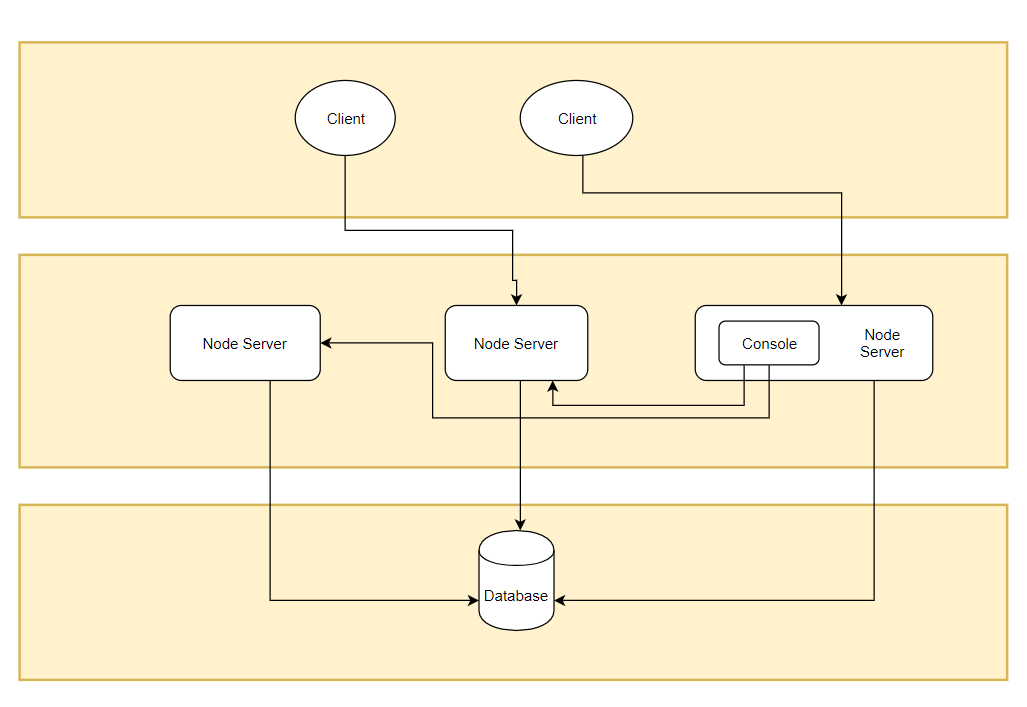
architecture
client
A .net client to read configurations from server node .
node
Node is just a .net core app . Client connect to the node in real time over websocket . Any node can be an admin console to manage configurations.
database
AgileConfig support most popular databases.
dbprovider :
sqlserver = SqlServer
mysql = MySql
sqlite = Sqlite
npgsql = PostgreSql
oracle = Oracle
mongodb = Mongodb
✅️How to use ?
run node on docker
sudo docker run \
--name agile_config \
-e TZ=Asia/Shanghai \
-e adminConsole=true \
-e db__provider=sqlite \
-e db__conn="Data Source=agile_config.db" \
-p 5000:5000 \
-v /etc/localtime:/etc/localtime \
#-v /your_host_dir:/app/db \
-d kklldog/agile_config:latest
After the docker instance has successfully started you can visit http://localhost:5000 .
use client
install client lib from nuget:
Install-Package AgileConfig.Client
add a section in appsettings.json of you application:
{
  "Logging": {
    "LogLevel": {
      "Default": "Information",
      "Microsoft": "Warning",
      "Microsoft.Hosting.Lifetime": "Information"
    }
  },
  "AllowedHosts": "*",

  //agile_config
  "AgileConfig": {
    "appId": "app",
    "secret": "xxx",
    "nodes": "http://localhost:5000,http://localhost:5001",
    "name": "client_name",
    "tag": "tag1",
    "env": "dev"
  }
}
in Main function add agileconfig client services:
   public static IHostBuilder CreateHostBuilder(string[] args) =>
            Host.CreateDefaultBuilder(args)
                .UseAgileConfig()
                .ConfigureWebHostDefaults(webBuilder =>
                {
                    webBuilder.UseStartup<Startup>();
                });
read configuration
You can still use IConfiguration or IOption patten to get the specific configuration value.
public class HomeController : Controller
{
    private readonly IConfiguration _IConfiguration;
    private readonly IOptions<DbConfigOptions> _dbOptions;

    public HomeController(IConfiguration configuration, IOptions<DbConfigOptions> dbOptions)
    {
        _IConfiguration = configuration;
        _dbOptions = dbOptions;
    }
}
Or you can use IConfigClient interface to get the specific configuration value.
public class HomeController : Controller
{
    private readonly IConfigClient _configClient

    public HomeController(IConfigClient configClient)
    {
        _configClient = configClient;
    }

    /// <summary>
    /// By IConfigClient
    /// </summary>
    /// <returns></returns>
    public IActionResult ByIConfigClient()
    {
        var userId = _configClient["userId"];
        var dbConn = _configClient["db:connection"];

        foreach (var item in _configClient.Data)
        {
            Console.WriteLine($"{item.Key} = {item.Value}");
        }

        ViewBag.userId = userId;
        ViewBag.dbConn = dbConn;

        return View();
    }
}
Or you can use a signleton instance without any injection.
var userid = ConfigClient.Instance["userid"]
donate
If this project is helpful to you, please scan the QR code below for a cup of coffee.


thanks 💖💖💖
大鹏¥66.66 , 瘦草¥6.66 + 88 , ziana¥10.0 , Nullable¥9.99 , *三 ¥6.66 , HHM ¥6.66 , *。 ¥6.66 , 微笑刺客 ¥6.66 ,飞鸟与鱼 ¥38.88, *航 ¥9.9, *啦 ¥6.66, *海 ¥6.66, Dyx 邓杨喜 ¥30 And more ...
contact me
mail:minj.zhou@gmail.com
🐧 group:1022985150