Support OS system
| MacOS | RedHat | Alpine Linux | Debian | Ubuntu |
| AlmaLinux | Fedora | Rocky Linux | openSUSE | Anolis |
| OpencloudOS | TencentOS | Amazon Linux | EulerOS | openEuler |
| Kylin | LinuxMint | Alibaba Linux | Elementary | Uos |
| Deepin | KylinsecOS | Oracle Linux | Kali Linux | Arch Linux |
| CentOS | ... |
Install
bash -c "$(curl -sSL https://mirrors.linuxeye.com/bypanel/quick_install.sh)"
Linux default install path:
/opt/bypanelLinux bypanel binary path:
/usr/bin/bypanelMacOS default install path:
$HOME/bypanelMacOS bypanel binary path:
$HOME/bypanel/bin/bypanel
bypanel binary download url(quick_install.sh has been automatically installed):
- Linux AMD64: https://mirrors.linuxeye.com/bypanel/bypanel-linux-amd64
- Linux AArch64: https://mirrors.linuxeye.com/bypanel/bypanel-linux-arm64
- MacOS AMD64: https://mirrors.linuxeye.com/bypanel/bypanel-darwin-amd64
- MacOS AArch64: https://mirrors.linuxeye.com/bypanel/bypanel-darwin-arm64
Arch
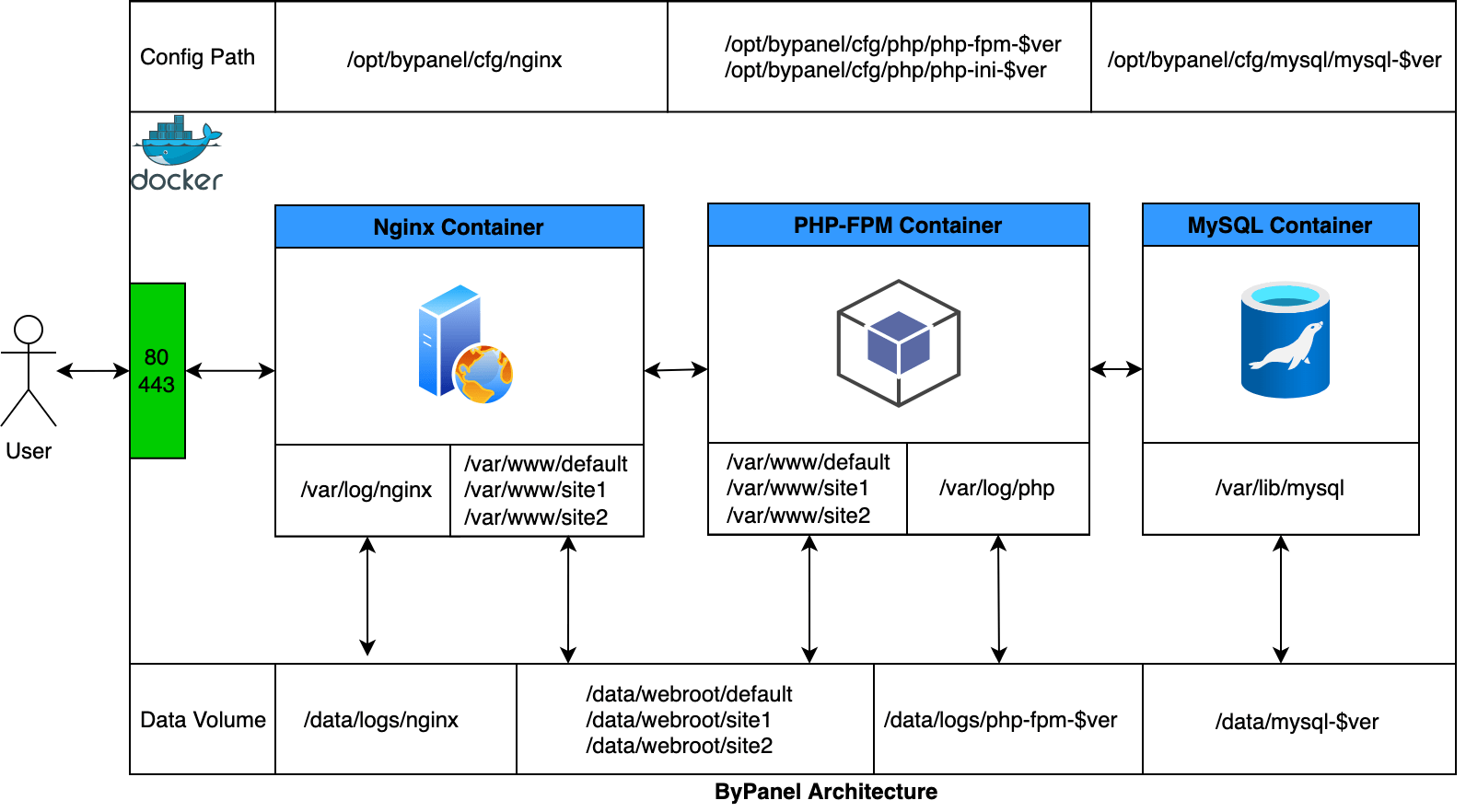
Help
Configure
Configuration of deployment parameters for bypanel
- Linux:
/opt/bypanel/.env - MacOS:
~/bypanel/.env
Configure
Global Configuration File: Lowest priority
Configure deployment parameters for bypanel, which modifies the global configuration file
- Linux:
/opt/bypanel/.env - MacOS:
$HOME/bypanel/.env
Application Configuration File: Medium priority
- Linux:
/opt/bypanel/app/{AppName}/.env - MacOS:
$HOME/bypanel/app/{AppName}/.env
Application Version Configuration File: Highest priority
- Linux:
/opt/bypanel/app/{AppName}/{AppVersion}/.env - MacOS:
$HOME/bypanel/app/{AppName}/{AppVersion}/.env
When different configuration files exist, the configuration file with the highest priority will override the configuration file with the lowest priority. That is, the application version configuration file will override the application configuration file, and the application configuration file will override the global configuration file.
Pull service images
Create and start
Create and start containers,
-d: Detached mode: Run containers in the background
Execute a command in a running container
bypanel exec SERVICE COMMAND
Setting up virtual hosts on HTTP Server
Add
Delete
List
SSL Certificate Manager
Add
Delete
List
Reload Web service
Reload Web service containers
List images used
Logs
View output from containers,
-f: Follow log output
Status
List containers, or
bypanel status
Down
Stop and remove containers, networks
Restart
Restart service containers
Start
Start services containers
Stop
Stop services containers
Upgrade
Version
Uninstall
bash -c "$(curl -sSL https://mirrors.linuxeye.com/bypanel/uninstall.sh)"