Haystack is an AS/Intellij IDEA plugin to rapid construct a Flutter app architecture. It consists of the follow features.
- Using Redux to manage state and update UI.
- json to dart entities class, support int, bool, String, double, Datetime.
- Generate restful api base on your json entities
- Generate database module.
- Generate some widgets with BottomNavigatorBar, Draw, AppBar TopTabBar, ListView(bind model entry from restful api or Database), Login, if you want.
- Generate CustomScrollView widgets with FixedExtentLit, Grid, BoxAdapter as you wish.
Usage
- Search “Flutter App Template Generator” in Plugin Market and install the plugin.
- Create a Flutter project with AS or Intellij IEDA.
- Right tap the lib folder in AS project structure, select "New" -> "Generate App Template".
- Click the "Init project" to init the project(Just init project once only).
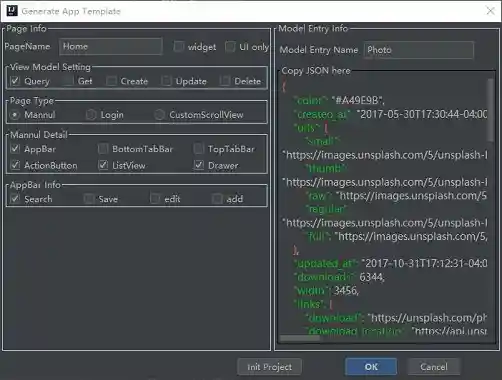
- Enter the information of your page and tap "OK".
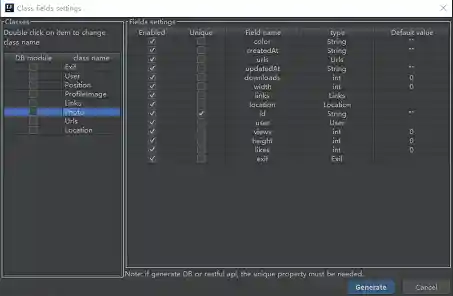
- Configure class field and tap ”Generate“.(the model class must has a unique field)
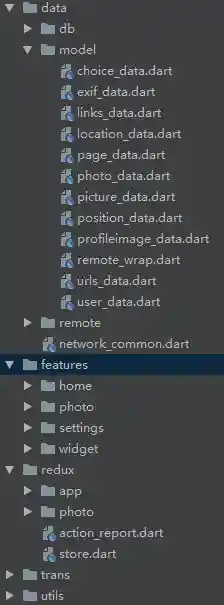
- the plugin will generate code
- Add your page to the routes in the main.dart


  Map<String, WidgetBuilder> _routes() {
    return <String, WidgetBuilder>{
      "/settings": (_) => SettingsOptionsPage(
            options: _options,
            onOptionsChanged: _handleOptionsChanged,
          ),
      "/": (_) => new HomeView(),
    };
  }
- configure server and decode data from server. network_common.dart
    Dio dio = new Dio();
    // Set default configs
    dio.options.baseUrl = 'https://unsplash.com/';
photo_repository.dart
  Future<List<Photo>> getPhotosList(String sorting, int page, int limit) {
    return new NetworkCommon().dio.get("napi/photos").then((d) {
      var results = new NetworkCommon().decodeResp(d);
      List<Photo> list =
      results.map<Photo>((item) => new Photo.fromJson(item)).toList();
      return list;
    });
  }
photo_middleware.dart
    repository
        .getPhotosList(
            "sorting",
            store.state.photoState.page.currPage,
            store.state.photoState.page.pageSize)
        .then((map) {
      if (map.isNotEmpty) {

        next(SyncPhotosAction(page: Page(), photos: map));
}- bind data to UI home_view.dart
class _PhotoListItem extends ListTile {
_PhotoListItem({Photo photo, GestureTapCallback onTap})
    : super(
          title: Text(photo.id),
          subtitle: Text(photo.views==null?"0":photo.views.toString()),
          leading: CircleAvatar(child: Image.network(photo.urls.thumb)),
          onTap: onTap);
}
You can run the project


Localization

Insert a widget

New a redux action
