EnvironmentMapEffect
| DirectXTK | Effects |
|---|
This is a native Direct3D 11 implementation of the built-in EnvironmentMapEffect from XNA Game Studio 4 (Microsoft.Xna.Framework.Graphics.EnvironmentMapEffect) which supports environment mapping with texture mapping, vertex or per-pixel lighting, and fogging.
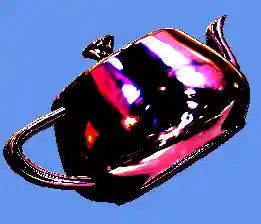
Related tutorials: Using advanced shaders
classDiagram
class Mapping{
    <<enumeration>>
    Mapping_Cube
    Mapping_Sphere
    Mapping_DualParabola
}
class IEffect{
    <<Interface>>
    +Apply()
    +GetVertexShaderBytecode()
}
class IEffectMatrices{
    <<Interface>>
    +SetWorld()
    +SetView()
    +SetProjection()
    +SetMatrices()
}
class IEffectLights{
    <<Interface>>
    +SetPerPixelLighting()
    +SetAmbientLightColor()
    +SetLightEnabled()
    +SetLightDirection()
    +SetLightDiffuseColor()
    +EnableDefaultLighting()
}
class IEffectFog{
    <<Interface>>
    +SetFogEnabled()
    +SetFogStart()
    +SetFogEnd()
    +SetFogColor()
}
class EnvironmentMapEffect{
    +SetDiffuseColor()
    +SetEmissiveColor()
    +SetAlpha()
    +SetColorAndAlpha()
    +SetTexture()
    +SetEnvironmentMap()
    +SetMode()
    +SetEnvironmentMapAmount()
    +SetEnvironmentMapSpecular()
    +SetFresnelFactor()
    +SetBiasedVertexNormals()
}
EnvironmentMapEffect .. Mapping
EnvironmentMapEffect --|> IEffect
EnvironmentMapEffect --|> IEffectMatrices
EnvironmentMapEffect --|> IEffectLights
EnvironmentMapEffect --|> IEffectFog
class DirectX::EnvironmentMapEffect :
    public DirectX::IEffect,
    public DirectX::IEffectMatrices,
    public DirectX::IEffectLights,
    public DirectX::IEffectFog
Header
Initialization
Construction requires a Direct3D 11 device.
std::unique_ptr<EnvironmentMapEffect> effect;
effect = std::make_unique<EnvironmentMapEffect>(device);
For exception safety, it is recommended you make use of the C++ RAII pattern and use a std::unique_ptr or std::shared_ptr
Interfaces
EnvironmentMapEffect supports IEffect, IEffectMatrices, IEffectLights, and IEffectFog
Input layout
This effect requires SV_Position, NORMAL and TEXCOORD.
Properties
-
SetDiffuseColor: Sets the diffuse color of the effect. Defaults to white (1,1,1). Alpha channel (.w component) is ignored.
-
SetEmissiveColor: Sets the emissive color of the effect. Defaults to black (0,0,0).
-
SetAlpha: Sets the alpha (transparency) of the effect. Defaults to 1 (fully opaque). This value is also used for binning opaque vs. transparent geometry.
-
SetColorAndAlpha: Sets the diffuse color of the effect and the alpha (transparency).
-
SetTexture: Associates a texture shader resource view with the effect for the diffuse layer. Can be set to nullptr to remove a reference. Can optionally include an alpha channel as well.
-
SetMode: Sets the environment mapping mode. Defaults to
Mapping_Cubefor cubic environment maps.
| Mapping_Cube | Cubic environment mapping |
| Mapping_Sphere | Spherical environment mapping |
| Mapping_DualParabola | Dual-parabolic environment mapping |
-
SetEnvironmentMap: Associates the environment texture and sampler descriptor with the effect. For the cubic mapping (
Mapping_Cube), this should be a cubemap. For sphere mapping (Mapping_Sphere), this is a single texture. For dual-parabolic mapping (Mapping_DualParabola), this is a 2D texture array with two items: front and back. Can be set to nullptr to remove a reference. -
SetEnvironmentMapAmount: Controls the diffuse vs. environment map blending percentage, and ranges from 0 to 1. It defaults to 1.
-
SetEnvironmentMapSpecular: Sets the specular color for the environment map. Defaults to black (0,0,0) which disables the specular highlight.
-
SetFresnelFactor: Sets the Frensel factor for the environment map. Defaults to 1. Can be set to 0 to disable the Fresnel factor.
-
SetBiasedVertexNormals: Enables support for compressed vertex normals which require
*2 - 1biasing at runtime such asDXGI_FORMAT_R10G10B10A2_UNORM.
Exceptions
The ctor can throw std::bad_alloc.
The method SetMode can throw std::invalid_argument. It can also throw std::runtime_error if attempting to use Mapping_DualParabola on a Direct3D feature level below 10.0.
The methods SetLightEnabled, SetLightDirection, SetLightDiffuseColor, and SetLightSpecularColor can throw std::invalid_argument.
The other property methods of this implementation do not throw C++ exceptions.
Remarks
EnvironmentMapEffect computes all specular effects using the cubemap and specular factor, and always performs vertex or per-pixel lighting. Calling SetLightingEnabled(false); on an instance of EnvironmentMapEffect will throw a C++ exception. Calls to the SetLightSpecularColor method are ignored.
For the sphere and dual-parabolic mapping modes, per-pixel lighting is always in effect.
This effect always performs texturing, so if 'untextured' rendering is desired you must provide texture coordinates, and a sampler in slot 0. The class will default to a 1x1 texture with white (1,1,1,1) for the base texture. An environment texture map must always be provided.
This effect requires a texture sampler in both slots 0 and 1. GeometricPrimitive and SpriteBatch only set a texture sampler in slot 0 by default, Model sets a sampler in slots 0 and 1.
Cubic Environment Map
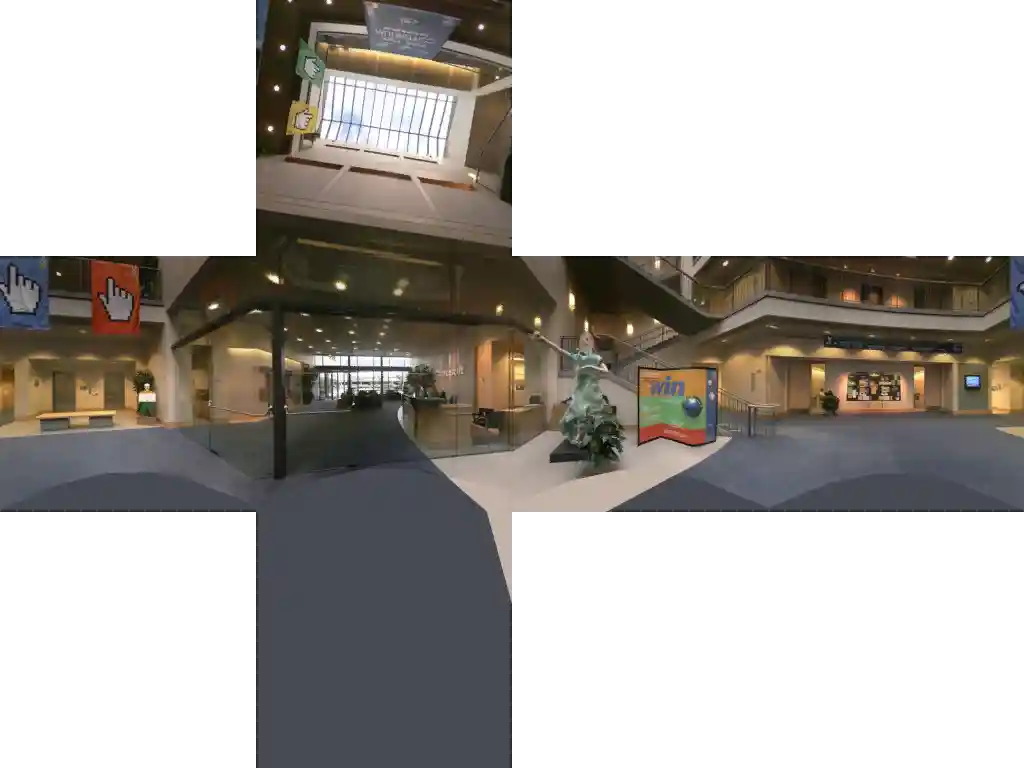
See Microsoft Docs
Spherical Environment Map
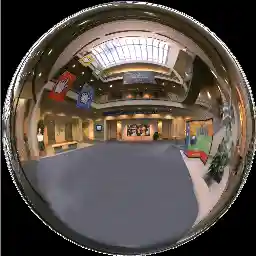
See Microsoft Docs
Feature Level Notes
This effect uses Shader Model 4.0 when using dual-parabolic mapping, and requires Direct3D hardware feature level 10.0 or greater for this mode. Otherwise it supports all feature levels.
Further reading
Blinn & Newell, "Texture and Reflection in Computer Generated Images", Communications of the ACM. 1976. link
Greene, "Environment Mapping and Other Applications of World Projections", IEEE Computer Graphics and Applications., 1986. link
Heidrich & Seidel, “View-independent Environment Maps”, Eurographics Workshop on Graphics Hardware, 1998. link