Infrastructure as Code for eCommerce Cloud Architecture on AWS
(with support for multi-cloud: AWS, GCP, Azure)
This repository contains Terraform infrastructure-as-code for running Magento 2 (and other eCommerce / web platforms) on AWS.
The infrastructure is based on years of experience scaling Magento 1 & 2 in the cloud and comes with battle-tested cloud patterns to save you time and money.
Using your own AWS account dramatically reduces monthly spend compared to expensive PaaS / SaaS managed hosting.
Although originally designed for Magento, this setup can also be used for:
WordPress, WooCommerce, Drupal, Shopware 6, Shopify Apps (Custom Private App), Vue Storefront, Sylius, Odoo, Oro, Java apps and more.
Some projects even use it to run large Enterprise Java applications with auto scaling.
If you have any questions, feel free to contact: yegorshytikov@gmail.com
Table of Contents
- Important Note
- Why Auto Scaling
- AWS Magento 2 Cloud Features
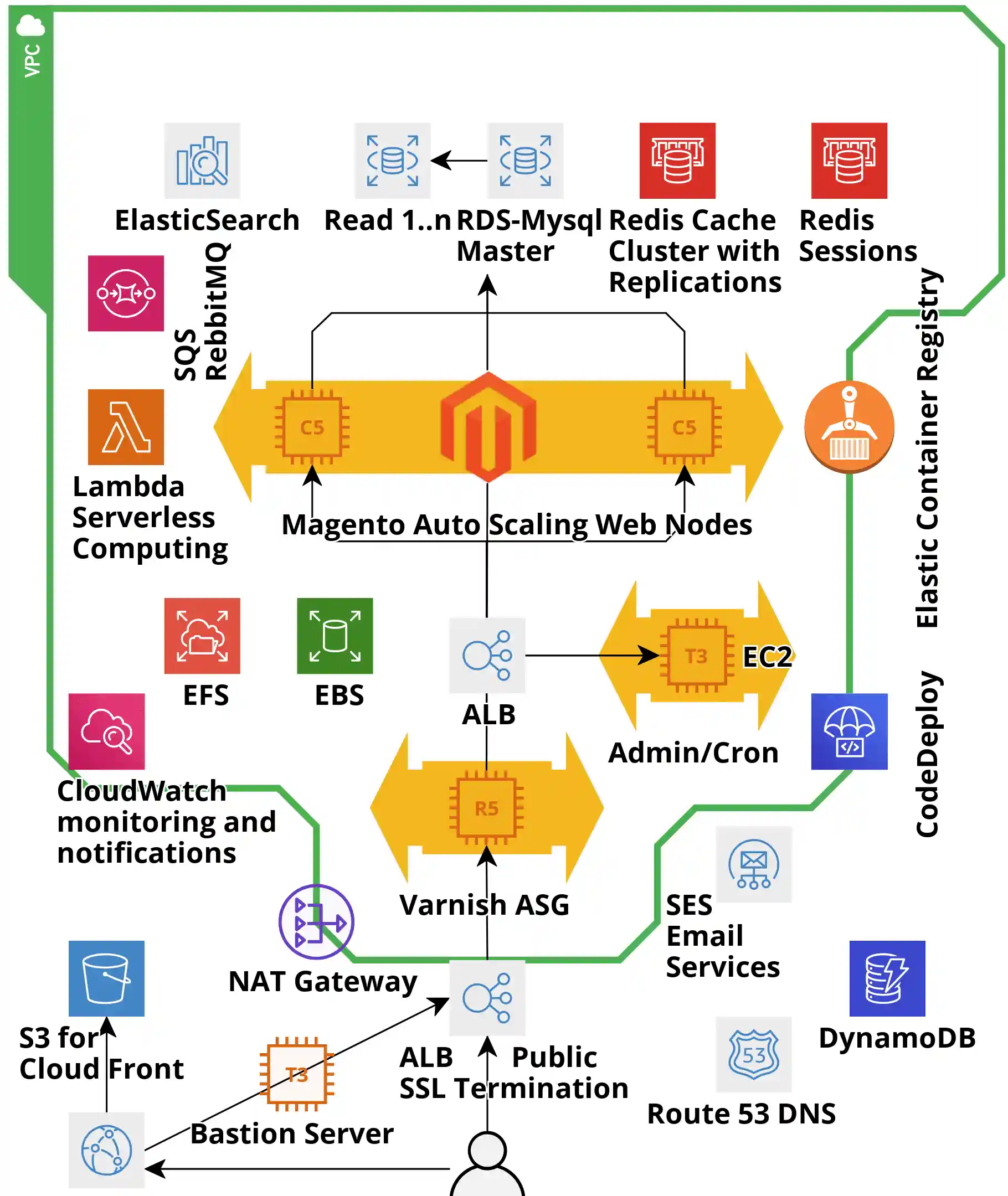
- Infrastructure Overview
- Minimal Magento Cloud Setup
- Multi-Regional Magento Infrastructure
- Prerequisites
- Installing Homebrew (Linux)
- Installing Terragrunt & Terraform
- Usage Instructions
- Destroying Infrastructure
- Demo Video
- Debug Logging
- Clearing Terragrunt Cache
- Environments: Prod & Staging
- Multi-Cloud Deployments
- Enterprise Support
- Approximate AWS Cost
- Why Not Magento Cloud?
- CodeDeploy Example
- Golden AMI Automation
- Magento Installation Automation
- DynamoDB & Logging Integration
- Licensing & Credits
- Terragrunt + Terraform Registry
Important Note
Magento Software installation is out of scope for this project.
This repository provides AWS infrastructure provisioning for Magento using Terraform.
For automated Magento 2 installation on CentOS 8 / Amazon Linux 2 (x86/ARM), see the separate project:
Magento 2 Installation Automation (CentOS 8.2, Amazon Linux 2, ARM support)
👉 Magento installation script
Graviton2 ARM instances are supported.
Why Auto Scaling
Increasing the number of PHP-FPM processes beyond the number of physical CPU cores does not improve performance. It typically reduces performance and wastes resources.
A simple rule of thumb for uncached traffic:
Physical CPU cores ≈ Concurrent HTTP Requests × Avg. Request Duration
Notes:
- Intel instances expose vCPUs; effective physical core factor is usually 2.
- AWS Graviton2 ARM64 instances use factor 1 and often perform better for highly concurrent workloads.
Intel CPUs may be 20–30% faster for some workloads, but for Magento (long, heavy queries), more physical cores = better throughput. With increasing traffic, you need more CPU.
This rule applies to uncached pages.
With Varnish / FPC, the principle remains: Varnish can respond in ~1 ms, and a single CPU can serve hundreds or thousands of cached pages per second. To avoid misleading metrics caused by cache invalidations / misses / uncached checkout/API calls:
Best practice is to measure performance without FPC. FPC is a bonus, not the base.
AWS Magento 2 Cloud Features
Key features of this Terraform setup:
- True horizontal auto scaling
- Affordable: starting from ~$300/month in
us-west-2 - MySQL RDS: fully managed, multi-AZ failover, vertical scaling with minimal or no downtime
- Compatible with RDS Aurora (Cluster & Serverless)
- EFS: elastic NFS for media & config storage
- CloudFront CDN for static and media (S3 or Magento/EFS as secondary origin)
- Automatic backups: code & database (point-in-time snapshots)
- ~99.9% uptime with multi-AZ architecture
- Strong security: private subnets, Security Groups
- Elastic (static) IP with outbound access via NAT
- Bastion host for secure SSH access to web servers
- Fine-grained Security Groups per role
- Private/public subnets, NAT gateway, Bastion
- OS & software update patching
- DDoS protection with AWS Shield
- PCI-ready infrastructure patterns
- Redis cluster
- Amazon OpenSearch / Elasticsearch with Kibana, zero-downtime scaling
- Multiple Application Auto Scaling Groups (ASG)
- Application Load Balancer (ALB) with SSL/TLS termination & certificates
- ALB: path-based, host-based, header, method & query-string routing; Lambda targets
- Scaled Varnish ASG
- Dedicated Admin/Cron ASG
- Add new ASGs per website / checkout / API by copying module code
- Same pattern for Production / Staging / Dev and multiple projects
- CI/CD ready: CodePipeline / CodeDeploy
- CodeDeploy: in-place & blue/green deployments from Git or S3 with rollback
- Cross-account deployments (Dev → Prod)
- Amazon SES: ~$0.10 per 1K emails
- CloudWatch: metrics (CPU, RAM, network) with 15 months retention
- CloudWatch alarms: SMS / email on metrics or math expressions
- Simple / step scaling policies
- Manual scaling available for Magento ASG
- AWS CLI integration for scripting
- DynamoDB for logs/indexes/analytics
- Lambda as ALB targets
- ECR for container images
- Optional ECS instead of ASG with Service Auto Scaling
- Backed by excellent AWS documentation & open-source tooling


Infrastructure Overview
The infrastructure consists of multiple layers (autoscaling, ALB, RDS, security groups, VPC, etc.). Each layer:
- Uses a Terraform AWS module
- Is configured via
terraform.tfvarsin its layer directory
Terraform downloads module sources during terraform init.
We use Terragrunt to:
- Orchestrate dependent layers
- Keep configuration DRY
- Dynamically update arguments
- Reuse code across environments
Minimal Magento Cloud Setup

The Minimal Magento Cloud infrastructure is designed for both small and very large merchants:
- Internal tests: up to 10,000 uncached requests/sec
- Magento Commerce Cloud often struggles with ~100 concurrent requests
After applying Magento-specific fixes, Varnish becomes redundant for ~98% of merchants in this architecture.
Minimal setup is available in a separate branch:
👉 https://github.com/Genaker/TerraformMagentoCloud/tree/minimal
Multi-Regional Magento Infrastructure
We support a global scale-out model:
- All writes (POST/DELETE) go to the primary region
- All GET & cached requests are served from regional data centers
Remote web servers add latency and hurt UX, leading to:
- Lost customers
- Missed revenue
- Reputation damage
Using geolocation routing, you can:
- Route traffic to the closest Magento region
- Localize storefronts (language, content, currencies)
- Restrict access by region (distribution rights)
- Balance traffic across endpoints
Imagine US customers hitting servers only in Norway 🇳🇴 or Australia 🇦🇺 – not ideal.
Prerequisites
- Terraform 0.12+
- Terragrunt 0.19+
- tfvars-annotations – update
terraform.tfvarsvia annotations - Optional: pre-commit hooks (formatting, docs, etc.)
Installing Homebrew (Linux)
/bin/bash -c "$(curl -fsSL https://raw.githubusercontent.com/Homebrew/install/master/install.sh)"Then:
test -d ~/.linuxbrew && eval $(~/.linuxbrew/bin/brew shellenv)
test -d /home/linuxbrew/.linuxbrew && eval $(/home/linuxbrew/.linuxbrew/bin/brew shellenv)
test -r ~/.bash_profile && echo "eval \$($(brew --prefix)/bin/brew shellenv)" >>~/.bash_profile
echo "eval \$($(brew --prefix)/bin/brew shellenv)" >>~/.profile
Test:
On macOS, install dependencies:
brew install terraform terragrunt pre-commit
Installing Terragrunt & Terraform
Manual install (Ubuntu example)
sudo -s  # run as root

export TERRAFORM_VERSION=0.12.24
export TERRAGRUNT_VERSION=0.23.2

mkdir -p /ci/terraform_${TERRAFORM_VERSION}
wget -nv -O /ci/terraform_${TERRAFORM_VERSION}/terraform_${TERRAFORM_VERSION}_linux_amd64.zip \
  https://releases.hashicorp.com/terraform/${TERRAFORM_VERSION}/terraform_${TERRAFORM_VERSION}_linux_amd64.zip
unzip -o /ci/terraform_${TERRAFORM_VERSION}/terraform_${TERRAFORM_VERSION}_linux_amd64.zip -d /usr/local/bin/

mkdir -p /ci/terragrunt-${TERRAGRUNT_VERSION}
wget -nv -O /ci/terragrunt-${TERRAGRUNT_VERSION}/terragrunt \
  https://github.com/gruntwork-io/terragrunt/releases/download/v${TERRAGRUNT_VERSION}/terragrunt_linux_amd64
chmod a+x /ci/terragrunt-${TERRAGRUNT_VERSION}/terragrunt
cp /ci/terragrunt-${TERRAGRUNT_VERSION}/terragrunt /bin
chmod a+x /bin/terragrunt

rm -rf /ci
exit
Test:
terragrunt -v
terraform -v
Usage Instructions
Step 0 – SSH
Terraform uses SSH to clone modules. Configure your SSH key in GitHub: https://help.github.com/en/enterprise/2.15/user/articles/adding-a-new-ssh-key-to-your-github-account
Git+SSH works for both public & private repos.
Step 1 – AWS Credentials
Set environment variables:
export AWS_DEFAULT_REGION=us-west-1   # choose your region
export AWS_ACCESS_KEY_ID="..."
export AWS_SECRET_ACCESS_KEY="..."
Or configure credentials as per the AWS provider docs.
Step 2 – Create Infrastructure
All layers in region:
cd production
terragrunt apply-all
Single layer (example: autoscaling_3):
cd production/autoscaling_3
terragrunt apply
For newer Terragrunt:
-
Region (all layers):
cd ap-southeast-1 terragrunt run-all apply -
Single layer:
cd ap-southeast-1/magento_auto_scaling
terragrunt apply
Destroying Infrastructure
Preferred:
terragrunt run-all destroy
Terraform will ask for confirmation unless -auto-approve is used.
Preview with:
Demo Video
Click to watch:
Or open: https://www.youtube.com/watch?v=kmnlrXSTQlM
The video shows how to:
- Transform a single-node Magento into a highly available, elastic deployment
- Use Varnish (on EC2) and Amazon ElastiCache for caching
- Keep Magento media outside app instances using EFS
Debug Logging
Set:
export TERRAGRUNT_DEBUG=true
export TG_LOG=debug
Example:
TF_LOG=DEBUG terragrunt apply
New Terragrunt versions:
terragrunt run-all apply --terragrunt-log-level debug --terragrunt-debug
This:
- Creates
terragrunt-debug.tfvars.json - Prints instructions to reproduce the same Terraform run
Useful to determine if issues are caused by:
- Misconfiguration
- Terragrunt bugs
- Terraform bugs
Clearing Terragrunt Cache
Terragrunt uses .terragrunt-cache for temporary files.
List caches:
find . -type d -name ".terragrunt-cache"
Delete them:
find . -type d -name ".terragrunt-cache" -prune -exec rm -rf {} \;
You can relocate cache directories using TERRAGRUNT_DOWNLOAD.
Environments: Prod & Staging
Example structure with three Magento environments:
└── magento
    ├── prod
    │   ├── app
    │   ├── mysql
    │   └── vpc
    ├── project-3
    │   ├── app
    │   ├── mysql
    │   └── vpc
    └── stage
        ├── app
        ├── mysql
        └── vpc
To keep things DRY, use Terragrunt with a root terragrunt.hcl and per-module terragrunt.hcl files, inheriting shared configuration.
Multi-Cloud Deployments
Terraform provides cloud-agnostic IaC:
- AWS
- GCP
- Microsoft Azure
- Alibaba Cloud
- VMware
- Kubernetes
- On-prem solutions
The same patterns can be extended beyond AWS where relevant modules exist.
Enterprise Support
Several Magento agencies use this solution and provide:
- Installation
- Support
- Custom development
The project currently has 10+ partners. To be listed as a cloud service provider, contact: yegorshytikov@gmail.com
Other related projects:
-
Ansible-based Magento Cloud provisioning: https://github.com/Genaker/AWS_Magento2_Ansible
-
AWS CDK-based Magento Cloud provisioning: coming soon
Approximate AWS Cost (Example)
+-------------+---------------------+-----------+------------+
| Category    | Type                | Region    | Total cost |
+-------------+---------------------+-----------+------------+
| appservices | Email 10K (SES)     | us-west-2 | $1.00      |
| storage     | EFS 20GB            | us-west-2 | $6.00      |
| storage     | S3 50GB             | us-west-2 | $2.00      |
| compute     | EC2 Web (c5.large)  | us-west-2 | $61.20     |
| networking  | 2x ALB              | us-west-2 | $43.92     |
| compute     | Admin/Cron (t3.med) | us-west-2 | $29.95     |
| database    | ElastiCache Redis   | us-west-2 | $24.48     |
| compute     | Varnish (t3.large)  | us-west-2 | $29.95     |
| analytics   | Elasticsearch (t2)  | us-west-2 | $12.96     |
| database    | RDS MySQL (t3.med)  | us-west-2 | $48.96     |
| storage     | EBS 30GB            | us-west-2 | $9.13      |
+-------------+---------------------+-----------+------------+
| Total                               ≈         | $269.55    |
+-------------------------------------+---------+------------+

Why Not Magento Cloud?
+-----------------------------------------+-------------------------------------------+
|              Magento Cloud              |               This Solution               |
+-----------------------------------------+-------------------------------------------+
| Manual, vertical scaling; performance   | Rule-based auto scaling; no performance   |
| degradation during scaling              | degradation                               |
+-----------------------------------------+-------------------------------------------+
| Fastly CDN only                         | CDN-agnostic (Cloudflare, CloudFront, …)  |
+-----------------------------------------+-------------------------------------------+
| Enterprise-only licensing               | Works with any Magento 1/2 edition        |
+-----------------------------------------+-------------------------------------------+
| $2,000–$10,000+/month + Enterprise lic. | Pay only for AWS usage, from ~$300/month  |
+-----------------------------------------+-------------------------------------------+
| Limited customization                   | Fully customizable                        |
+-----------------------------------------+-------------------------------------------+
| Single Magento 2 CE installation        | Hosts multiple sites, stacks & apps       |
+-----------------------------------------+-------------------------------------------+
Magento Cloud also charges overage fees for compute usage (vCPU-days). Given raw AWS vCPU is under $1/day, these overages can be very expensive.
From Magento Cloud agreement:
“Customer authorizes Magento to charge Subscription Fees, Overage Fees, upgrades, and taxes…”
Because of Magento Cloud’s architecture and performance, hidden overage fees can exceed your contract price.
CodeDeploy Example
Note: Application deployment is out of scope; this repo is for infrastructure provisioning.
Example appspec.yml:
version: 0.0
os: linux
hooks:
  BeforeInstall:
    - location: config_files/scripts/beforeInstall.bash
      runas: root
  AfterInstall:
    - location: config_files/scripts/afterInstall.bash
      runas: mage_user
    - location: config_files/scripts/moveToProduction.bash
      runas: root
    - location: config_files/scripts/cacheclean.bash
      runas: mage_user
Magento 2 build script example (compile.sh):
cd production/build/public_html

git checkout .
git pull origin master

rm -rf var/cache/* var/page_cache/* var/composer_home/* var/tmp/*

php composer.phar update --no-interaction --no-progress --optimize-autoloader
bin/magento setup:upgrade
bin/magento setup:static-content:deploy -t Magento/backend
bin/magento setup:static-content:deploy en_US es_ES -a frontend
bin/magento setup:di-compile

echo "Setting directory base permissions to 0750"
find . -type d -exec chmod 0750 {} \;

echo "Setting file base permissions to 0640"
find . -type f -exec chmod 0640 {} \;

chmod o-rwx app/etc/env.php
chmod u+x bin/magento

if [ ! -d /build ]; then
  mkdir -p /build
fi

tar -czvf /build/build.tar.gz . \
  --exclude='./pub/media' \
  --exclude='./.htaccess' \
  --exclude='./.git' \
  --exclude='./var/cache' \
  --exclude='./var/composer_home' \
  --exclude='./var/log' \
  --exclude='./var/page_cache' \
  --exclude='./var/import' \
  --exclude='./var/export' \
  --exclude='./var/report' \
  --exclude='./var/backups' \
  --exclude='./var/tmp' \
  --exclude='./var/resource_config.json' \
  --exclude='./var/.sample-data-state.flag' \
  --exclude='./app/etc/config.php' \
  --exclude='./app/etc/env.php'
Create deployment:
sh ./compile.sh

aws deploy create-deployment \
  --application-name AppMagento2 \
  --deployment-config-name CodeDeployDefault.OneAtATime \
  --deployment-group-name MyMagentoApp \
  --description "Live Deployment" \
  --s3-location bucket=mage-codedeploy,bundleType=zip,eTag=<tagname>,key=live-build2.zip
Check status (show-deployment.sh):
aws deploy get-deployment \
  --deployment-id "$1" \
  --query "deploymentInfo.[status, creator]" \
  --output text
For Docker-based deployment, you can instead:
docker pull MAGENTO_IMAGE_NAME:TAG
Example deploy script: https://github.com/Genaker/TerraformMagentoCloud/blob/master/deploy.sh
Golden AMI Automation
A Golden AMI (gold image) is a hardened OS image with:
- Baseline configuration
- Security patches
- Logging / monitoring agents
You can:
- Launch from base AMI
- Install Magento / Odoo / WordPress / Shopware etc.
- Bake a custom AMI
- Launch new instances from that AMI
With Packer
Packer creates machine images for many platforms from a single JSON template.
Magento Installation Automation
Magento installation is handled in a separate repo: 👉 Magento installation script
DynamoDB & Logging Integration
Magento includes a PHP library for DynamoDB:
use Aws\DynamoDb\Exception\DynamoDbException;
use Aws\DynamoDb\Marshaler;

// ...
Use cases:
- Store logs in DynamoDB via Monolog’s
DynamoDbHandler - Leverage TTL to auto-clean log entries
- Use maxbanton/cwh to send logs to CloudWatch Logs:
php composer.phar require maxbanton/cwh:^1.0
Licensing & Credits
Terraform AWS modules by: Anton Babenko
All content, including Terraform AWS modules, is released under the MIT License.
Terragrunt + Terraform Registry
Terragrunt’s issue with using modules from the Terraform Registry has been resolved: gruntwork-io/terragrunt#311
Terragrunt v0.31.5 adds support for fetching modules from any Terraform Registry via the tfr:// protocol in source.
::contentReference[oaicite:0]{index=0}