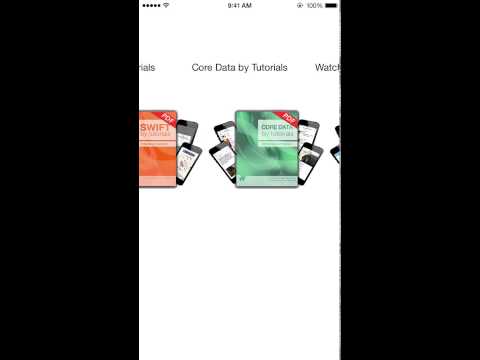
Swift Carousel using a Paged UIScrollView
This is a infite carousel made using a Paged UIScrollView
and some easy maths. You can create a Carousel of UIImageViews or UIButtons.
Carousels must be of at least 3 items and as long as you want.
**You need to add the ZCarousel Delegate to your Controller:**
class ViewController: UIViewController, ZCarouselDelegate {
}
**To create a UIButtons Carousel just go on and create a ZCarousel variable with frame. Set thee delegate and use the method .addButtons() and add it to your view.**
var menu = ZCarousel(frame: CGRect( x: self.view.frame.size.width/5,
            y: 100,
            width: (self.view.frame.size.width/5)*3,
            height: 50))
menu.ZCdelegate = self
menu.addButtons(["iOS 8 by Tutorials", "Swift by Tutorials", "Core Data by Tutorials", "WatchKit by Tutorials"])

self.view.addSubview(menu!)
**To create a UIImageViews Carousel just go on and create a ZCarousel variable with frame. Set thee delegate and use the method .addImages() and add it to your view.**
Note: Just add the image title as a String.
images = ZCarousel(frame: CGRect( x: self.view.frame.size.width/5,
            y: 200,
            width: (self.view.frame.size.width/5)*3,
            height: 150))
images.ZCdelegate = self
images.addImages(["1", "2", "3"])

self.view.addSubview(images)
**Add the delegate function ZCarouselShowingIndex() to your controller to know the index showing.**
Note: scrollview is to know the difference between two ZCarousels and show the correct index if both are on the same controller ```swift func ZCarouselShowingIndex(scrollview: ZCarousel, index: Int) { if scrollview == menu { println("Showing Button at index \(index)") } else if scrollview == images { println("Showing Image at index \(index)") } } ```
Hope you find it useful.
Follow me on Twitter @richzertuche
[](https://gitter.im/richzertuche/ZCarousel?utm_source=badge&utm_medium=badge&utm_campaign=pr-badge&utm_content=badge)](https://gitter.im/richzertuche/ZCarousel?utm_source=badge&utm_medium=badge&utm_campaign=pr-badge&utm_content=badge)](https://txtdot.deep-swarm.xyz/get?url=https%3A%2F%2Fgitter.im%2Frichzertuche%2FZCarousel%5D(https%3A%2F%2Fbadges.gitter.im%2FJoin%20Chat.svg)%5D(https%3A%2F%2Fgitter.im%2Frichzertuche%2FZCarousel%3Futm_source%3Dbadge%26utm_medium%3Dbadge%26utm_campaign%3Dpr-badge%26utm_content%3Dbadge))