
RCalendarPicker Calendar calendar control, select control, calendar, date selection, the clock selection control. 日历控件 ,日历选择控件,日历,日期选择,时钟选择控件




Preview
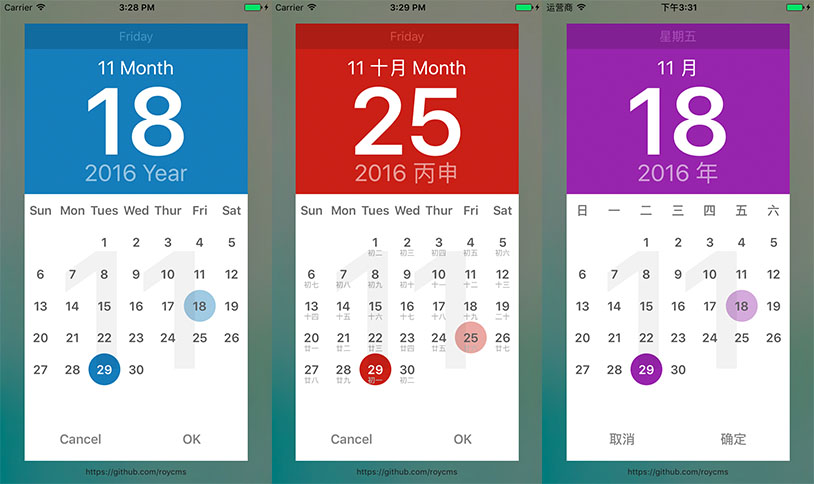
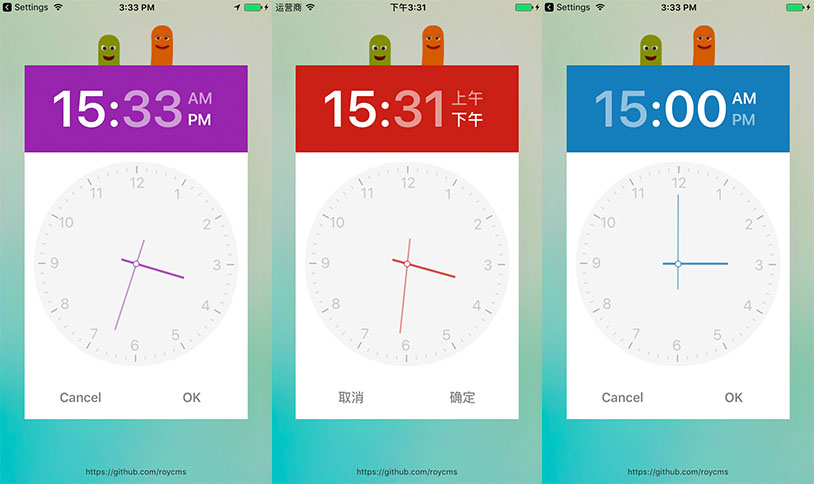
cocoapods
Pod installation failure Please have a look at issues2 #2
pod 'RCalendarPicker'
---or---
pod 'RCalendarPicker', :git => 'https://github.com/roycms/RCalendarPicker.git'
Run
cd myfinder
git clone https://github.com/roycms/RCalendarPicker.git
cd RCalendarPicker
run pod install
xcode open RCalendarPicker.xcworkspace
Use Introduce file
Introduce the head file
#import "RCalendarPickerView.h" // The calendar
#import "RClockPickerView.h" // A clock dial effect
#import "DateHelper.h" // Time processing with the help of the class
calendar
default: MainScreenWidth = 360 MainScreenHeight = 960
 RCalendarPickerView *calendarPicker = [[RCalendarPickerView alloc]initWithFrame:CGRectMake(0, 0, MainScreenWidth, MainScreenHeight)];
            calendarPicker.selectDate = [NSDate date]; //默认被选中时间
            calendarPicker.complete = ^(NSInteger day, NSInteger month, NSInteger year, NSDate *date){
                NSLog(@"%d-%d-%d", (int)year,(int)month,(int)day);
            };
            [self.view addSubview:calendarPicker];
The lunar calendar
Calendar lunar display forms
RCalendarPickerView *calendarPicker = [[RCalendarPickerView alloc]init];
calendarPicker.isLunarCalendar = YES; //开启农历
The calendar dataSource
The days in the calendar display when binding event data
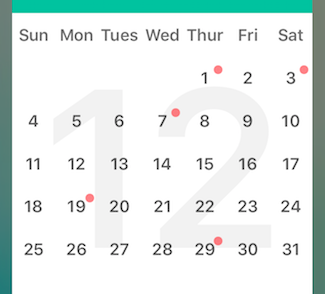
RCalendarPickerView *calendarPicker = [[RCalendarPickerView alloc]init];
calendarPicker.dataSource = self.dataSource;
self.dataSource is test data for json file
[{"date":"2016-12-1","value":1},
{"date":"2016-12-3","value":1},
{"date":"2016-12-7","value":1},
{"date":"2016-12-19","value":1},
{"date":"2016-12-29","value":1}]
calendar Theme
Set the calendar theme colors
RCalendarPickerView *calendarPicker = [[RCalendarPickerView alloc]init];
calendarPicker.thisTheme =[UIColor blackColor]; //设置主题颜色 缺省情况下随机显示
A clock dial effect
The effect of a similar watches and clocks, can drag pointer to set a time
 RClockPickerView *rClockPickerView = [[RClockPickerView alloc]initWithFrame:CGRectMake(0, 0, MainScreenWidth, MainScreenHeight)
                                                                            clockRadius:140
                                                                 clockCalibrationRadius:130];
            rClockPickerView.date = [NSDate date];
            rClockPickerView.complete = ^(NSInteger hours, NSInteger minutes, NSInteger noon,float clockDate){
                NSLog(@"%d-%d-%d   float clockDate:  -%f", (int)hours,(int)minutes,(int)noon,clockDate);

            };
            [self.view addSubview:rClockPickerView];
calendar + clock use
To choose the calendar (date) (month) (year) and the vehicle to choose the combination use of the clock
RCalendarPickerView *calendarPicker = [[RCalendarPickerView alloc]initWithFrame:CGRectMake(0, 0, MainScreenWidth, MainScreenHeight)];
            calendarPicker.selectDate = [NSDate date]; //默认被选中时间
            [self.view addSubview:calendarPicker];

            calendarPicker.complete = ^(NSInteger day, NSInteger month, NSInteger year, NSDate *date){
                NSLog(@"%d-%d-%d", (int)year,(int)month,(int)day);

                RClockPickerView *rClockPickerView = [[RClockPickerView alloc]initWithFrame:CGRectMake(0, 0, MainScreenWidth, MainScreenHeight)
                                                                                clockRadius:140
                                                                     clockCalibrationRadius:130];
                rClockPickerView.date = [NSDate date];
                rClockPickerView.complete = ^(NSInteger hours, NSInteger minutes, NSInteger noon,float clockDate){
                    NSLog(@"%d-%d-%d", (int)hours,(int)minutes,(int)noon);

                    NSDate *selectDate = [DateHelper dateInDate:date Hours:hours minutes:minutes];

                    NSLog(@"selectDate: %@",selectDate);

                };
                [self.view addSubview:rClockPickerView];
            };
pop-up window Gestures conflict bug
In the current UIView sliding gesture of conflicts between the pop-up window will open bugs can be directly in the new UIViewController
            UIViewController *viewController = [[UIViewController alloc]init];

            RCalendarPickerView *calendarPicker = [[RCalendarPickerView alloc]initWithFrame:CGRectMake(0, 0, MainScreenWidth, MainScreenHeight)];
            calendarPicker.selectDate = [NSDate date]; //默认被选中时间
            [viewController.view addSubview:calendarPicker];
            calendarPicker.complete = ^(NSInteger day, NSInteger month, NSInteger year, NSDate *date){
                NSLog(@"%d-%d-%d", (int)year,(int)month,(int)day);
                  [self.navigationController popViewControllerAnimated:YES];
            };
            [self.navigationController pushViewController:viewController animated:YES];
TODO
- 增加选择年月的切换形式
- 定义日期的可选择范围
- Tests