equirectangular projections
OpenGL, device-oriented, touch-interactive

acceptable image sizes: (4096×2048), 2048×1024, 1024×512, 512×256, 256×128 ...
- (4096 supported on iPhone 4s and iPad2 onward)
#methods
image
-(void) setImage:(UIImage*)image;
-(void) setImageWithName:(NSString*)fileName;  // path or bundle. will check at both
orientation
 // auto-update (usually only one of these at a time is recommended)
-(void) setOrientToDevice:(BOOL)   // activate motion sensors
-(void) setTouchToPan:(BOOL)       // activate UIPanGesture

 // aligns z-axis (into screen)
-(void) orientToVector:(GLKVector3)
-(void) orientToAzimuth:(float) Altitude:(float)
field of view
-(void) setFieldOfView:(float)     // in degrees
-(void) setPinchToZoom:(BOOL)      // activate UIPinchGesture
touches
-(void) setShowTouches:(BOOL)      // overlay latitude longitude intersects
-(BOOL) touchInRect:(CGRect)       // hotspot detection in world coordinates
2D - 3D conversion
-(CGPoint) screenLocationFromVector:(GLKVector3) // 2D screen point from a 3D point
-(GLKVector3) vectorFromScreenLocation:(CGPoint) // 3D point from 2D screen point
-(CGPoint) imagePixelAtScreenLocation:(CGPoint)  // 3D point from 2D screen point
  // except this 3D point is expressed as 2D pixel unit in the panorama image
VR Split screen
This activates a split screen that works inside of VR headsets like Google Cardboard. TBD if more VR best practices are needed, such as a barrel shader.
- Illusion of varying depth is not available. The two screens are rendered using the same image with no difference between camera IPD.
usage
make your ViewController a subclass of GLKViewController
panoramaView = [[PanoramaView alloc] init];
 // load image and any other customization
[self setView:panoramaView];
also in your GLKViewController:
-(void) glkView:(GLKView *)view drawInRect:(CGRect)rect{
    [panoramaView draw];
}
make sure
- no device landscape/portrait auto-rotation

- works properly under any of the 4 device orientations
swift
class MainView: GLKViewController {

    var panoramaView = PanoramaView()

    override func viewDidLoad() {
        panoramaView.setImageWithName("imagename.jpg")
        panoramaView.touchToPan = true          // Use touch input to pan
        panoramaView.orientToDevice = false     // Use motion sensors to pan
        panoramaView.pinchToZoom = true         // Use pinch gesture to zoom
        panoramaView.showTouches = true         // Show touches
        self.view = panoramaView
    }

    override func glkView(view: GLKView, drawInRect rect: CGRect) {
        panoramaView.draw()
    }
}
orientation
- azimuth and altitude
- look direction, the Z vector pointing through the center of the screen

The program begins by facing the center column of the image, or azimuth 0°
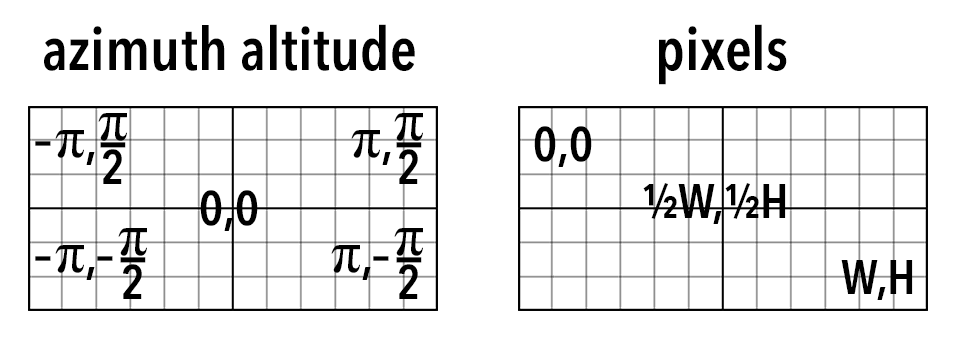
about equirectangular
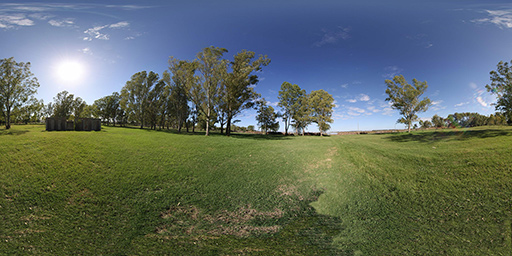
equirectangular images mapped to the inside of a celestial sphere come out looking like the original scene, and the math is relatively simple http://en.wikipedia.org/wiki/Equirectangular_projection
license
MIT