jQuery Smart Wizard v7
A modern and accessible step wizard plugin for jQuery



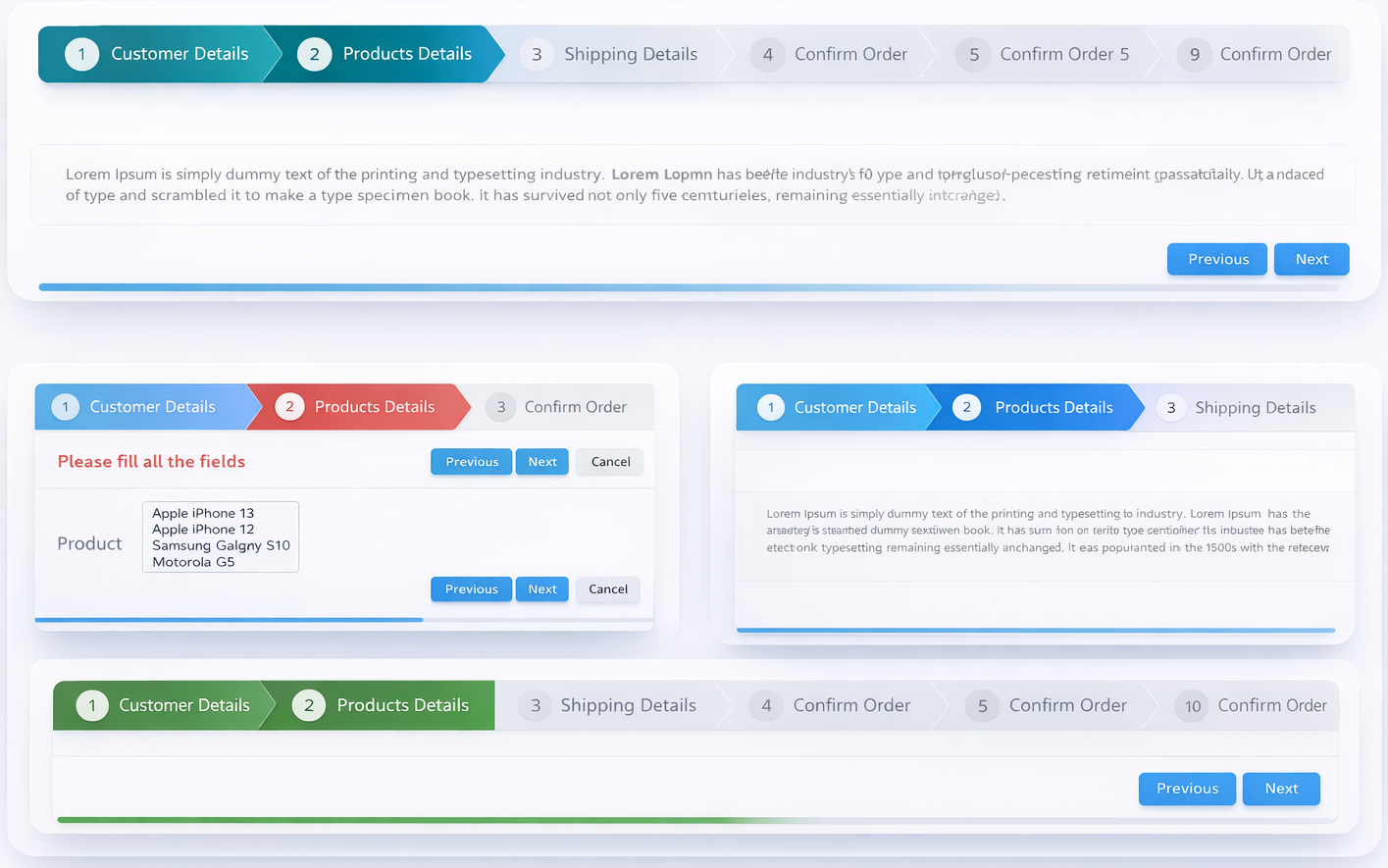
jQuery Smart Wizard v7 is a lightweight and extensible step wizard plugin built for modern web applications using jQuery. It provides a clean, intuitive interface for managing multi-step processes such as registration forms, checkout screens, surveys, configuration flows, and more.
jQuery Smart Wizard v7 focuses on usability and flexibility. It offers customizable navigation styles, toolbars, transitions, and events, making it easy to integrate into existing applications. Whether you’re building a simple step form or a complex workflow, Smart Wizard adapts to your needs.
Demos
Screenshots
Requirements
- jQuery >= 1.11.1 (jQuery 4.x and jQuery Slim versions are also supported)
Installation
NPM
Yarn
CDN - jsDelivr
<!-- Base CSS -->
<link href="https://cdn.jsdelivr.net/npm/smartwizard@7/dist/css/smartwizard.min.css" rel="stylesheet" type="text/css" />

<!-- Theme CSS -->
<link href="https://cdn.jsdelivr.net/npm/smartwizard@7/dist/css/themes/arrows.min.css" rel="stylesheet" type="text/css" />

<!-- JavaScript -->
<script src="https://cdn.jsdelivr.net/npm/smartwizard@7/dist/js/jquery.smartWizard.min.js" type="text/javascript"></script>
CDN - UNPKG
<!-- Base CSS -->
<link href="https://unpkg.com/smartwizard@7/dist/css/smartwizard.min.css" rel="stylesheet" type="text/css" />

<!-- Theme CSS -->
<link href="https://unpkg.com/smartwizard@7/dist/css/themes/arrows.min.css" rel="stylesheet" type="text/css" />

<!-- JavaScript -->
<script src="https://unpkg.com/smartwizard@7/dist/js/jquery.smartWizard.min.js" type="text/javascript"></script>
ES Module / Bundler
import $ from "jquery";
import "smartwizard/dist/css/smartwizard.min.css";
import "smartwizard/dist/css/themes/arrows.min.css";
import smartWizard from "smartwizard";

$(function() {
    $('#smartwizard').smartWizard();
});
CommonJS / Webpack
var $ = require("jquery");
require("smartwizard/dist/css/smartwizard.min.css");
require("smartwizard/dist/css/themes/arrows.min.css");
const smartWizard = require("smartwizard");

$(function() {
    $('#smartwizard').smartWizard();
});
Download
Download from GitHub
Features
- Easy to implement with minimal and clean HTML structure
- Fully rewritten in TypeScript (v7) with built-in type declarations
- Compatible with all modern browsers
- Responsive and mobile-ready design
- Multiple built-in themes (
basic|arrows|glow|pills), easily customizable - Flexible color customization using CSS variables
- Light / dark / auto display mode support
- Built-in transition animations (
default|fade|slideHorizontal|slideVertical|slideSwing|css) - Compatible with CSS animation libraries (including Animate.css)
- Extendable transition system with custom animation handlers
- Comprehensive step states:
completed,active,disabled,hidden,error,warning - Runtime option updates via
setOptions() - Automatic horizontal scrolling when steps overflow (mouse wheel supported)
- Keyboard navigation (left/right arrow keys)
- Form validation support via
leave.swevent - RTL (right-to-left language) support
- Accessible navigation controls
- Support for external navigation controls
- Dynamic content loading via
contentLoadercallback - Auto content height adjustment
- Customizable toolbar with support for additional HTML elements
- Integrated progress bar
- URL hash navigation with browser history integration
- UMD (Universal Module Definition) compatible
- Supports jQuery >= 1.11.1, jQuery 3.x, jQuery 4.x, and jQuery Slim versions
Usage
Include SmartWizard CSS
<link href="https://cdn.jsdelivr.net/npm/smartwizard@7/dist/css/smart_wizard_all.min.css" rel="stylesheet" type="text/css" />
Include HTML (This is the basic HTML markup. Customize it by adding your own step content).
<!-- SmartWizard HTML -->
<div id="smartwizard">
    <ul class="nav">
        <li class="nav-item">
          <a class="nav-link" href="#step-1">
            <div class="badge">1</div>
            Step Title
          </a>
        </li>
        <li class="nav-item">
          <a class="nav-link" href="#step-2">
            <span class="badge">2</span>
            Step Title
          </a>
        </li>
        <li class="nav-item">
          <a class="nav-link" href="#step-3">
            <span class="badge">3</span>
            Step Title
          </a>
        </li>
        <li class="nav-item">
          <a class="nav-link" href="#step-4">
            <span class="badge">4</span>
            Step Title
          </a>
        </li>
    </ul>

    <div class="tab-content">
        <div id="step-1" class="tab-pane" role="tabpanel" aria-labelledby="step-1">
            Step 1 content
        </div>
        <div id="step-2" class="tab-pane" role="tabpanel" aria-labelledby="step-2">
            Step 2 content
        </div>
        <div id="step-3" class="tab-pane" role="tabpanel" aria-labelledby="step-3">
            Step 3 content
        </div>
        <div id="step-4" class="tab-pane" role="tabpanel" aria-labelledby="step-4">
            Step 4 content
        </div>
    </div>

    <!-- Optional progressbar -->
    <div class="progress">
      <div class="progress-bar" role="progressbar" style="width: 0%" aria-valuenow="0" aria-valuemin="0" aria-valuemax="100"></div>
    </div>

</div>
Include JavaScript
Note:- jQuery should be included before the jQuery SmartWizard JavaScript file.
Include SmartWizard plugin JavaScript
<script src="https://cdn.jsdelivr.net/npm/smartwizard@7/dist/js/jquery.smartWizard.min.js" type="text/javascript"></script>
Initialize the jQuery SmartWizard
$(function() {
  // SmartWizard initialize
  $('#smartwizard').smartWizard();
});
That's it!
Please see the detailed documentation for implementation and usage.
All options
$('#smartwizard').smartWizard({
    initialStep: 0,         // Initial selected step (0 = first step)
    theme: 'basic',         // Theme: basic | arrows | dots | round | square | progress (ensure related CSS is included)
    displayMode: 'auto',    // Display mode: auto (system preference) | dark | light | none

    behavior: {
        autoHeight: true,             // Auto-adjust content height to active step
        useUrlHash: false,            // Enable step selection via URL hash
        supportBrowserHistory: false  // Enable browser back/forward button support
    },

    navigation: {
        enabled: true,          // Enable/disable anchor click navigation
        alwaysClickable: false, // Allow clicking any step at any time
        completed: {
            enabled: true,                  // Mark visited steps as completed
            completeAllPreviousSteps: true, // Mark all prior steps done when navigating via URL hash
            clearOnBack: false,             // Clear completed state when navigating backward
            clickable: true                 // Allow navigating back to completed steps
        }
    },

    transition: {
        effect: 'default',  // none | fade | slideHorizontal | slideVertical | slideSwing | css
        speed: 400,         // Animation speed in ms (not used for 'css')
        easing: '',         // jQuery easing (requires easing plugin; not used for 'css')
        css: {              // Settings used only when effect is 'css'
            prefix: '',     // CSS animation class prefix (e.g. 'animate__animated')
            forward:  { show: '', hide: '' },  // Classes for forward animation
            backward: { show: '', hide: '' }   // Classes for backward animation
        }
    },

    toolbar: {
        position: 'bottom',        // none | top | bottom | both
        buttons: {
            showNext: true,        // Show/hide the Next button
            showPrevious: true     // Show/hide the Previous button
        },
        extraElements: ''          // Additional HTML or jQuery elements to append to toolbar
    },

    keyboardNavigation: {
        enabled: true,             // Enable left/right arrow key navigation
        keys: {
            left: [37],            // Key codes for backward navigation
            right: [39]            // Key codes for forward navigation
        }
    },

    swipeNavigation: {
        enabled: false,            // Enable swipe navigation on touch devices
        threshold: 50              // Minimum swipe distance in px to trigger navigation
    },

    localization: {
        buttons: {
            next: 'Next',
            previous: 'Previous'
        }
    },

    stepStates: {
        completed: [],  // Step indexes to mark as completed on init
        disabled: [],   // Step indexes to disable on init
        hidden: [],     // Step indexes to hide on init
        error: [],      // Step indexes to mark as error on init
        warning: []     // Step indexes to mark as warning on init
    },

    scrollToView: false, // Scroll the active step anchor into view on step change

    contentLoader: null  // function(stepIndex, stepDirection, stepPosition, stepElement, callback)
                         // Dynamically load step content; call callback(htmlContent) when ready
});
Events
// Fires after the wizard is fully initialized
$('#smartwizard').on('initialized.sw', function(e) { });

// Fires after the initial step is shown for the first time
$('#smartwizard').on('loaded.sw', function(e) { });

// Fires before leaving the current step
// Return false from the handler to cancel navigation
$('#smartwizard').on('leave.sw', function(e, args) {
    // args: { stepIndex, nextStepIndex, stepElement, stepDirection, stepPosition }
});

// Fires after a new step is shown
$('#smartwizard').on('shown.sw', function(e, args) {
    // args: { stepIndex, stepElement, stepDirection, stepPosition }
});
Public methods
const wizard = $('#smartwizard');

wizard.smartWizard('next');                  // Navigate to next step
wizard.smartWizard('prev');                  // Navigate to previous step
wizard.smartWizard('goToStep', 2);           // Go to step index 2
wizard.smartWizard('goToStep', 2, true);     // Go to step index 2 (force, marks previous as done)
wizard.smartWizard('reset');                 // Reset wizard to initial state
wizard.smartWizard('setOptions', { theme: 'arrows' }); // Update options at runtime

wizard.smartWizard('setState',   [1, 2], 'disable'); // Disable steps 1 and 2
wizard.smartWizard('setState',   [3],    'error');     // Mark step 3 as error
wizard.smartWizard('unsetState', [1, 2], 'disable'); // Re-enable steps 1 and 2

wizard.smartWizard('loader', 'show'); // Show loader
wizard.smartWizard('loader', 'hide'); // Hide loader

wizard.smartWizard('adjustHeight'); // Manually re-adjust content height

const info = wizard.smartWizard('getStepInfo');
// Returns: { currentStep, totalSteps }
License
jQuery SmartWizard v7 is dual-licensed:
MIT License — Free for personal and open-source projects.
Commercial License — Required for closed-source, SaaS, or any commercial projects.
If you use jQuery SmartWizard v7 in a commercial or client application, please purchase a commercial license.
Commercial licenses help support continued development, maintenance, and new features.
Contribute
If you like the project please support with your contribution.
Happy Coding ❤️