Scripts to build wheels for GraalPy.
GraalPy is compatible with many Python libraries, including those that extend the Python runtime with native code. However, implemented in Java and thus binary incompatible with existing extensions, users of native Python extension libraries such as NumPy, SciPy, or PyTorch have to build their own binaries when installing these libraries if neither the project nor the GraalPy team provides prebuilt wheels. For many libraries, this means installing additional build dependencies and sitting through long and resource-intensive compilation processes.
This project is meant to be a place for the community to collect build recipes for as many popular packages as possible that can then be built individually or in CI/CD systems like GitHub Actions.
Quickstart
-
Fork this repository.
-
Go to the actions on your fork.
-
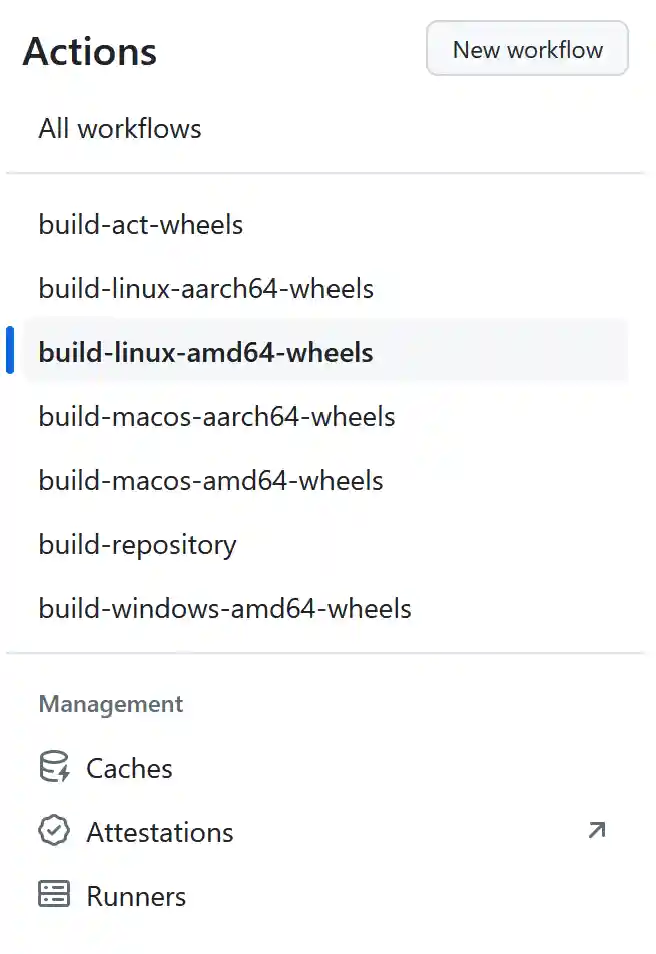
On the left, choose the Workflow for the OS you are interested in.
-
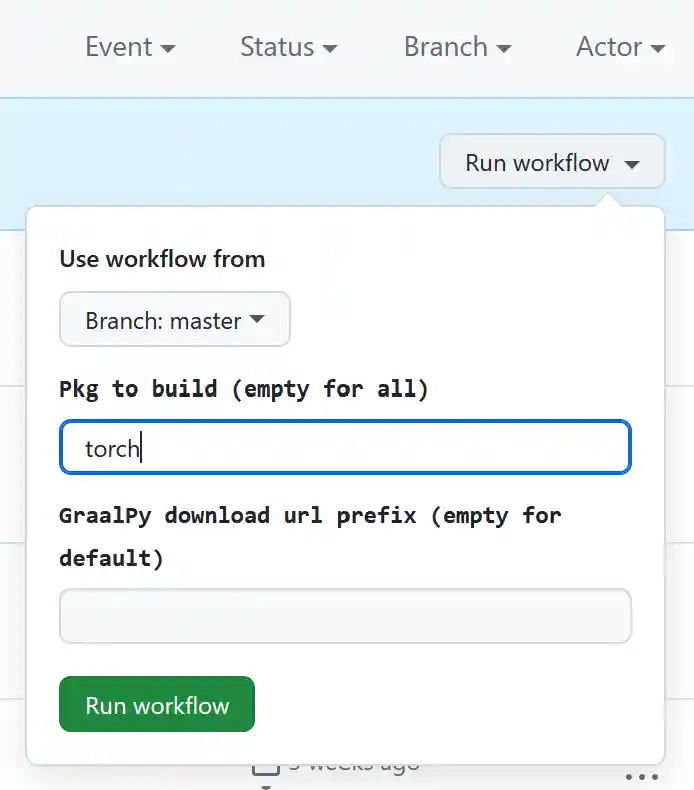
Click on "Run workflow". You can enter a package name or build all packages. See the platform subfolders for which packages have buildscripts.


How to contribute
We collect simple build scripts per platform and package in the linux, darwin, and win32 subdirectories.
The format is simply the package name followed by .sh for macOS and Linux or .bat for Windows.
An additional component can be added in between the name and the extension.
This file is then only run if the process environment contains a variable matching the middle component.
That can be useful to put things like package installations specific to GitHub Actions while keeping the main build script generic for other platforms.
How to run this
Just run the build_wheels.py script.
It expects a URL to download the GraalPy release from.
You can set the environment variable PACKAGES_TO_BUILD to a comma-separated list of package build scripts you want to consider.
You can build wheels locally. The way to go about it is to make sure to include the packages you care about in the packages.txt.
For Linux/amd64, I use act on a Linux machine:
git clone https://github.com/oracle/graalpython
cd graalpython
VERSION=24.2.0
BINDIR=. curl --proto '=https' --tlsv1.2 -sSf https://raw.githubusercontent.com/nektos/act/master/install.sh | bash
echo "graalpy_url=https://github.com/oracle/graalpython/releases/download/graal-$VERSION/graalpy-$VERSION-linux-amd64.tar.gz" > .input
podman system service -t 0 unix:///tmp/podman.sock &
export DOCKER_HOST=unix:///tmp/podman.sock
./act --env http_proxy=$http_proxy --env https_proxy=$https_proxy -W .github/workflows/build-linux-amd64-wheels.yml --artifact-server-path=$(pwd)/artifacts
For Linux/aarch64, I use act on a mac, those are usually beefy ARM machines that a developer has in front of them, if we make sure the podman VM has enough memory.
git clone https://github.com/oracle/graalpython
cd graalpython
VERSION=24.2.0
brew install act
echo "graalpy_url=https://github.com/oracle/graalpython/releases/download/graal-$VERSION/graalpy-$VERSION-linux-aarch64.tar.gz" > .input
podman machine init -m 16384 --now
act --env http_proxy=$http_proxy --env https_proxy=$https_proxy -W .github/workflows/build-linux-aarch64-wheels.yml --artifact-server-path=$(pwd)/artifacts --container-architecture linux/aarch64
For macOS/aarch64, you get no isolation from act, so I just run it directly.
git clone https://github.com/oracle/graalpython
VERSION=24.2.0
export GITHUB_RUN_ID=doesntMatterJustTriggerBrewInstallScripts
python3 -m venv wheelbuilder-venv
. wheelbuilder-venv/bin/activate
python3 graalpython/scripts/wheelbuilder/build_wheels.py https://github.com/oracle/graalpython/releases/download/graal-$VERSION/graalpy-$VERSION-macos-aarch64.tar.gz
For Windows/amd64, you get no isolation from act, so I just run it directly in Visual Studio powershell.
git clone https://github.com/oracle/graalpython
$VERSION="24.2.0"
$env:GITHUB_RUN_ID="doesntMatterJustTriggerBrewInstallScripts"
python3 -m venv wheelbuilder-venv
wheelbuilder-venv/scripts/activate
python3 graalpython/scripts/wheelbuilder/build_wheels.py https://github.com/oracle/graalpython/releases/download/graal-$VERSION/graalpy-$VERSION-windows-amd64.zip