
⌚ RoutineHero – A Smartwatch Experience for Kids
Forked from InfiniTime
Full credit and thanks to the original InfiniTime team for their amazing open-source smartwatch firmware project!
📘 About
RoutineHero is a fun and structured smartwatch experience built for kids, based on the InfiniTime firmware.
As a parent, you define a daily routine made up of activities — like brushing teeth, reading, playtime, etc. — and the watch guides your child throughout the day.
RoutineHero displays these activities visually as segments on a pie chart over an analog-style clock face, giving kids a sense of time and structure in a playful and intuitive way.
🖼 Smartwatch in Action
Here are two GIFs showcasing RoutineHero on the watch:

Time-lapse

Clock-Timer transitions
📱 App Demonstration
Short videos of the app in use:
🚀 Initial setup
App on the Play Store: https://play.google.com/store/apps/details?id=com.routinehero
🎯 Key Features
-
🧭 Analog Clock UI with Activity Pie Chart
Each segment of the analog clock represents an activity in the child’s day. -
👨👩👧👦 Parent-Defined Routine
Define your child’s daily routine with a simple config (custom app or BLE tool integration planned). -
🔔 Gentle Time Awareness
Visual reminders help kids understand when it's time to transition to the next task. -
🎨 Kid-Friendly Design
Clean, colorful UI tailored for younger users with simplified interactions. -
💡 Based on InfiniTime
Leverages the powerful open-source firmware platform that runs on PineTime and compatible devices.
📱 Devices Supported
RoutineHero runs on devices compatible with InfiniTime, including:
- PineTime (nRF52832)
- Dev boards supporting BLE and compatible display controllers (with porting)
🚀 Getting Started
Easiest way: Flash the pre-built DFU file
-
Download the latest DFU package from the repo:
doc/dfu/pinetime-mcuboot-app-dfu-1.15.0.zip -
Use a Bluetooth Low Energy (BLE) capable DFU tool to flash the firmware to your PineTime device, for example:
-
Follow the instructions in the DFU tool to upload the firmware to your watch over BLE.
📱 Configure Your Child’s Routine
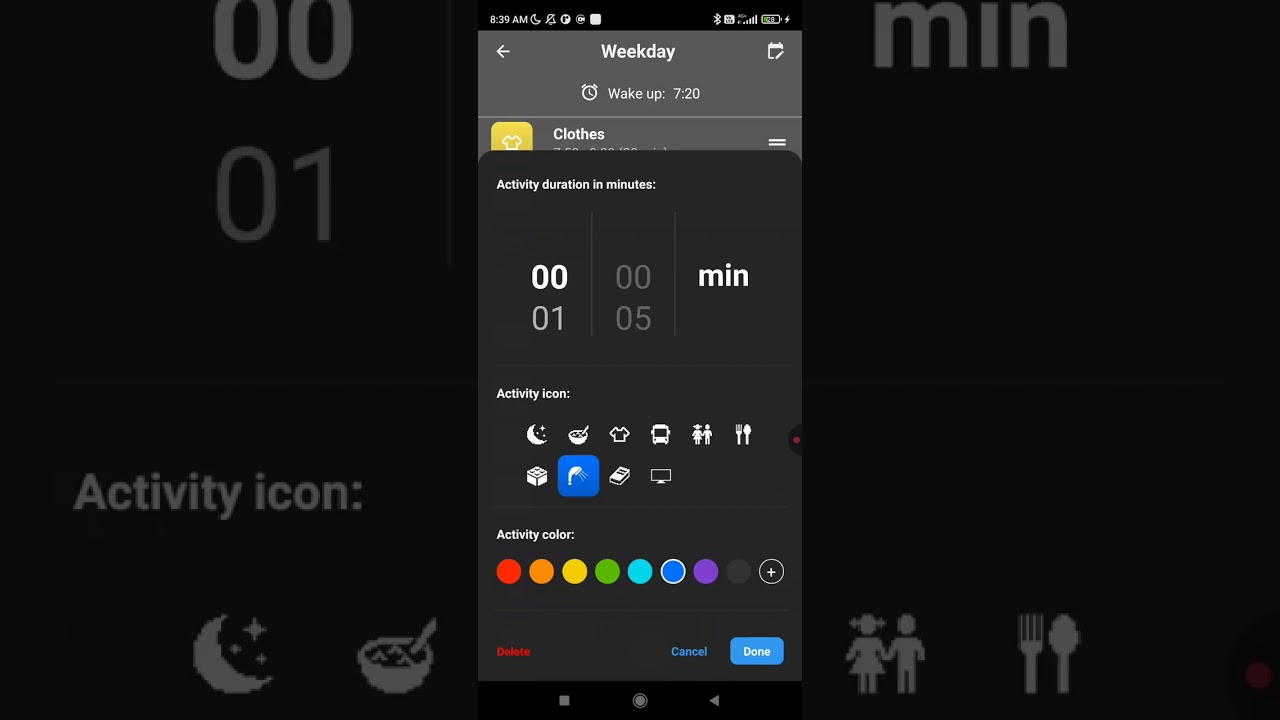
After flashing the watch, use the official RoutineHero Parent App to set up daily routines and activities:
This app lets you:
- Create and manage a daily schedule
- Set icons, names, and durations for each task
- Sync routines wirelessly to the watch
iOS support is planned for the future.
🛠 Building from Source (Optional)
Want to build or customize the firmware yourself?
-
Clone the Repo
git clone https://github.com/trollderiu/InfiniTime-RoutineHero.git cd InfiniTime-RoutineHero -
Build the Firmware
Follow the InfiniTime build instructions, as they apply here too.docker pull --platform linux/amd64 infinitime/infinitime-build docker run --rm -it -v ${PWD}:/sources --user $(id -u):$(id -g) infinitime/infinitime-build -
Flash to Device
Use your preferred method (DFU, SWD, etc.) to upload to your PineTime or compatible hardware.
📂 Project Structure
This project retains much of the original InfiniTime code, with key changes including:
src/display/RoutineHeroWatchFace.cpp– Custom watchface with pie chart overlaysrc/display/RoutineHeroTimer.cpp– Screen with time left for the current activityresources/images/– Custom icons for kid-friendly interface
More detailed module descriptions coming soon.
🛠 Contributing
Want to help improve RoutineHero? PRs and suggestions are welcome!
Check the Issues tab for bugs and roadmap items.
🙏 Credits
RoutineHero is powered by:
- InfiniTime – Original firmware base
- LittlevGL (LVGL) – Embedded graphics library
- The open-source community ❤️
📄 License
RoutineHero inherits the InfiniTime license (Apache 2.0).