API_Python_Base
Overview:
The MemProcFS process and module API for Python consists of two primary objects:
-
Vmm- the core MemProcFS virtual memory manager object. -
VmmPdb- an object for the Microsoft symbol server PDB debug symbols. -
memprocfs.CONSTANTS- MemProcFS constants.
MemProcFS is initialized by creating a Vmm object. Only one Vmm object may exist within a Python process at a given time at this moment.
Vmm:
The core MemProcFS virtual memory manager.
Example:
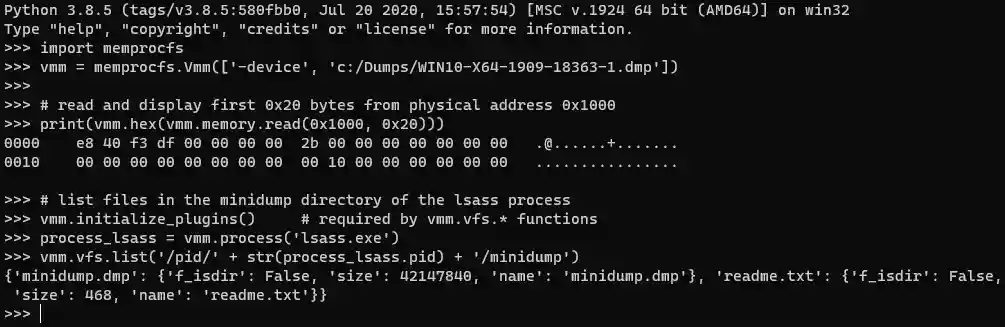
Sources:
-
memprocfs.Vmm([str1, ..., strN])- constructor: create a new vmm object with a parameter list. -
memprocfs.Vmm()- constructor: grab a reference to an already initialized vmm object. -
virtualmachine.Vmm()- constructor: analyze a virtual machine.
Attributes:
vmm.vfs            # VmmVfs: see methods below. ex: vmm.vfs -> Vfs
vmm.maps           # VmmMaps: see methods below. ex: vmm.maps -> Maps
vmm.memory         # VmmMaps: see methods below. ex: vmm.memory -> PhysicalMemory
vmm.kernel.build   # int: the kernel build number.
vmm.kernel.pdb     # VmmPdb: the kernel debug symbols. ex: vmm.kernel.pdb -> Pdb:nt
vmm.kernel.process # VmmProcess: the kernel process. ex: vmm.kernel.process -> Process:4
Methods:
# Close the VMM MemProcFS handle - which should not be accessed after the close.
# New VMM MemProcFS handles may be created after a close().
vmm.close() # -> None
# example:
#   vmm.close() -> None


# Retrieve a VMM numeric config value denoted by config id.
# -- config_id = memprocfs.OPT_*.
# -- return
vmm.get_config(int: config_id) # -> int
# example:
#   vmm.get_config(memprocfs.OPT_WIN_VERSION_MAJOR) -> 10


# Set a VMM numeric config value denoted by config id.
# -- config_id = memprocfs.OPT_*.
# -- config_value
vmm.set_config(int: config_id, int: config_value) # -> None
# example:
#   vmm.set_config(memprocfs.OPT_CORE_PRINTF_ENABLE, 1)


# Retrieve a process by process id PID or name.
# -- pid
# -- return
vmm.process(int: pid) # -> VmmProcess
# example:
#   vmm.process(4) -> Process:4


# Retrieve a process by process id PID or name.
# -- name
# -- return
vmm.process(str: name) # -> VmmProcess
# example:
#   vmm.process('explorer.exe') -> Process:4280


# List all processes.
# --return
vmm.process_list() # -> list:VmmProcess
# example:
#   vmm.process_list() ->
#   [Process:4, Process:1776, Process:10136, Process:9584, Process:1720, Process:6592, ...]


# List all registry hives.
# -- return
vmm.reg_hive_list() # -> list:VmmRegHive
# example:
#   vmm.reg_hive_list() ->
#   [RegHive:ekyb3d8bbwe\ActivationStore.dat, ..., RegHive:SYSTEM]


# Retrieve a registry key by its path/name.
# -- path
# -- return
vmm.reg_key(str: path) # -> VmmRegKey
# example:
#   vmm.reg_key('HKLM\\SOFTWARE\\Microsoft\\Windows\\CurrentVersion\\Run') -> RegKey:Run


# Retrieve a registry value by its path/name.
# -- path
# -- return
vmm.reg_value(str: path) # -> VmmRegValue
# example:
#   vmm.reg_value('HKLM\\SOFTWARE\\Microsoft\\Windows\\CurrentVersion\\Run\\SecurityHealth') ->
#   RegValue:SecurityHealth


# Read physical memory.
# -- address_physical
# -- bytes_to_read
# -- flags = optional read flags memprocfs.FLAG_*.
# -- return
vmm.memory.read(int: address_physical, int: size_to_read, opt int: flags) # -> bytes
# example:
#   print(vmm.hex( vmm.memory.read(0x1000, 0x20) )) ->
#   0000    e8 40 f3 df 00 00 00 00  2b 00 00 00 00 00 00 00   .@......+.......
#   0010    00 00 00 00 00 00 00 00  00 10 00 00 00 00 00 00   ................


# Read physical memory (multiple ranges).
# -- list of physical ranges
# -- flags = optional read flags memprocfs.FLAG_*.
# -- return
vmm.memory.read(list: physical_ranges, opt int: flags) # -> bytes
# example:
#   vmm.memory.read( [[0x1000, 0x20], [0x3000, 0x10]] ) -> [b'..', b'..']


# Read a single native data type from memory.
# Valid types: i8, u8, i16, u16, f32, i32, u32, f64, i64, u64.
# -- address_physical
# -- bytes_to_read
# -- flags = optional read flags memprocfs.FLAG_*.
# -- return
vmm.memory.read_type(int: address_physical, str: type_to_read, opt int: flags) # -> type
# example:
#   vmm.memory.read_type(0x930000, 'u16') -> 23117


# Read multiple native data type from memory.
# Valid types: i8, u8, i16, u16, f32, i32, u32, f64, i64, u64.
# -- list_of_types
# -- flags = optional read flags memprocfs.FLAG_*.
# -- return
vmm.memory.read_type(list: list_of_types, str: type_to_read, opt int: flags) # -> [type1, .., typeN]
# example:
#   vmm.memory.read_type([[0x7FF750930000, 'u64'], [0x7FF750930000, 'f32']]) -> [12894362189, 1.325670526335053e-38]


# Read multiple 0x1000 bytes-sized chunks scattered among listed
# 0x1000 byte aligned addresses.
# -- address_list = list of 0x1000-aligned physical addresses.
# -- return
vmm.memory.read_scatter([int: address_physical1, ...], opt int: flags) # -> list:dict
# example:
#   vmm.memory.read_scatter([0x1000, 0x2000]) ->
#   [{'addr': 4096, 'pa': 4096, 'data': b'\xe8@\xf3\xdf\x00\x00\x00\x00+\x00...', 'size': 4096},
#    {'addr': 8192, 'pa': 8192, 'data': b'c\x18\x10\x00\x00\x00...', 'size': 4096}]
Please see VmmScatterMemory for information about how to use the VmmScatterObject returned by function vmm.memory.scatter_initialize(opt int: flags) which is documented below.
# Initialize a Scatter Physical Memory Read object which is used to simplify efficient memory reads.
# This is accomplished by using the simplified native MemProcFS VMMDLL_Scatter_* functionality.
# -- flags = flags as specified by memprocfs.FLAG_*.
# -- return
vmm.memory.scatter_initialize(opt int: flags) # -> VmmScatterMemory
# example:
#   vmm.memory.scatter_initialize(memprocfs.FLAG_NOCACHE) -> VmmScatterMemory


# Write data (if supported) to physical memory.
# -- address_physical
# -- data
vmm.memory.write(int: address_physical, bytes: data) # -> None
# example:
#   process.memory.write(0x1000, b'0000')


# Create a hexascii 'dump-style' string from bytes.
# -- data
# -- initial_offset = optional initial offset of data.
# -- return
vmm.hex(bytes: data, opt int: initial_offset) # -> str
# example:
#   print(vmm.hex( vmm.read(0x1000, 0x20) )) ->
#   0000    e8 40 f3 df 00 00 00 00  2b 00 00 00 00 00 00 00   .@......+.......
#   0010    00 00 00 00 00 00 00 00  00 10 00 00 00 00 00 00   ................


# Search physical memory
# See API documentation for search/yara.
# -- addr_min = opt int: min physical address to search.
# -- addr_max = opt int: max physical address to search.
# -- flags = opt int: optional read flags memprocfs.FLAG_*.
# -- return = VmmSearch object.
vmm.search(opt int: addr_min, opt int: addr_max, opt int: flags) # -> VmmSearch
# example:
#   vmm.search(0, 0x200000000, memprocfs.FLAG_NOCACHE) -> VmmSearch:Physical


# Yara search physical memory
# See API documentation for search/yara.
# -- rules = list str: yara rule(s) to use to search. str or list of str.
# -- addr_min = opt int: min physical address to search.
# -- addr_max = opt int: max physical address to search.
# -- results = opt int: max search results (max = 0x10000).
# -- flags = opt int: optional read flags memprocfs.FLAG_*.
# -- return = VmmYara object.
vmm.search_yara(list str: rules, opt int: min, opt int: max, opt int: results, opt int: flags) # -> VmmYara
# example:
#   vmm.search_yara('c:/temp/rules.yar', 0, 0x200000000, 1000, memprocfs.FLAG_NOCACHE) -> VmmYara:Physical


# Retrieve the physical memory map of the system.
# -- return
vmm.maps.memmap() # -> list:list:int
# example:
#   vmm.maps.memmap() ->
#   [[4096, 651264], [1048576, 3738521600], [3739574272, 17301504], [3757285376, 548864],
#    [3757965312, 65536], [4294967296, 2684354560]]


# Retrieve networking connection info.
# -- return
vmm.maps.net() # -> list:dict
# example:
#   vmm.maps.net() ->
#   [{'ver': 6, 'pid': 4, 'pooltag': 1415802956, 'state': 1, 'va': 18446644053909865472, 'time': 132162320706122210,
#     'time-str': '2019-10-22 15:34:30 UTC', 'src-ip': '::', 'src-port': 445, 'dst-ip': '::', 'dst-port': 0},
#    ...]


# Retrieve user information.
# -- return
vmm.maps.user() # -> list:dict
# example:
#   vmm.maps.user() ->
#   [{'va-reghive': 18446663847596163072, 'sid': 'S-1-5-21-3317879871-105768242-2947499445-1001', 'name': 'User'},
#    ...]


# Retrieve kernel device information.
# -- return
vmm.maps.kdevice() # -> list:dict
# example:
#   vmm.maps.kdevice() ->
#   [{'va': 18446697356379880928, 'depth': 0, 'type': 0, 'type_name': 'FILE_DEVICE_BUS_EXTENDER', 'va_driver_object': 18446697356459971328, 'va_attached_device': 0, 'va_file_system_device': 0, 'volume_info_str': ''},
#    ...]


# Retrieve kernel driver information.
# -- return
vmm.maps.kdriver() # -> list:dict
# example:
#   vmm.maps.kdriver() ->
#   [{'va': 18446697356381322544, 'name': 'RAW', 'path': '\\FileSystem\\RAW', 'service_key_name': '', 'major_function': [18446735291007860560, ...]},
#    ...]


# Retrieve kernel named objects information.
# -- return
vmm.maps.kobject() # -> list:dict
# example:
#   vmm.maps.kobject() ->
#   [{'va': 18446714959288364592, 'va_parent': 0, 'name': '\\', 'type': 'Directory', 'va_child': [18446697356386645024, ...]},
#    ...]


# Retrieve services information.
# -- return = dict keyed by service ordinal.
vmm.maps.service() # -> dict:dict
# example:
#   vmm.maps.service() ->
#   {1: {'ordinal': 1, 'va-obj': 2187256236608, 'pid': 0, 'dwStartType': 3, 'dwServiceType': 1,
#        'dwCurrentState': 1, 'dwControlsAccepted': 0, 'dwWin32ExitCode': 1077,
#        'dwServiceSpecificExitCode': 0, 'dwCheckPoint': 0, 'dwWaitHint': 0, 'name': '1394ohci',
#        'name-display': '1394ohci', 'path': '', 'user-tp': '', 'user-acct': '',
#        'path-image': '\\SystemRoot\\System32\\drivers\\1394ohci.sys'},
#    ...
#    N: {...}}


# Retrieve info about select page frame numbers (PFNs).
# -- pfns_to_query = list of PFNs to query.
# -- return = dict keyed by pfn.
vmm.maps.pfn(list<int>: pfns_to_query) # -> dict:dict
# example:
#   vmm.maps.pfn([1, 2]) ->
#   {1: {'pfn': 1, 'pid': 0, 'va': 18446735127292674048, 'va-pte': 18446640152387256320, 'tp': 'Active', 'tpex': '-'},
#    2: {'pfn': 2, 'pid': 0, 'va': 0, 'va-pte': 18446639966764083528, 'tp': 'Bad', 'tpex': 'Unused'}}


# Retrieve all kernel pool allocations.
# Pool allocations are sorted by pool tag and virtual address.
# -- return
vmm.maps.pool() # -> dict
# example:
#   vmm.maps.pool() ->
#   { 'va':  {18446690201385311152: {'va': 18446690201385311152, 'cb': 384, 'alloc': True, 'tpPool': 1, 'tpSS': 1, 'dwTag': 1701603654, 'tag': 'File'},
#             ... }
#   { 'tag': {'File': {18446690201385311152: {'va': 18446690201385311152, 'cb': 384, 'alloc': True, 'tpPool': 1, 'tpSS': 1, 'dwTag': 1701603654, 'tag': 'File'},
#                      ...},
#             ...}}

# Retrieve only specific kernel pool allocations by pool tag.
# List consisting of string, bytes or integers are allowed.
# Pool allocations are sorted by pool tag and virtual address.
# -- return
vmm.maps.pool(opt list<string|bytes|int> pooltags) # -> dict
# example:
#   vmm.maps.pool(['File', b'MmSt']) ->
#   { 'va':  {18446690201385311152: {'va': 18446690201385311152, 'cb': 384, 'alloc': True, 'tpPool': 1, 'tpSS': 1, 'dwTag': 1701603654, 'tag': 'File'},
#             ... }
#   { 'tag': {'File': {18446690201385311152: {'va': 18446690201385311152, 'cb': 384, 'alloc': True, 'tpPool': 1, 'tpSS': 1, 'dwTag': 1701603654, 'tag': 'File'},
#                      ...},
#             ...}}
Please see VmmVirtualMachine for information about how to use the VmmVirtualMachine returned by function vmm.maps.virtualmachines() which is documented below. Please also note that one of the startup arguments -vm / -vm-basic / -vm-nested must have been supplied at Vmm() initialization for vmm.maps.virtualmachines() to work.
# List available virtual machines. Please note that the VMM must have
# been initialized with the -vm option for virtual machines to parse.
# -- path = virtual file system path starting with '/' or '\\'
# -- return = list of VmmVirtualMachine
vmm.maps.virtualmachines() # -> list:VmmVirtualMachine
# example:
#   vmm.maps.virtualmachines() ->
#   [VmmVirtualMachine, VmmVirtualMachine, ...]


# List a directory in the MemProcFS virtual file system.
# -- path = virtual file system path starting with '/' or '\\'
# -- return = dict keyed by file name
vmm.vfs.list(str: path) # -> dict:dict
# example:
#   vmm.vfs.list('/sys/services') ->
#   {'services.txt': {'f_isdir': False, 'size': 180576, 'name': 'services.txt'},
#    'by-name': {'f_isdir': True, 'size': 0, 'name': 'by-name'},
#    'by-id': {'f_isdir': True, 'size': 0, 'name': 'by-id'}}


# Read a file in the virtual file system.
# -- filepath
# -- length = optional max length to read, default = 1MB.
# -- offset = optional starting file offset.
# -- return
vmm.vfs.read(str: filepath, opt int: length, opt int: offset) # -> bytes
# example:
#   vmm.vfs.read('/sys/version-build.txt') -> b'18363'


# Write to a file in the virtual file system (if supported).
# -- filepath
# -- data
# -- offset = optional starting file offset.
vmm.vfs.write(str: filepath, bytes: data, opt int: offset) # -> None
# example:
#   vmm.vfs.write('/.status/config_printf_enable.txt', b'1')
VmmPdb:
Represents debug symbols for a specific module. Debug symbols are loaded from the Microsoft symbol server. Due to some overhead please use some care when selecting which modules to query.
Example:
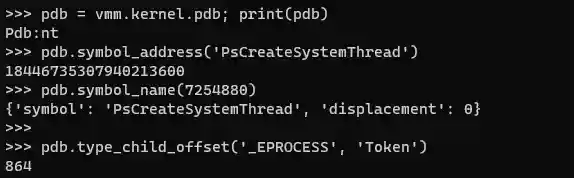
Sources:
-
module.pdb- symbols related to a specific module (if any). -
vmm.kernel.pdb- the ntoskrnl.exe 'nt' symbols.
Attributes:
pdb.module # str: the pdb symbols module. ex: pdb.module -> 'nt'
Methods:
# Retrieve a symbol address given its name.
# -- symbol_name = the symbol name.
# -- return = the symbol address.
pdb.symbol_address(str: symbol_name) # -> int: address
# example:
#   pdb.symbol_address('PsCreateSystemThread') -> 18446735307940213600


# Retrieve a symbol name given its address offset.
# -- symbol_address_or_offset = address or offset to the symbol from module base (exact or nearby).
# -- return = the symbol name and the displacement (distance) to its location.
pdb.symbol_name(int: symbol_address_or_offset ) # -> dict: name info
# example #1:
#   pdb.symbol_name(18446735307940213600) ->
#   {'symbol': 'PsCreateSystemThread', 'displacement': 0}
# example #2:
#   pdb.symbol_name(7254880) ->
#   {'symbol': 'PsCreateSystemThread', 'displacement': 0}


# Retrieve the child name offset within a type.
# -- type_name = the name of the type.
# -- child_name = the struct name of the type child.
# -- return = an offset.
pdb.type_child_offset(str: type_name, str: child_name) # -> int: offset
# example:
#   pdb.type_child_offset('_EPROCESS', 'Token') -> 864


# Retrieve the size of a type.
# -- type_name = the name of the type.
# -- return = the size of the type.
pdb.type_size(str: type_name) # -> int: type size
# example:
#   pdb.type_size('_EPROCESS') -> 2176
CONSTANTS:
MemProcFS constants used by various functions. Constants are generally equal to constants in vmmdll.h.
Constants are generally accessed by memprocfs.<CONSTANT_NAME>.
PID_PROCESS_CLONE_WITH_KERNELMEMORY

# MemProcFS flags related to memory read() / write() functionality:
FLAG_NOCACHE            # do not use the data cache (force reading from memory acquisition device)
FLAG_ZEROPAD_ON_FAIL    # zero pad failed physical memory reads and report success if read within range of physical memory.
FLAG_FORCECACHE_READ    # force use of cache - fail non-cached pages - only valid for reads, invalid with VMM_FLAG_NOCACHE/VMM_FLAG_ZEROPAD_ON_FAIL.
FLAG_NOPAGING           # do not try to retrieve memory from paged out memory from pagefile/compressed (even if possible)
FLAG_NOPAGING_IO        # do not try to retrieve memory from paged out memory if read would incur additional I/O (even if possible).
FLAG_NOCACHEPUT         # do not write back to the data cache upon successful read from memory acquisition device.
FLAG_CACHE_RECENT_ONLY  # only fetch from the most recent active cache region when reading.
FLAG_NO_PREDICTIVE_READ # do not perform additional predictive page reads (default on smaller requests).

# NTSTATUS values. (Used/Returned by Write file plugin callbacks).
STATUS_SUCCESS
STATUS_UNSUCCESSFUL
STATUS_END_OF_FILE
STATUS_FILE_INVALID

# SYSTEM values:
SYSTEM_UNKNOWN_X64
SYSTEM_WINDOWS_X64
SYSTEM_UNKNOWN_X86
SYSTEM_WINDOWS_X86

# MEMORYMODEL values:
MEMORYMODEL_NA
MEMORYMODEL_X86
MEMORYMODEL_X86PAE
MEMORYMODEL_X64

# NOTIFY EVENT values - received by the notify callback function for specific
# events occuring in the native plugin manager / VMM / MemProcFS.
PLUGIN_NOTIFY_VERBOSITYCHANGE
PLUGIN_NOTIFY_REFRESH_FAST           # refresh fast event   - at partial process refresh.
PLUGIN_NOTIFY_REFRESH_MEDIUM         # refresh medium event - at full process refresh.
PLUGIN_NOTIFY_REFRESH_SLOW           # refresh slow event   - at registry refresh.
PLUGIN_NOTIFY_FORENSIC_INIT
PLUGIN_NOTIFY_FORENSIC_INIT_COMPLETE

# WINDOWS REGISTRY contants below:
WINREG_NONE
WINREG_SZ
WINREG_EXPAND_SZ
WINREG_BINARY
WINREG_DWORD
WINREG_DWORD_BIG_ENDIAN
WINREG_LINK
WINREG_MULTI_SZ
WINREG_RESOURCE_LIST
WINREG_FULL_RESOURCE_DESCRIPTOR
WINREG_RESOURCE_REQUIREMENTS_LIST
WINREG_QWORD

# CONFIG GET/SET OPTION VALUES BELOW:
# used together with vmm.get_config() / vmm.set_config()
OPT_CORE_PRINTF_ENABLE              # RW
OPT_CORE_VERBOSE                    # RW
OPT_CORE_VERBOSE_EXTRA              # RW
OPT_CORE_VERBOSE_EXTRA_TLP          # RW
OPT_CORE_MAX_NATIVE_ADDRESS         # R
OPT_CORE_LEECHCORE_HANDLE           # R - underlying leechcore handle (do not close).

OPT_CORE_SYSTEM                     # R
OPT_CORE_MEMORYMODEL                # R

OPT_CONFIG_IS_REFRESH_ENABLED       # R - 1/0
OPT_CONFIG_TICK_PERIOD              # RW - base tick period in ms
OPT_CONFIG_READCACHE_TICKS          # RW - memory cache validity period (in ticks)
OPT_CONFIG_TLBCACHE_TICKS           # RW - page table (tlb) cache validity period (in ticks)
OPT_CONFIG_PROCCACHE_TICKS_PARTIAL  # RW - process refresh (partial) period (in ticks)
OPT_CONFIG_PROCCACHE_TICKS_TOTAL    # RW - process refresh (full) period (in ticks)
OPT_CONFIG_VMM_VERSION_MAJOR        # R
OPT_CONFIG_VMM_VERSION_MINOR        # R
OPT_CONFIG_VMM_VERSION_REVISION     # R
OPT_CONFIG_STATISTICS_FUNCTIONCALL  # RW - enable function call statistics (.status/statistics_fncall file)
OPT_CONFIG_IS_PAGING_ENABLED        # RW - 1/0
OPT_CONFIG_DEBUG                    # W
OPT_CONFIG_YARA_RULES               # R

OPT_WIN_VERSION_MAJOR               # R
OPT_WIN_VERSION_MINOR               # R
OPT_WIN_VERSION_BUILD               # R
OPT_WIN_SYSTEM_UNIQUE_ID            # R

OPT_FORENSIC_MODE                   # RW - enable/retrieve forensic mode type [0-4].

OPT_REFRESH_ALL                     # W - refresh all caches
OPT_REFRESH_FREQ_MEM                # W - refresh memory cache (excl. TLB) [fully]
OPT_REFRESH_FREQ_MEM_PARTIAL        # W - refresh memory cache (excl. TLB) [partial 33%/call]
OPT_REFRESH_FREQ_TLB                # W - refresh page table (TLB) cache [fully]
OPT_REFRESH_FREQ_TLB_PARTIAL        # W - refresh page table (TLB) cache [partial 33%/call]
OPT_REFRESH_FREQ_FAST               # W - refresh fast frequency - incl. partial process refresh
OPT_REFRESH_FREQ_MEDIUM             # W - refresh medium frequency - incl. full process refresh
OPT_REFRESH_FREQ_SLOW               # W - refresh slow frequency.

OPT_PROCESS_DTB                     # W - force set process directory table base. [LO-DWORD: Process PID]