

A C++ & Java library for Image/Camera/Video filters. PRs are welcomed.
New Features
v3.x adds CameraX support (CameraXProvider) and a unified zoom API (ICameraProvider.setZoomRatio).


Gradle dependency
allprojects {
    repositories {
        maven {
            // Use github hosted maven repo for now.
            // Repo url: https://github.com/wysaid/android-gpuimage-plus-maven
            url 'https://maven.wysaid.org/'
        }
    }
}

// Choose only one of them
dependencies {
    // Page size: 4KB (default)
    // Architectures: armeabi-v7a, arm64-v8a, x86, x86_64
    // Full-featured with FFmpeg bundled
    implementation 'org.wysaid:gpuimage-plus:3.1.2'

    // Page size: 16KB
    // Architectures: armeabi-v7a, arm64-v8a, x86, x86_64
    // Full-featured with FFmpeg bundled
    implementation 'org.wysaid:gpuimage-plus:3.1.2-16k'

    // Page size: 4KB (default)
    // Architectures: armeabi-v7a, arm64-v8a, x86, x86_64
    // Image-only version (no video features or FFmpeg)
    implementation 'org.wysaid:gpuimage-plus:3.1.2-min'

    // Page size: 16KB
    // Architectures: armeabi-v7a, arm64-v8a, x86, x86_64
    // Image-only version (no video features or FFmpeg)
    implementation 'org.wysaid:gpuimage-plus:3.1.2-16k-min'
}
To compile other versions of ffmpeg, see: https://github.com/wysaid/FFmpeg-Android.git
Build
Quick start with Android Studio:
- Add
usingCMakeCompile=truetolocal.properties - Open the project in Android Studio
- Wait for NDK/CMake initialization
- Build and run
For detailed build instructions, configuration options, and alternative build methods (VS Code, command line, ndk-build), see docs/build.md.
Precompiled libraries: android-gpuimage-plus-libs
iOS version: ios-gpuimage-plus
Manual
1. Usage
Apply a filter with a rule string:
Bitmap srcImage = ...;

// HSL Adjust (hue: 0.02, saturation: -0.31, luminance: -0.17)
String ruleString = "@adjust hsl 0.02 -0.31 -0.17";

Bitmap dstImage = CGENativeLibrary.filterImage_MultipleEffects(srcImage, ruleString, 1.0f);

// Save result
ImageUtil.saveBitmap(dstImage);
2. Custom Shader Filter
2.1 Writing a Filter
Custom filters inherit from CGEImageFilterInterface:
// A simple color reversal filter
class MyCustomFilter : public CGE::CGEImageFilterInterface
{
public:
    bool init()
    {
        CGEConstString fragmentShaderString = CGE_SHADER_STRING_PRECISION_H
        (
        varying vec2 textureCoordinate;
        uniform sampler2D inputImageTexture;

        void main()
        {
            vec4 src = texture2D(inputImageTexture, textureCoordinate);
            src.rgb = 1.0 - src.rgb;  // Reverse all channels
            gl_FragColor = src;
        }
        );

        return m_program.initWithShaderStrings(g_vshDefaultWithoutTexCoord, fragmentShaderString);
    }
};
See customFilter_N.cpp for a complete example.
2.2 Running a Custom Filter
In C++:
// Assumes GL context exists
CGEImageHandlerAndroid handler;
auto* customFilter = new MyCustomFilter();

customFilter->init();
handler.initWithBitmap(env, bitmap);
handler.addImageFilter(customFilter);  // Handler takes ownership

handler.processingFilters();
jobject resultBitmap = handler.getResultBitmap(env);
If no GL context exists, use
CGESharedGLContext.
In Java:
Use CGENativeLibrary.cgeFilterImageWithCustomFilter or CGEImageHandler directly.
3. Filter Rule Strings
Filter effects are defined by text-based rule strings. See docs/filter-rules.md for complete syntax reference.
Quick example:
// Chain multiple filters with @ separator
String filter = "@curve RGB (0,0) (128,150) (255,255) " +
                "@adjust hsl 0.02 -0.31 -0.17 " +
                "@blend overlay texture.jpg 80";
4. Key Classes & Threading
| Class | Purpose |
|---|---|
CGENativeLibrary |
Main entry — static filter methods |
CGEImageHandler |
Image handler wrapper |
CGEFrameRenderer |
Real-time camera/video renderer |
CGEFrameRecorder |
Video recording (requires FFmpeg) |
Important: GL operations must run on the GL thread:
glSurfaceView.queueEvent(() -> {
    // Your GL operations here
});
Documentation
- docs/build.md — Full build guide and configuration options
- docs/filter-rules.md — Complete filter syntax reference
- .github/CONTRIBUTING.md — Contributing guidelines
- .github/RELEASE.md — Release process
Tool
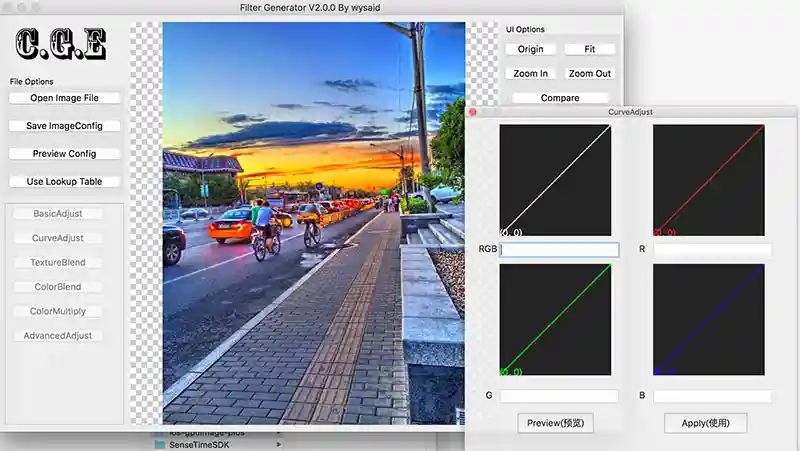
CGE-Tools — open-source desktop companion for creating and previewing CGE filter rules (macOS / Linux / Windows). Latest release: v2.0.0.
Contributors
This project is built with help from the open-source community. Contributions of code, documentation, tests, bug reports, and reviews are all welcome.