Compression benchmark: 7-Zip, PeaZip, WinRar, WinZip comparison
Compression
/ decompression test "out-of-the-box"
Benchmark methodsBenchmark input data is saved in system disk (solid state, SSD) and compressed to system disk, same partition, separate directory; the resulting archives are then extracted to separate directory on same (system) disk/partition.
Each compression and extraction test is repeated 5 times to get an average value; size is expressed in MB (lower, better), time in seconds (lower, better).
Apps are tested at default out-of-the-box compression settings for ZIP (chosen as most commonly supported format) and a secondary, well knwon and widely supported format (7Z and RAR).
Please note that PeaZip uses same Open Source routines implemented in 7-Zip for 7Z and ZIP formats (tested in this benchmark), so speed and compression ratio of the two apps are similar with same compression settings, while values reported in this benchmark differs due the different choices for default compression settings in the two apps - PeaZip defaults more oriented to speed, and 7-Zip defaults more oriented to high compression.
Benchmark results table, the lower the better for all columns
| Compressed
size (MB) |
Compression
ratio |
Compression
time (sec) |
Extraction time (sec) | |
| W10
Compressed Folders |
415,00 |
33,02% |
48,0 |
17,2 |
| WinRar,
ZIP default |
407,00 | 32,38% |
24,0 |
9,1 |
| WinRar,
RAR default |
318,00 | 25,30% |
106,0 |
5,6 |
| WinZip,
ZIP default |
393,00 | 31,26% |
141,5 |
11,8 |
| 7-Zip, ZIP
medium |
396,00 | 31,50% |
118,1 |
8,9 |
| 7-Zip, 7Z
medium |
286,00 | 22,75% |
284,0 |
4,4 |
| PeaZip,
ZIP fast |
426,00 | 33,89% |
28,8 |
9,5 |
| PeaZip, 7Z
fast |
346,00 | 27,53% |
56,4 |
3,9 |
| macOS
Finder,
ZIP |
410,00 | 32,62% |
38,4 |
3,5 |
| macOS
PeaZip,
ZIP fast |
426,00 | 33,89% |
16,4 |
5,3 |
| macOS
PeaZip, 7Z
fast |
346,00 | 27,53% |
25,8 |
1,9 |
| Linux
Gnome Archive Manager |
410,00 |
32,62% |
85,0 |
17,5 |
| Linux
PeaZip, ZIP fast |
426,00 |
33,89% |
41,6 |
12,3 |
Archive size in MB (lower better), compression ratio of input data, and time in seconds (lower better) to complete compression and de-compression of data.
Compression ratio
results:
what application compresses better by default
In terms of attainable compression, 7Z and RAR formats shows a clear advantage ove ZIP format, which never reaches a compression ratio lower than 30%, some percentage points worse than non-zip formats.
7Z provides best compression result with medium compression level (default on 7-Zip), and third best result with fast compression level (default on PeaZip), with RAR at medium compression level (default on WinRar) providing the second best compression ratio, with an intermediate output size.
As for ZIP compression, WinZip provides the best result, even if it is significantly worse (larger output) even of 7Z at fast compression level.

Compression speed
results:
what is the fastest application by default
WinRar (fastest) and PeaZip (second fastest) provides the best results in terms of compression speed when using ZIP format.
Fastest non-zip compressor is PeaZip using 7Z fast, with RAR being almost twice as slow, and 7Z medium being almost 6 times slower.
WinZip notably provides the slowest ZIP compression performance, even solwer than RAR compression.
On macOS, Finder compresses significantly slower than PeaZip, with "ZIP fast" compression being over 2x faster that Finder ZIP compression, and "7Z fast" compression being 1,5x faster while providing significantly better compression ratio (+5%, -64MB output size).
On Linux results are quite similar, Gnome Archive Manager compresses significantly slower (2x) than PeaZip in the default "ZIP fast" mode, scoring a modest gain in compression ratio (+1,3%, -16MB output size) for Gnome Archive Manager.

Extraction speed
results:
what is the fastest application by default
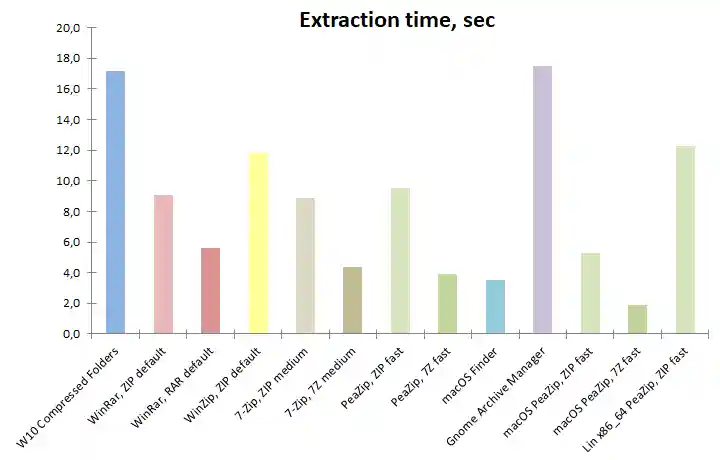
Decompression of ZIP archives is slower than decompression of RAR and 7Z archives, in contrast with typical compression speed test results.
This design choice for newer archive formats makes sense, as for general rule of thumb it is assumed it is more probable / frequent the need to extract a compressed content rather than to create a compressed archive - in example a package, which was compressed a single time, may be accesssed multiple times to restore saved content, or distributed to many users each one needing to extract the compressed content.
Fastest decompression time is provided by PeaZip (7Z fast), second fastest by 7-Zip (7Z medium), third fastest by WinRar (RAR).
As for ZIP format extraction, 7-Zip, PeaZip, and WinRar performances are very close, while WinZip and Windows 10 Compressed Folders are significantly slower.
On macOS, Finder provides remarkably fast extraction of its own ZIP archive, outperforming PeaZip "ZIP fast" but being almost 2x slower than extraction of PeaZip "7Z fast", due to the .7Z format optimization for extraction speed holding true on macOS platform.
On Linux, PeaZip "ZIP fast" outperforms Gnome Archive Manager in extraction speed by a x1,4 factor.
Conclusions:
what is the best performing application?
Overall best
compressor out-of-the-box
It is not easy,
if even possible, to define what is the best performing
application in this benchmark, as all tested apps supports multiple
archive formats fulfilling different needs for different user cases at
best.
Let see results in detail:
Fastest compressor
WinRar (ZIP default) provides the fastest compression, quite closely
matched by PeaZip (ZIP fast) which however, with this setting, produces
a larger archive.
PeaZip (7Z fast) provides an interesting option when speed is a
prominent requiremet, being the fastest non-zip compressor of this
benchmark, and producing a significantly smaller archive than any other
ZIP compressor, with the additional benefit of being the fastest format
in the extraction benchmark.
Read more about fast compressors in fastest
copression benchmark.
Best compression ratio
7-Zip (7Z medium) provides the best compression ratio, 22,75% against
25,30% of WinRar (RAR default) but being 2.7x times slower.
PeaZip (7Z fast) provides a reasonable performances tradeoff reaching
27,53% compression ratio (significantly better than any ZIP compressor)
but being almost 2x faster than RAR default compression.
Read more about best compressors in terms of maximum attained
compression ratio in maximum
copression benchmark.
Final recommendations
ZIP remains the format of choice if fast compression and compatibility are the main concerns, with WinRar and PeaZip providing faster ZIP compression even if at the cost of losing some compression ratio compared to other utilities.
RAR and 7Z formats provides far better compression ratio than ZIP increasing only compression time, not decompression, making it a viable high performance alternative in every user case where archive extraction occurs more often than archive creation - i.e. for content distribution.
In 7Z subgroup, 7-Zip and PeaZip performs very similarily (PeaZip using same Open Source libraries provided by 7-Zip), but different defaults makes 7-Zip more oriented to strong compression out of the box, while PeaZip default 7Z compression setting is gerared toward speed - a choice which is influenced by today's incidence of large files (as multimedia formats) containing poorly of non-compressible data.
RAR format is proprietary and is supported for archive creation only by WinRar - even if some archivers as PeaZip can create RAR archives this requires WinRar being installed to use its binaries.
Verdict
For users needing maximum compatibility with recipients using different archive managers, the best choice is ZIP format, in which WinRar and PeaZip provides best compression speeds, with WinRar providing better ZIP compression.
For maximum compression ratio, 7-Zip (7Z medium) - or PeaZip set with same compression settings - provides an better compression ratio than RAR, and (by wide margin) over ZIP format.
PeaZip (7Z fast) provides a well balanced alternative, with fastest non-zip compression speed, fastest extraction speed, and third best compression ratio which exceeds CR attainable with any ZIP compressor - even spending more time and computing power as with WinZip.
Synopsis: Out-of-the-box
compression
benchmark. What is the overall best application between 7-Zip,
PeaZip, WinRar, WinZip for general purpose archiving and
compression in different formats. What is the application providing
best compression out-of-the-box. What is the fastest application. What
software
extracts / decompress faster by default. Conclusion about file
archivers
performances comparative.
Topics: PeaZip vs 7-Zip vs
WinRar vs WinZip compression benchmark, which is the best file archiver
application
PeaZip > Compression benchmark > 7-Zip, PeaZip, WinRar, WinZip comparison