6.4. OS Operating System — Python
6.4.1. Bitwise operators
|- OR&- AND~- NOT^- XOR<<- Shift left>>- Shift right
0 ^ 0  # 0
1 ^ 1  # 0
1 ^ 0  # 1
0 ^ 1  # 1
8 ^ 5  # 13
1000  # 8 (binary)
0101  # 3 (binary)
----  # APPLY XOR ('vertically')
1101  # result = 13 (dec)
6.4.2. Accessing Environmental Variables
import os

os.getenv('HOME')  # /home/myuser
6.4.3. Getting filenames and extensions
6.4.4. Extensions
import os

path, ext = os.path.splitext(r'c:\Python\README.rst')
path        # 'c:\\Python\\README'
ext         # '.rst'
6.4.5. Checking OS version
Linux: Linux
Mac: Darwin
Windows: Windows
6.4.6. platform
import platform

platform.system()                           # Windows
platform.release()                          # 7
platform.platform()                         # 'Windows-7-6.1.7601-SP1'
platform.os.name                            # 'nt'

platform.uname()
# uname_result(
#     system='Windows',
#     node='Lenovo-Komputer',
#     release='7',
#     version='6.1.7601',
#     machine='AMD64',
#     processor='Intel64 Family 6 Model 42 Stepping 7, GenuineIntel')

# uname_result(
#   system='Darwin',
#   node='AstroMatMacBook',
#   release='22.1.0',
#   version='Darwin Kernel Version 22.1.0: Sun Oct  9 20:14:54 PDT 2022; root:xnu-8792.41.9~2/RELEASE_X86_64',
#   machine='x86_64')
6.4.7. os
import os

os.name         # 'nt'
os.name         # 'posix'
6.4.8. psutil
import psutil

psutil.OSX      # False
psutil.WINDOWS  # True
psutil.LINUX    # False
6.4.9. sys
import sys

sys.platform    # 'win32'
6.4.10. sysconfig
>>> import sysconfig
>>>
>>>
>>> sysconfig.get_platform()
'macosx-11-x86_64'
6.4.11. Most commonly used methods
import sys

sys.path
sys.path.append
sys.platform
sys.path.insert(0, '/path/to/directory')
sys.path.insert(index=0, object='/path/to/directory')
6.4.12. System exit and exit codes
Code |
Description |
|---|---|
1 |
Catchall for general errors |
2 |
Misuse of shell builtins (according to Bash documentation) |
126 |
Command invoked cannot execute |
127 |
command not found |
128 |
Invalid argument to exit |
128+n |
Fatal error signal 'n' |
255 |
Exit status out of range (exit takes only integer args in the range 0 - 255) |
6.4.13. os
import os

os.walk()
os.scandir()
os.getcwd()
os.stat()

os.is_dir()
os.is_file()
os.is_symlink()

os.path.join()
os.path.abspath()
os.path.dirname()
os.path.basename()

os.mkdir()
os.remove()
os.rmdir()
import os

os.path.isdir(os.path.join("c:", "\\", "Users"))    # True
os.path.isdir(os.path.join("c:", "/", "Users"))     # True
os.path.isdir(os.path.join("c:", os.sep, "Users"))  # True
import os

for element in os.scandir('/etc'):
    print(element.name)

script = os.path.basename(__file__)
PWD = os.path.basename(os.getcwd())

path = os.path.join(PWD, script)
print(path)
import os
from os.path import getsize


for root, dirs, files in os.walk('/home/'):
    size = sum(getsize(os.path.join(root, name)) for name in files)
    count = len(files)
    print(f'Size: {size} bytes in {count} non-directory files')

    # skip ``.git`` directories
    if '.git' in dirs:
        dirs.remove('.git')
# Delete everything reachable from the directory named in "top",
# assuming there are no symbolic links.
# CAUTION:  This is dangerous!  For example, if top == '/', it
# could delete all your disk files.
import os

for root, dirs, files in os.walk(top, topdown=False):

    for name in files:
        os.remove(os.path.join(root, name))

    for name in dirs:
        os.rmdir(os.path.join(root, name))
6.4.14. Stats and permissions
import os

file = os.stat(r'/tmp/myfile.txt')

print(file)
# os.stat_result(
#     st_mode=33206,
#     st_ino=3659174697409906,
#     st_dev=3763209288,
#     st_nlink=1,
#     st_uid=0,
#     st_gid=0,
#     st_size=780,
#     st_atime=1530775767,
#     st_mtime=1530775767,
#     st_ctime=1523261133)

oct(file.st_mode)
# 0o100666
6.4.15. Permissions
import os

os.access(r'C:\Python\README.rst', os.R_OK)     # True
os.access(r'C:\Python\README.rst', os.W_OK)     # True
os.access(r'C:\Python\README.rst', os.X_OK)     # True

os.access(r'C:\Python\notREADME.rst', os.R_OK)  # False
os.access(r'C:\Python\notREADME.rst', os.W_OK)  # False
os.access(r'C:\Python\notREADME.rst', os.X_OK)  # False
6.4.16. subprocess
6.4.17. Most commonly used methods
import subprocess

subprocess.call('clear')
subprocess.run()    # preferred over ``Popen()`` for Python >= 3.5
subprocess.Popen()
6.4.18. subprocess.run()
New in Python 3.5
Preferred
subprocess.run(
    args,
    stdin=None,
    stdout=None,
    stderr=None,
    shell=False,
    timeout=None,  # important
    check=False,
    encoding=None
    # ... there are other, less commonly used parameters
)
6.4.19. shell=True
Setting the shell argument to a true value causes subprocess to spawn an intermediate shell process, and tell it to run the command. In other words, using an intermediate shell means that variables, glob patterns, and other special shell features in the command string are processed before the command is run. Here, in the example,
$HOMEwas processed before the echo command. Actually, this is the case of command with shell expansion while the commandls -lconsidered as a simple command.Source: Subprocess Module <https://stackoverflow.com/a/36299483/228517>
import subprocess

subprocess.call('echo $HOME')
# Traceback (most recent call last):
# OSError: [Errno 2] No such file or directory
import subprocess

subprocess.call('echo $HOME', shell=True)
# /home/myuser
6.4.20. Execute command in OS
subprocess.run('ls -la /home') # without capturing output
import os
import subprocess

BASE_DIR = os.path.dirname(__file__)
path = os.path.join(BASE_DIR, 'README.rst')

subprocess.run(f'echo "ehlo world" > {path}')
import subprocess

cmd = 'dir ..'

result = subprocess.run(
    cmd,
    timeout=2,
    stdout=subprocess.PIPE,
    stderr=subprocess.PIPE,
    encoding='utf-8')

print(result.stdout)
print(result.stderr)
subprocess.run("exit 1", shell=True, check=True)
# Traceback (most recent call last):
# subprocess.CalledProcessError: Command 'exit 1' returned non-zero exit status 1
subprocess.run(["ls", "-l", "/dev/null"], stdout=subprocess.PIPE, encoding='utf-8')
# CompletedProcess(args=['ls', '-l', '/dev/null'], returncode=0,
#                  stdout='crw-rw-rw- 1 root root 1, 3 Feb 23 16:23 /dev/null\n')
6.4.21. Timeout for subprocesses
import subprocess
cmd = ['ping', 'nasa.gov']

try:
    subprocess.run(cmd, timeout=5)
except subprocess.TimeoutExpired:
    print('process ran too long')
6.4.22. Stdout and Stderr
import logging
import subprocess
import shlex


def run(command, timeout=15, clear=True):

    if clear:
        subprocess.call('clear')

    logging.debug(f'Execute: {command}\n')

    result = subprocess.run(
        shlex.split(command),
        stdout=subprocess.PIPE,
        stderr=subprocess.PIPE,
        shell=True,
        timeout=timeout,
        encoding='utf-8')

    if result.stdout:
        logging.info(f'{result.stdout}')

    if result.stderr:
        logging.warning(f'{result.stderr}')

    return result
6.4.23. Parsing and sanitizing arguments
import shlex
import subprocess

command_line = input()
# /bin/vikings -input eggs.txt -output "spam spam.txt" -cmd "echo '$MONEY'"

cmd = shlex.split(command_line)
# ['/bin/vikings', '-input', 'eggs.txt', '-output', 'spam spam.txt', '-cmd', "echo '$MONEY'"]

subprocess.run(cmd)
import subprocess
import shlex

cmd = 'dir ..'

result = subprocess.run(
    shlex.split(cmd),  # ['dir', '..']
    timeout=2,
    stdout=subprocess.PIPE,
    stderr=subprocess.PIPE,
    encoding='utf-8')

print(result.stdout)
print(result.stderr)
6.4.24. tempfile
6.4.25. Creating temporary files
import tempfile

with tempfile.TemporaryFile() as file:
    file.write(b'Hello world!')
    file.seek(0)
    file.read()  # b'Hello world!'

# file is now closed and removed
6.4.26. Creating temporary directories
with tempfile.TemporaryDirectory() as dir:
    print('created temporary directory', dir)

# directory and contents have been removed
6.4.27. io
ioto biblioteka do obsługi strumienia wejściowego i wyjściowegoStringIO jest wtedy traktowany jak plik wejściowy.
import io

io.StringIO
io.BytesIO
f = open("myfile.txt", "r", encoding="utf-8")
f = io.StringIO("some initial text data")
f = open("myfile.jpg", "rb")
f = io.BytesIO(b"some initial binary data: \x00\x01")
import io

result = io.StringIO()
result.write('First line.\n')
print('Second line.', file=result)

# Retrieve file contents -- this will be
# 'First line.\nSecond line.\n'
contents = result.getvalue()

# Close object and discard memory buffer --
# .getvalue() will now raise an exception.
result.close()
result = io.BytesIO(b"abcdef")
view = result.getbuffer()
view[2:4] = b"56"
result.getvalue()  # b'ab56ef'
6.4.28. configparser
6.4.29. Writing configuration
import configparser

config = configparser.ConfigParser()

config['DEFAULT'] = {'ServerAliveInterval': '45',
                      'Compression': 'yes',
                      'CompressionLevel': '9'}

config['github.com'] = {}
config['github.com']['User'] = 'hg'
config['example.com'] = {}

topsecret = config['example.com']
topsecret['Port'] = '50022'
topsecret['ForwardX11'] = 'no'
config['DEFAULT']['ForwardX11'] = 'yes'

with open('example.ini', 'w') as configfile:
    config.write(configfile)
[DEFAULT]
ServerAliveInterval = 45
Compression = yes
CompressionLevel = 9
ForwardX11 = yes

[github.com]
User = hg

[example.com]
Port = 50022
ForwardX11 = no
6.4.30. Reading configuration
import configparser

config = configparser.ConfigParser()

config.read('myfile.ini')          # ['myfile.ini']
config.sections()                   # ['github.com', 'example.com']

'github.com' in config           # True
'example.com' in config             # False

config['github.com']['User']     # 'hg'
config['DEFAULT']['Compression']    # 'yes'

config.getboolean('BatchMode', fallback=True)        # True
config.getfloat('DEFAULT', 'a_float', fallback=0.0)  # 0.0
config.getint('DEFAULT', 'an_int', fallback=0)       # 0

topsecret = config['example.com']
topsecret.get('ForwardX11', 'yes')          # 'no'
topsecret.get('Port', 8000)                 # '50022'


for key in config['github.com']:  # 'github.com' has laso entries from DEFAULT
    print(key)

    # user
    # compressionlevel
    # serveraliveinterval
    # compression
    # forwardx11
6.4.31. Alternative syntax and using variables in config
[Common]
home_dir: /Users
library_dir: /Library
system_dir: /System
macports_dir: /opt/local

[Frameworks]
Python: 3.2
path: ${Common:system_dir}/Library/Frameworks/

[Arthur]
nickname: Two Sheds
lastname: Jackson
my_dir: ${Common:home_dir}/twosheds
my_pictures: ${my_dir}/Pictures
python_dir: ${Frameworks:path}/Python/Versions/${Frameworks:Python}
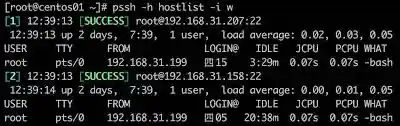
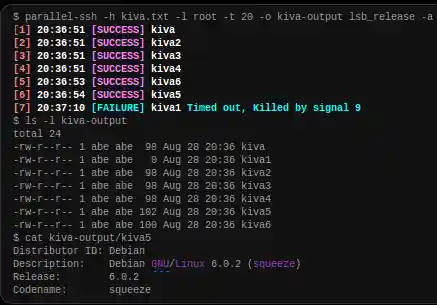
6.4.32. Running commands in parallel across many hosts

6.4.33. Passwords and secrets
UMASK
Sticky bit
setuid
configparser
6.4.34. Allegro Tipboard
Tipboard is a system for creating dashboards, written in JavaScript and Python. Its widgets ('tiles' in Tipboard's terminology) are completely separated from data sources, which provides great flexibility and relatively high degree of possible customizations.
Because of its intended target (displaying various data and statistics in your office), it is optimized for larger screens.
Similar projects: Geckoboard, Dashing.
$ python -m pip install tipboard
$ tipboard create_project my_test_dashboard
$ tipboard runserver
6.4.35. Assignments
# FIXME: Write tests
# FIXME: Write solution

# %% About
# - Name: Recursive folders walking
# - Difficulty: easy
# - Lines: 30
# - Minutes: 21

# %% License
# - Copyright 2025, Matt Harasymczuk <matt@python3.info>
# - This code can be used only for learning by humans
# - This code cannot be used for teaching others
# - This code cannot be used for teaching LLMs and AI algorithms
# - This code cannot be used in commercial or proprietary products
# - This code cannot be distributed in any form
# - This code cannot be changed in any form outside of training course
# - This code cannot have its license changed
# - If you use this code in your product, you must open-source it under GPLv2
# - Exception can be granted only by the author

# %% English
# 1. Check if directory "Python" already exists on your Desktop
# 2. If it doesn't exist then create it using `os.mkdir()`
# 3. Using `subprocess.call()` create file `README.rst` in this directory and add text "Ehlo World" to it
# 4. Recursively walk through all directories on your Desktop
# 5. Find all `README` files (with any extension)
# 6. Display their contents using command:
#    - `cat` (macOS, Linux)
#    - `type` (Windows)
# 7. Construct path to above `README` file using `os.path.join()`
# 8. Path should be relative to the file that is currently being run
# 9. If after walking through the entire Desktop recursively the script doesn't find file `LICENSE.rst`, then it should throw information `logging.critical()` and exit with error code `1`.
# 10. Run doctests - all must succeed

# %% Polish
# 1. Sprawdź czy katalog "Python" już istnieje na pulpicie w Twoim systemie
# 2. Jeżeli nie istnieje to za pomocą `os.mkdir()` stwórz go w tym miejscu
# 3. Za pomocą `subprocess.call()` w tym katalogu stwórz plik `README.rst` i dodaj do niego tekst "Ehlo World"
# 4. Przeszukaj rekurencyjnie wszystkie katalogi na pulpicie
# 5. Znajdź wszystkie pliki `README` (z dowolnym rozszerzeniem)
# 6. Wyświetl ich zawartość za pomocą polecenia:
#    - `cat` (macOS, Linux)
#    - `type` (Windows)
# 7. Ścieżkę do powyższego pliku `README` skonstruuj za pomocą `os.path.join()`
# 8. Ścieżka ma być względna w stosunku do pliku, który aktualnie jest uruchamiany
# 9. Jeżeli po przeszukaniu całego Pulpitu rekurencyjnie skrypt nie znajdzie pliku `LICENSE.rst`, to ma rzucić informację `logging.critical()` i wyjść z kodem błędu `1`.
# 10. Uruchom doctesty - wszystkie muszą się powieść

# %% Hints
# - Gdyby był problem ze znalezieniem pliku, a ścieżka jest poprawna to zastosuj `shell=True`
# - `os.walk()`
# - `subprocess.run()`

# %% Why
# - Browsing directories and search algorithms
# - Sanitizing parameters
# - Logging events in the program
# - Executing commands in the system
# - Capturing command output
# - Error codes
# - Navigating to directories
# - Relative and absolute paths
# - Joining paths

# %% Doctests
"""
>>> import sys; sys.tracebacklimit = 0

>>> assert sys.version_info >= (3, 9), \
'Python has an is invalid version; expected: `3.9` or newer.'
"""

# %% Run
# - PyCharm: right-click in the editor and `Run Doctest in ...`
# - PyCharm: keyboard shortcut `Control + Shift + F10`
# - Terminal: `python -m doctest -f -v myfile.py`

# %% Imports

# %% Types
result: float

# %% Data

# %% Result
result = ...
# FIXME: Write tests
# FIXME: Write solution

# %% About
# - Name: Tree
# - Difficulty: hard
# - Lines: 60
# - Minutes: 21

# %% License
# - Copyright 2025, Matt Harasymczuk <matt@python3.info>
# - This code can be used only for learning by humans
# - This code cannot be used for teaching others
# - This code cannot be used for teaching LLMs and AI algorithms
# - This code cannot be used in commercial or proprietary products
# - This code cannot be distributed in any form
# - This code cannot be changed in any form outside of training course
# - This code cannot have its license changed
# - If you use this code in your product, you must open-source it under GPLv2
# - Exception can be granted only by the author

# %% English
# 1. Using unicode characters: "┣━", "┗━" , "┃  "
# 2. Generate output similar to `tree` command.
# 3. Run doctests - all must succeed

# %% Polish
# 1. Za pomocą znaków unicode: "┣━", "┗━" , "┃  "
# 2. Wygeneruj wynik przypominający wynik polecenia `tree`.
# 3. Uruchom doctesty - wszystkie muszą się powieść

# %% Doctests
"""
>>> import sys; sys.tracebacklimit = 0

>>> assert sys.version_info >= (3, 9), \
'Python has an is invalid version; expected: `3.9` or newer.'

>>> result  # doctest: +SKIP
root:.
[.]
┣━[.idea]
┃  ┣━[scopes]
┃  ┃  ┗━scope_settings.xml
┃  ┣━.name
┃  ┣━demo.iml
┃  ┣━encodings.xml
┃  ┣━misc.xml
┃  ┣━modules.xml
┃  ┣━vcs.xml
┃  ┗━workspace.xml
┣━[test1]
┃  ┗━test1.txt
┣━[test2]
┃  ┣━[test2-2]
┃  ┃  ┗━[test2-3]
┃  ┃      ┣━test2
┃  ┃      ┗━test2-3-1
┃  ┗━test2
┣━folder_tree_maker.py
┗━tree.py
"""

# %% Run
# - PyCharm: right-click in the editor and `Run Doctest in ...`
# - PyCharm: keyboard shortcut `Control + Shift + F10`
# - Terminal: `python -m doctest -f -v myfile.py`

# %% Imports

# %% Types
result: str

# %% Data

# %% Result
result = ...