Velato
One of Forty-Four Esolangs, the first artist's monograph of programming languages
Velato is a programming language, created by Daniel Temkin in 2009, which uses MIDI files as source code: the pattern of notes determines commands. Velato offers an unusual challenge to programmer-musicians: to compose a musical piece that, in addition to expressing their aims musically, fills the constraints necessary to compile to a working Velato program. Each song has a secret message: the program it determines when compiled as Velato.
There are now two dialects of the language; original (2009) is written in MIDI files. The new version (2024), is written by whistling to the machine, for more spontaneous composition.
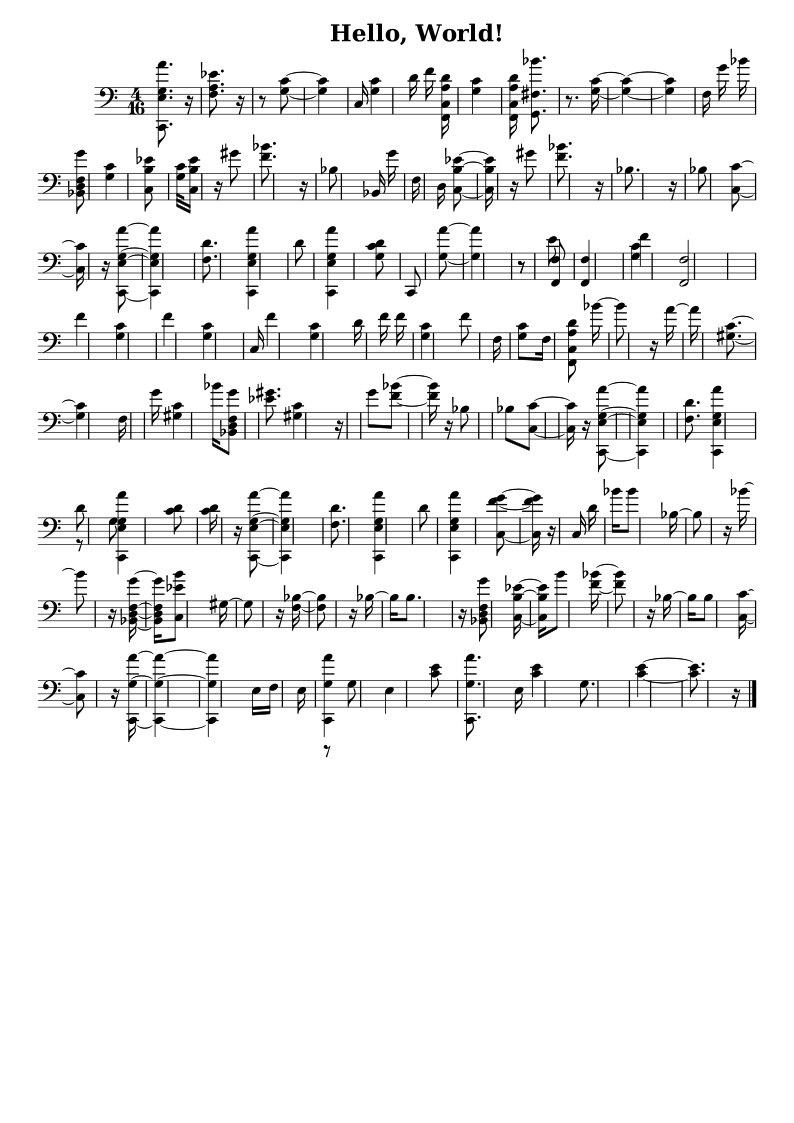

The two programs above take different approaches to Hello World.
Velato is written in musical intervals from the root note, the first note of the song. The root can be changed at any time, even in the middle of a chord, giving flexibility to the programmer-composer. The first Hello World uses dense harmonies to play multiple notes together. They are read programmatically by the order they appear in the MIDI file, even if they are sounded simultaneously. The second Hello World has multiple MIDI tracks. Only the first is read; the other two harmonize without affecting the behavior of the program.
- Intro to the project
- Language rules
- Example: Writing "Hello, World" in Velato
- Note Tool for Composers: Given pseudo-code in a special format, it will give a range of possible notes
Outside Links
- Reference Compiler (C#, .NET Framework 4.8) (github.com)
- Velato Interpreter (Python) (github.com)
- This has a note suggestion tool and scripts for generating midi files and sheet music
- Velato.js by Erik Erwitt. (github.com)
- Hands-Free Velato source code (JS) (github.com)
- Download the original reference compiler in .NET 3.5 (Velato.zip 0.1)
- Velato on Esolangs.org (wiki)
- Create Digital Music on Velato (2009)
Intro
Velato (2009) is a programming language which uses MIDI files as source code. Commands are determined by the intervals between notes.
Velato commands
All commands in Velato are expressed strictly by the pitch and order of notes. With the exception of variable names (more on this below), only the interval between notes is relevant, rather than the pitch itself.
The range of pitches is the alphabet in which Velato commands are written. This means that time signature, key signature, measures, rests, repeat marks, even note durations, are ignored by the code. If two notes are played as a chord, with no delay between the sounding of the notes, the one which appears first in the MIDI file is interpreted first, as if they had not been played simultaneously.
The commands and expressions themselves are determined by intervals from a command root note, which is the first note of the song. Therefore, a valid Velato program in one key can be translated to any other key, with no effect on the program. To allow versatility in Velato composition, the key can also be changed between any two commands within the song (using the "change command root" command). This allows the programmer to choose a starting pitch that better fits the flow of the song.Also, additional tracks can be added to the MIDI file, which will be ignored by the compiler. This can allow any Velato program to be accompanied, without affecting the program.For example: "C A G E D D", in the key of C, prints the variable D to the screen. In the key of G, the same command would be "G E D B A D". The actual definition of the print command are the set of intervals: Root (in the first case C), Major 6th (from root), Perfect 5th. The remaining three notes determine that it's variable D to print to the screen.
Note that we did not transpose the final D, which is the name of the variable. For commands and expressions (except variables), octave is ignored, so an A in any octave has the same meaning. Also, notes are determined by pitch, not the actual written note, so G# and Ab are equivalent.As mentioned above, variables are an exception. They are specific to octave and are not determined by interval; so command root changes do not affect them. This allows the program to have as many variables as there are notes allowed in the MIDI specification. This also makes programs less confusing to follow.
Commands
- Commands are made up of a series of notes.
- Commands can be of any length. All commands start with the Command Root.
- Intervals of the notes, following the command root, determine the command.
- Octave is ignored for commands (as is duration). So if a minor third from A is required, a C in any octave can be sounded.
The Command Root Note
- The command root note is not necessarily the root of the current key (or root of a chord).
- The command root note is defined by: the first note of the song, to begin with. Then, whenever the command is played twice in a row, the following note is the new command root.
Expressions
- Any notes from the end of a command to the beginning of the next are interpreted as an expression.
Numbers
- All numbers are assigned in base 10.
- Numbers are relative to the command root, and are not specific to an octave (so if a D represents a 1, it will do so in every octave).
- Command root is reserved for the end of the statement, and has no meaning in number assignment.
- One fifth above command root is end of int, or decimal point of double (second time would be end of double).
- All the other half steps from command root are digits of the number
- The next half-step up is zero, and numbers increment with each half-step, up to 9. At that point, we hit the command root in the next octave.
-
For example:
- if C is the command root, then the number sequence must end on a G (a perfect 5th up from the command root). Any G in the scale will suffice.
- If this is a double, and we wish to use a decimal point, it is represented by the first G, while the second G completes the number.
- Let's encode the number 458. Our command note is C, so four half-steps up is E. Five is F, and Seven is A. Then we finish on G to end the sequence.
Variables
- Any note can be a variable as well as a command, determined only by syntax.
- Variables can be assigned to any note.
- Variables can only be called by a command that does not start with (have a command root note) the same note as the variable note.
- So if the variable is assigned to Middle C, the command root note for the command calling it cannot be a C.
- A variable can be re-declared, erasing the value and type of the variable it is replacing.
Statements
- Statements in Velato always begin with the command root note, then a command, and then (in some cases) additional expressions.
- If an expression starts with the command root note, it is interpreted as a command, and will be matched to the Command List below.
Functions
- Functions are not yet implemented in Velato. They will work much like variables (in that they are represented by single notes, with no special meaning for interval or octave). They will be allowed to use the same "names" (pitches) as existing variables.
Other missing features
- Arrays (including arrays of char for strings), and a ReadLine() special command. Also, right now there is no method for handling input. I'm hoping to address these, plus improve the error messages version 0.2.
The following blog post will list all Velato commands.
Language Rules
Here is the complete list of commands currently implemented in Velato. For an introduction to the language, see the intro.
List of Commands
All statements start with the command root, followed by one of the following commands. Intervals are from the currant command root note.| command | second note | third note | followed by... |
|---|---|---|---|
| Change Root Note | Major 2nd | New root note | |
| Let (assignment) | Minor 3rd | Variable as single note, then expression | |
| Declare variable | Minor 6th | Variable as single note, then type | |
| Blocks | Major 3rd | ||
| While | Major 3rd | ||
| End While | Perfect 4th | ||
| If | Perfect 5th | ||
| Else | Major 6th | ||
| End If | Major 7th | ||
| Special Commands | Major 6th | ||
| Print to screen | Perfect 5th | Expression to print |
List of Other Expressions
If an operation is expecting an expression, the list that follows will determine what expression is interpreted. Expressions do not start with the command root note, but all intervals are still determined from it.
Expressions don't differentiate between perfect/diminished, major/minor, so that they can be diatonic to the scale used in the rest of the command. For example, if you're in C, this helps you avoid having a progression like C E C Eb, which could sound random or unmusical, depending on context. The programmer can pick which of the two intervals fits the song better.
| expression | first note | second note | third note | followed by... |
|---|---|---|---|---|
| value | 3rd (maj/min) | |||
| variable | 2nd | Name of varaible (since note) | ||
| pos. (+) int | 5th | Single note for each digit, ending with Perfect 5th to mark end of number | ||
| neg. (-) int | 3rd | Single note for each digit, ending with Perfect 5th to mark end of number | ||
| char | 4th | Char as ASCII int: single note for each digit, ending with Perfect 5th to mark end of number | ||
| pos. (+) double | 6th | Single note for each digit, first Perfect 5th to mark decimal point, second Perfect 5th marking end of number | ||
| neg. (-) double | 7th | Single note for each digit, first Perfect 5th to mark decimal point, second Perfect 5th marking end of number | ||
| conditional | 2nd | |||
| = | 2nd | |||
| > | 3rd | |||
| < | 4th | |||
| NOT | 5th | (also used for NOT < (indicating greater than or equal to) and NOT = | ||
| AND | 6th | |||
| OR | 7th | |||
| procedural | 6th | |||
| grouping | 6th | |||
| ( | 6th | |||
| ) | 2nd | |||
| math operation | 5th | |||
| simple | 5th | |||
| + | 3rd | |||
| - | 2nd | |||
| * | 5th | |||
| / | 4th | |||
| % (mod) | 6th | |||
| exponential / other | 7th | |||
| power | 2nd | |||
| log | 3rd |
The only interval without a choice is a 4th. There is no augmented 4th, a tritone is always interpreted as a diminished 5th.Each number of half-steps is interpreted as a unique interval -- so that there are no enharmonic intervals that may lead to ambigous commands. If an expression requires a 4th, only the Perfect 4th can be used, not an augmented 4th (tritone), which is considered a Diminished 5th in Velato. If a 3rd is required, either the Minor 3rd or Major 3rd can be used.
This is the interval list used by Velato:
| 2nd | Minor 2nd | 1 half-step |
| 2nd | Major 2nd | 2 half-steps |
| 3rd | Minor 3rd | 3 half-steps |
| 3rd | Major 3rd | 4 half-steps |
| 4th | Perfect 4th | 5 half-steps |
| 5th | Diminished 5th | 6 half-steps |
| 5th | Perfect 5th | 7 half-steps |
| 6th | Minor 6th | 8 half-steps |
| 6th | Major 6th | 9 half-steps |
| 7th | Minor 7th | 10 half-steps |
| 7th | Major 7th | 11 half-steps |
Types:
When a type needs to indicated (such as in a variable declaration), this table shows how they are indicated:
| type | note |
|---|---|
| int | 2nd |
| char | 3rd |
| double | 4th |
Numbers:
Individual digits in a number are determined by half-steps from the command root, excluding the Perfect 5th. In C, these are the numbers tied to each note:
| c# | d | d# | e | f | f# | g | g# | a | a# | b |
| 0 | 1 | 2 | 3 | 4 | 5 | - | 6 | 7 | 8 | 9 |
Characters:
All characters are entered by their ASCII int. You can find a table of ASCII values here.
For a practical example, see the Hello World Tutorial.