!!!###!!!title=Text to Chart——VisActor/VMind tutorial documents!!!###!!!!!!###!!!description=In the previous section [Chart Generation](./Chart_Generation), we learned how to intelligently generate charts from existing structured data. However, in some scenarios, we may not have a dataset available and might only have more raw data, such as text data. In this tutorial, we will introduce how to use VMind to directly generate charts from a piece of text.!!!###!!!
In the previous section Chart Generation, we learned how to intelligently generate charts from existing structured data. However, in some scenarios, we may not have a dataset available and might only have more raw data, such as text data. In this tutorial, we will introduce how to use VMind to directly generate charts from a piece of text.
text2Chart
The text2Chart function in VMind is similar to generateChart, with the main difference being that the input changes from a data table and field information to plain text content, as follows:
text (string): Required, the original text content
userPrompt (string): Optional, the user's visualization intent (what data you mainly want to extract from the text and how to display it with a chart)
options: Optional, option parameters, including:
fieldInfo (Array): Field information contained in the text type, including field names, types, etc.
chartTypeList (ChartType[], optional): Supported chart type list. If not undefined, a chart will be generated from the chart types specified in this list.
enableDataQuery (boolean, optional): Decides whether to enable data aggregation during chart generation
colorPalette (Array, optional): Used to set the color palette of the chart
animationDuration (number, optional): Used to set the playback duration of the chart animation
theme (ChartTheme | string, optional): Sets the theme style of the final spec. By default, VMind uses a theme style with gradient colors. You can set VChart's general light or dark theme ('light' | 'dark') or a theme style that suits your usage scenario
Throughout the process, VMind first uses a large model to extract structured table data from the original text and automatically cleans the table data. Then, similar to intelligent chart generation, it uses the large model to obtain the recommended chart type and specific mapping method. Finally, VMind assembles the results to generate the final VChart spec.
VMind will add an entrance animation to the generated chart by default, so it will also return the duration of the chart animation time. If you don't want the chart animation, you can set spec.animation to false.
Below is an example of using text2Chart to generate a chart:
import VMind from'@visactor/vmind';const vmind = new VMind(options);
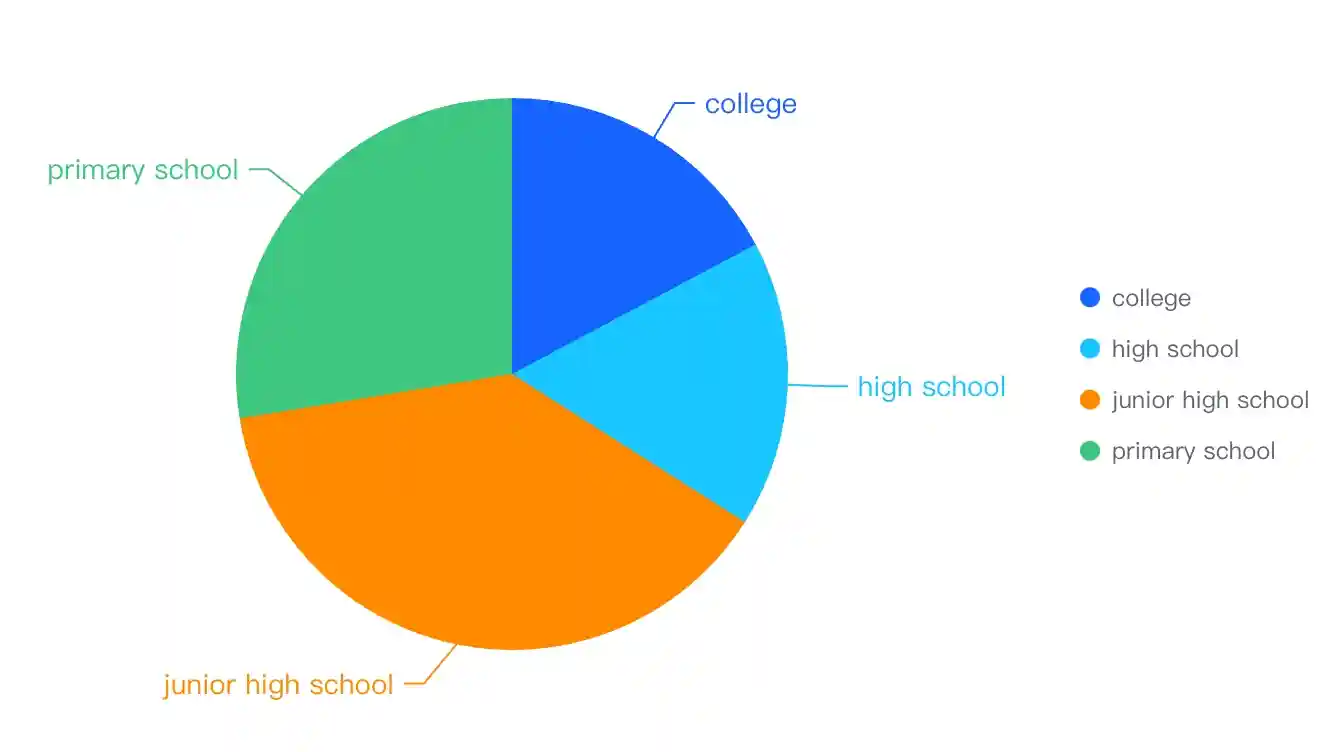
consttext = 'Among the national population[2], the number of people with a college (including junior college and above) education level is 218,360,767; the number of people with a high school (including technical secondary school) education level is 213,005,258; the number of people with a junior high school education level is 487,163,489; the number of people with a primary school education level is 349,658,828 (the above-mentioned education levels include graduates, students who have completed some courses, and students currently enrolled in various schools).';const userPrompt = 'Compare the proportion of the population with different education levels in this census';const { spec, time, dataTable } = await vmind.generateChart(text, userPrompt);
console.log(dataTable);
// The data table result isas follows
dataTable = [
{
"education_level": "college",
"number_of_people": 218360767 },
{
"education_level": "high school",
"number_of_people": 213005258 },
{
"education_level": "junior high school",
"number_of_people": 487163489 },
{
"education_level": "primary school",
"number_of_people": 349658828 }
]
The result of the chart spec is shown below:
Parameter Details
The parameters of this function are almost the same as generateChart. For more details, see the parameter details section in Chart Generation.