coder.cinclude - Include header file in generated code - MATLAB
Include header file in generated code
Syntax
Description
coder.cinclude( includes a
header file in generated C/C++ source code.headerfile)
MATLAB®
Coder™ generates the include statement in the C/C++ source files that are
generated from the MATLAB code that contains the coder.cinclude
call.
In a Simulink® model, when a coder.cinclude call appears in a
MATLAB Function block, the code generator puts the include
statement in the model header file.
Note
In most cases, use coder.ceval with the
"-headerfile" option instead of
coder.cinclude. Use coder.cinclude
only if you use coder.ceval to call multiple C/C++
functions defined in the same header file. You must call
coder.cinclude before the corresponding
coder.ceval call, and you must call
coder.cinclude and coder.ceval in
the same MATLAB function.
coder.cinclude(
uses the headerfile,'InAllSourceFiles',allfiles)allfiles option to determine whether to include the
header file in almost all C/C++ source
files.
If allfiles is true, MATLAB
Coder generates the include statement in almost
all C/C++ source files, except for some utility
files. This behavior is the coder.cinclude behavior from R2016a
and earlier releases. The presence of the include statement in these additional
files can increase compile time and make the generated code less readable. Use this
option only if your code depends on the legacy behavior. If
allfiles is false, the behavior is the
same as the behavior of coder.cinclude(headerfile).
In a MATLAB Function block,
coder.cinclude(headerfile,'InAllSourceFiles', allfiles) is
the same as coder.cinclude(headerfile).
Examples
collapse all
Generate code from a MATLAB function that
calls an external C function. Use coder.cinclude to
include the required header file in the generated C code.
In a writable folder, create a subfolder mycfiles.
Write a C function myMult2.c that doubles
its input. Save it in mycfiles.
#include "myMult2.h"
double myMult2(double u)
{
    return 2 * u;
}
Write the header file myMult2.h. Save it
in mycfiles.
#if !defined(MYMULT2)
#define MYMULT2
extern double myMult2(double);
#endif
Write a MATLAB function, myfunc,
that includes myMult2.h and calls myMult2 for
code generation only.
function y = myfunc
%#codegen
y = 21;
if ~coder.target('MATLAB')
    % Running in generated code
    coder.cinclude('myMult2.h');
    y = coder.ceval('myMult2', y);
else
    % Running in MATLAB
    y = y * 2;
end
end
Create a code configuration object for a static library.
Specify the locations of myMult2.h and myMult2.c
cfg = coder.config('lib');
cfg.CustomInclude = fullfile(pwd,'mycfiles');
cfg.CustomSource = fullfile(pwd,'mycfiles','myMult2.c');
Generate the code.
codegen -config cfg myfunc -report
The file myfunc.c contains this statement:
The include statement does not appear in any other file.
Generate code from a MATLAB Function block
that calls an external C function. Use coder.cinclude to
include the required header file in the generated C code.
In a writable folder, create a subfolder
mycfiles.
Write a C function myMult2.c that doubles its input.
Save it in mycfiles.
#include "myMult2.h"
double myMult2(double u)
{
    return 2 * u;
}
Write the header file myMult2.h. Save it in
mycfiles.
#if !defined(MYMULT2)
#define MYMULT2
extern double myMult2(double);
#endif
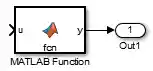
Create a Simulink model that contains a MATLAB Function block connected to an Outport block.
In the MATLAB Function block, add the function
myfunc that includes myMult2.h
and calls
myMult2.
function y = myfunc
%#codegen
y = 21;
coder.cinclude('myMult2.h');
y = coder.ceval('myMult2', y);
% Specify the locations of myMult2.h and myMult2.c
coder.extrinsic('pwd', 'fullfile');
customDir = coder.const(fullfile(pwd, 'mycfiles'));
coder.updateBuildInfo('addIncludePaths', customDir);
coder.updateBuildInfo('addSourcePaths', customDir);
coder.updateBuildInfo('addSourceFiles', 'myMult2.c');
end
Open the Configuration Parameters dialog box.
On the Solver pane, select a fixed-step solver.
Save the model as mymodel.
Build the model.
The file mymodel.h contains this statement:
To read more about integrating custom code in a MATLAB Function block, see Integrate C Code by Using the MATLAB Function Block (Simulink).
Input Arguments
collapse all
Option to include header file in all
generated C/C++ source files. If allfiles is true, MATLAB
Coder generates
the include statement in almost all
of the C/C++ source files, except for some utility files. If allfiles is false,
the behavior is the same as the behavior of coder.cinclude(headerfile).
In a MATLAB Function block, the code generator ignores the all source files option.
Data Types: logical
Limitations
Do not call
coder.cincludeinside run-time conditional constructs such asifstatements,switchstatements,while-loops, andfor-loops. You can callcoder.cincludeinside compile-time conditional statements, such ascoder.target. For example:... if ~coder.target('MATLAB') coder.cinclude('foo.h'); coder.ceval('foo'); end ...
Tips
Before a
coder.cevalcall, callcoder.cincludeto include the header file required by the external function thatcoder.cevalcalls.Extraneous include statements in generated C/C++ code can increase compile time and reduce code readability. To avoid extraneous include statements in code generated by MATLAB Coder, follow these best practices:
Place a
coder.cincludecall as close as possible to thecoder.cevalcall that requires the header file.Do not set
allfilestotrue.
For the MATLAB Function block, the code generator generates the include statement in the model header file.
In R2016a and earlier releases, for any
coder.cincludecall, MATLAB Coder included the header file in almost all generated C/C++ source files, except for some utility files. If you have code that depends on this legacy behavior, you can preserve the legacy behavior by using this syntax:coder.cinclude(headerfile,'InAllSourceFiles',true)
Extended Capabilities
expand all
The coder.cinclude function support only MATLAB to High-Level Synthesis (HLS) workflow in HDL Coder™.
Version History
Introduced in R2013a