C++ Vector
C++ Vectors
Last Updated : 14 Jan 2026
In C++, vectors are a part of the standard template library (STL). They are dynamic arrays that can automatically resize themselves when the elements are added or removed.
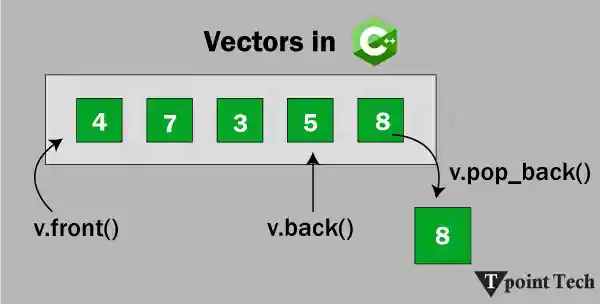
Unlike arrays, which have a certain size, vectors offer a wide range of flexibility and underlying functions, which makes them one of the most useful data structures in C++. The vectors provide many useful member functions, such as push_back(), insert(), size(), clear(), front(), pop_back(), etc.
A vector is a sequence container class that implements a dynamic array, which means size automatically changes when appending elements. A vector stores the elements in contiguous memory locations and allocates the memory as needed at run time. When more space is required, the vectors allocate new memory, copy existing elements into new memory, and deal with old memory.
Syntax
It has the following syntax:
In this syntax,
- T represents the type of elements.
- v represents the name of the vector.
Creating a Vector
If we need to create a vector, we have to include the <vector> header.:
C++ Vector Example
Let us take a simple example to illustrate the C++ Vector.
Example
Output:
Vector created
Inserting Elements
In C++, an element may be inserted into a vector via the insert() method, which takes a linear time. If we want to insert the number at the end, the push_back() method can be used. It works faster and takes only constant time.
Syntax
It has the following system:
C++ Inserting Element in C++
Let us take a simple example to insert elements in C++.
Example
Output:
T p o i n t
Accessing of Updating Elements
We can access the elements using the [] operator or at() method. The [] method is fast but unsafe because it does not check whether the given index exists in the vector. We can also use the .at() method to access elements. The elements can be updated by assigning a new value using their index.
Syntax
It has the following syntax:
Accessing and Updating Elements Example
Let us take an example to illustrate how to access and update elements in vectors.
Example
Output:
The Accessing Value at position 4 is: u
The Accessing Value at position 3 is: o
The Updating Value at Position 4 is: y
The Updating Value at Position 2 is: z
Find Vector Size
One of the main common problems of arrays is the need to maintain a separate variable to track their size. Vector can solve this problem by using the size() function, which helps to return the current number of elements in the vector.
Syntax
It has the following Syntax:
Example to Find Vector Size
Let us take an example to illustrate the size of vectors in C++.
Example
Output:
The Size of Vector is: 10
Traversing a Vector
We can traverse a vector using traditional for loops, range-based for loops, and iterators. We can utilize the loop and determine the size of the vector via the vector size() method to iterate via this range.
Example to Traverse a Vector
Let us take an example to illustrate how to traverse a vector in C++.
Example
Output:
T p o i n t T e c h
Deleting Elements
The vectors allow the removal of the ultimate element or remove the elements from any condition using erase() and pop_back() functions. If we know the value of the element in the vector, we can use the find() function to find the location of this element. After that, we can use the vector pop_back() function to delete the element that takes only constant time.
Syntax
It has the following syntax:
Example of Delete Elements in a Vector
Let us take an example to illustrate how to delete elements from a vector in C++.
Example
Output:
T p o i n
Time Complexity of Vector Operations
| Operation | Time Complexity |
|---|---|
| Access (index) | O(1) |
| Insertion (end) | O(1) |
| Deletion (end) | O(1) |
| Insertion (mid) | O(n) |
| Deletion (mid) | O(n) |
Passing Vector to Functions
The vector can be passed by the value (copy), reference (modifies the original), or const reference (read-only).
Syntax
It has the following syntax:
Internal Working of Vectors
In C++, vectors can manage their storage automatically. When we insert an element and there is no capacity left, the vector resizes itself by allocating new memory, copying existing elements to the new memory, and deleting the old one. This mechanism ensures that push_back() runs in amortized constant time.
Key points
- The capacity often exceeds the size.
- Capacity can be checked using capacity().
- If the size is known, use the reserve() to pre-allocate the memory.
Multidimensional Vector
The vector can be nested to create 2D or 3D structures. It is helpful in problems related to involving matrices.
Syntax:
It has the following syntax:
Multidimensional Vector Example
Let us take an example to illustrate the multidimensional vector in C++.
Example
Output:
1 2 3
4 5 6
7 8 9
Explanation
This code creates a 2D vector (matrix) with three rows and three columns, initializing it with specific values. After that, it uses nested loops to print each element in row-wise order, which creates a matrix.
C++ Vector Functions
In C++, vector offers several types of functions to perform different types of operations. The table below shows the function's names with their description.
| Function | Description |
|---|---|
| at() | It provides a reference to an element. |
| back() | It gives a reference to the last element. |
| front() | It gives a reference to the first element. |
| swap() | It exchanges the elements between two vectors. |
| push_back() | It adds a new element at the end. |
| pop_back() | It removes a last element from the vector. |
| empty() | It determines whether the vector is empty or not. |
| insert() | It inserts new element at the specified position. |
| erase() | It deletes the specified element. |
| resize() | It modifies the size of the vector. |
| clear() | It removes all the elements from the vector. |
| size() | It determines a number of elements in the vector. |
| capacity() | It determines the current capacity of the vector. |
| assign() | It assigns new values to the vector. |
| operator=() | It assigns new values to the vector container. |
| operator[]() | It access a specified element. |
| end() | It refers to the past-lats-element in the vector. |
| emplace() | It inserts a new element just before the position pos. |
| emplace_back() | It inserts a new element at the end. |
| rend() | It points the element preceding the first element of the vector. |
| rbegin() | It points the last element of the vector. |
| begin() | It points the first element of the vector. |
| max_size() | It returns the maximum number of elements that the vector can hold. |
| cend() | It refers to the past-last-element in the vector. |
| cbegin() | It refers to the first element of the vector. |
| crbegin() | It refers to the last character of the vector. |
| crend() | It refers to the element preceding the first element of the vector. |
| data() | It writes the data of the vector into an array. |
| shrink_to_fit() | It reduces the capacity and makes it equal to the size of the vector. |
C++ Vectors Example
Let's look at the program to demonstrate various vector functions in C++.
Example
Output:
Vector elements: 10 15 17 25 30 40 50
Size: 7
Capacity: 7
Max Size: 1073741823
After deletion: 15 17 25 30 40
Front: 15
Back: 40
At(1): 17
After swap v1: 100 200
Is v1 empty? Yes
After assign: 99 99 99
First element via data(): 99
Difference between Vector and Array
In C++, arrays and vectors are used to store collections of similar data types, but they differ in structure, flexibility and memory management.
| Feature | Array | Vector |
|---|---|---|
| Size | It can be fixed at compile time. | It can change dynamically at runtime. |
| Memory Management | Manual | Handled automatically by vector |
| Flexibility | Low | High (functions like push_back, insert) |
| STL Compatibility | Limited | Fully compatible |
| Bound Checking | Not provided | at() method offers bound checking |
| Initialization | int arr[5]; | vector<int> v(5); |
In conclusion, the vectors in C++ are highly efficient, easy to use, and a strong option for raw arrays. They provide a rich set of tasks for dynamic resizing, insertion, deletion, and traversal and integrate well with the rest of STL. Mastering vectors will not only simplify the code but will also make it more efficient and cleaner. Whether we are handling complex structures or simple data such as matrics, vectors are our go-to tool in C++.
Next TopicC++ Queue