Java Map Interface
Last Updated : 28 Mar 2026
Java Map Interface is used to store data in the form of key-value pairs. It allows you to store and access data using a key. It is widely used in real-world applications like searching, updating, and managing data.
In this chapter, you will learn about the Java Map interface, its features, and examples.
What is Map Interface in Java?
The Map interface in Java is a part of the java.util package. It stores data as key-value pairs, where each key is unique and maps to only one value. A Map is useful when you want to search, update, or delete data using a key.
Why to Use Map Interface?
The following points explain why the Map interface is useful:
- Efficient Data Retrieval:
Map allows fast searching of values using keys. It is very useful when you need to quickly access data from a large dataset. - No Duplicate Keys:
Each key in a Map is unique and maps to only one value. This helps maintain data consistency and avoids duplicate entries. - Flexible Data Types:
You can store different types of objects as keys and values in a Map. This makes it flexible for representing different types of relationships. - Associative Structure:
Map works like a dictionary where each key is linked to a value. It helps in organizing data in a meaningful and structured way. - Caching and Memoization:
Map can store results of operations so they can be reused later. This improves performance by avoiding repeated calculations.
Key Features of Map Interface
The following points describe the key features of the Map interface:
- Key-Value Pair Structure:
Map stores data in the form of key and value pairs. Each key is used to access its corresponding value. - No Duplicate Keys:
A Map does not allow duplicate keys, but it can have duplicate values. If you add a duplicate key, the old value is replaced with the new value. - Allows Null Values:
Some Map implementations allow null keys and values. For example, HashMap allows one null key and multiple null values. - Not a Subtype of Collection:
Map is not a part of the Collection interface. It is a separate interface in the Java Collections Framework. - Traversal Using Set:
A Map cannot be traversed directly. To iterate over it, you need to use keySet(), values(), or entrySet() methods. - Different Implementations:
Map has different implementations like HashMap, LinkedHashMap, and TreeMap. Each implementation works differently based on ordering and performance.
Key Features of Map Interface
The following points describe the key features of the Map interface:
- Key-Value Pair Structure:
Map stores data in the form of key and value pairs. Each key is used to access its corresponding value. - No Duplicate Keys:
A Map does not allow duplicate keys, but it can have duplicate values. If you add a duplicate key, the old value is replaced with the new value. - Allows Null Values:
Some Map implementations allow null keys and values. For example, HashMap allows one null key and multiple null values. - Not a Subtype of Collection:
Map is not a part of the Collection interface. It is a separate interface in the Java Collections Framework. - Traversal Using Set:
A Map cannot be traversed directly. To iterate over it, you need to use keySet(), values(), or entrySet() methods. - Different Implementations:
Map has different implementations like HashMap, LinkedHashMap, and TreeMap. Each implementation works differently based on ordering and performance.
Hierarchy of Map Interface
The following image shows the hierarchy of the Map interface and its implementations:
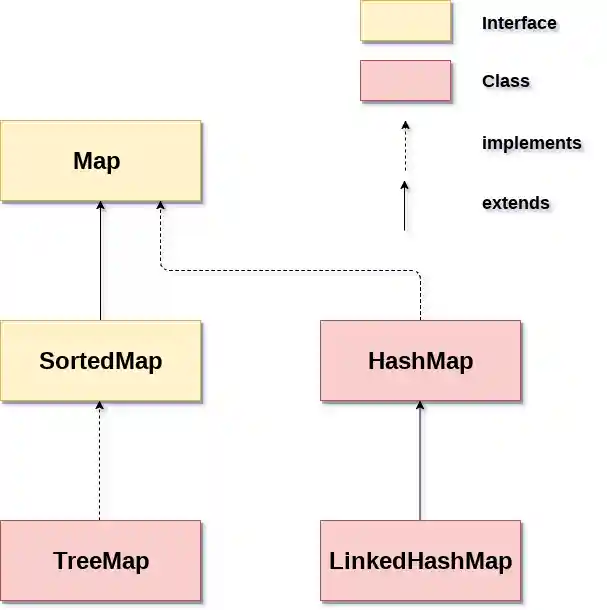
Classes of Map Interface
The following table describes the commonly used classes that implement the Map interface:
| Class | Description |
|---|---|
| HashMap | HashMap is the implementation of Map, but it doesn't maintain any order. |
| LinkedHashMap | LinkedHashMap is the implementation of Map. It inherits HashMap class. It maintains insertion order. |
| TreeMap | TreeMap is the implementation of Map and SortedMap. It maintains ascending order. |
Methods of Map Interface
The following table shows the commonly used methods of the Map interface:
| Method | Description |
|---|---|
| V put(Object key, Object value) | It is used to insert an entry in the map. |
| void putAll(Map map) | It is used to insert the specified map in the map. |
| V putIfAbsent(K key, V value) | It inserts the specified value with the specified key in the map only if it is not already specified. |
| V remove(Object key) | It is used to delete an entry for the specified key. |
| boolean remove(Object key, Object value) | It removes the specified values with the associated specified keys from the map. |
| Set keySet() | It returns the Set view containing all the keys. |
| Set<Map.Entry<K,V>> entrySet() | It returns the Set view containing all the keys and values. |
| void clear() | It is used to reset the map. |
| V compute(K key, BiFunction<? super K,? super V,? extends V> remappingFunction) | It is used to compute a mapping for the specified key and its current mapped value (or null if there is no current mapping). |
| V computeIfAbsent(K key, Function<? super K,? extends V> mappingFunction) | It is used to compute its value using the given mapping function, if the specified key is not already associated with a value (or is mapped to null), and enters it into this map unless null. |
| V computeIfPresent(K key, BiFunction<? super K,? super V,? extends V> remappingFunction) | It is used to compute a new mapping given the key and its current mapped value if the value for the specified key is present and non-null. |
| boolean containsValue(Object value) | This method returns true if some value equal to the value exists within the map, else return false. |
| boolean containsKey(Object key) | This method returns true if some key equal to the key exists within the map, else return false. |
| boolean equals(Object o) | It is used to compare the specified Object with the Map. |
| void forEach(BiConsumer<? super K,? super V> action) | It performs the given action for each entry in the map until all entries have been processed or the action throws an exception. |
| V get(Object key) | This method returns the object that contains the value associated with the key. |
| V getOrDefault(Object key, V defaultValue) | It returns the value to which the specified key is mapped, or defaultValue if the map contains no mapping for the key. |
| int hashCode() | It returns the hash code value for the Map |
| boolean isEmpty() | This method returns true if the map is empty; returns false if it contains at least one key. |
| V merge(K key, V value, BiFunction<? super V,? super V,? extends V> remappingFunction) | If the specified key is not already associated with a value or is associated with null, associates it with the given non-null value. |
| V replace(K key, V value) | It replaces the specified value for a specified key. |
| boolean replace(K key, V oldValue, V newValue) | It replaces the old value with the new value for a specified key. |
| void replaceAll(BiFunction<? super K,? super V,? extends V> function) | It replaces each entry's value with the result of invoking the given function on that entry until all entries have been processed or the function throws an exception. |
| Collectionvalues() | It returns a collection view of the values contained in the map. |
| int size() | This method returns the number of entries in the map. |
Map.Entry Interface
Map.Entry is an inner interface of the Map interface which represents a single pair of key-value in a map. It additionally allows one to get a map and to iterate over its entries, convert the map to a set of keys/values, etc. It returns a collection-view of the map, whose elements are of this class. It provides methods to get keys and values.
Methods of Map.Entry interface
The following table shows the commonly used methods of the Map.Entry interface:
| Method | Description |
|---|---|
| K getKey() | It is used to obtain a key. |
| V getValue() | It is used to obtain value. |
| int hashCode() | It is used to obtain hashCode. |
| V setValue(V value) | It is used to replace the value corresponding to this entry with the specified value. |
| boolean equals(Object o) | It is used to compare the specified object with the other existing objects. |
| static <K extends Comparable<? super K>,V> Comparator<Map.Entry<K,V>> comparingByKey() | It returns a comparator that compare the objects in natural order on key. |
| static <K,V> Comparator<Map.Entry<K,V>> comparingByKey(Comparator<? super K> cmp) | It returns a comparator that compare the objects by key using the given Comparator. |
| static <K,V extends Comparable<? super V>> Comparator<Map.Entry<K,V>> comparingByValue() | It returns a comparator that compare the objects in natural order on value. |
| static <K,V> Comparator<Map.Entry<K,V>> comparingByValue(Comparator<? super V> cmp) | It returns a comparator that compare the objects by value using the given Comparator. |
Java Map Examples
Here are some examples of the Java Map interface to understand its usage.
Example 1: Non-Generic Map (Old Style)
In this example, we are using a non-generic Map and traversing it using Iterator.
Output:
1 Amit
2 Jai
5 Rahul
6 Amit
Example 2: Generic Map Using HashMap
In this example, we are using a generic Map and traversing it using entrySet().
Output:
100 Amit
101 Vijay
102 Rahul
Example 3: Sorting Map by Key (Ascending Order)
Output:
100=Amit
101=Vijay
102=Rahul
Example 4: Sorting Map by Key (Descending Order)
In this example, we are sorting the Map entries by key in descending order.
Output:
102=Rahul
101=Vijay
100=Amit
Note: The Map interface is implemented by several classes such as HashMap, LinkedHashMap, and TreeMap.
HashMap
HashMap is an important data structure in Java which implements the Map interface. In this way, it provides a scheme for storing of key-value pairs. A HashMap has each key unique and only has one value for each key. This enables the lookup of values by their keys that are paired with them.
One of the most important features of HashMap is its underlying implementation as a hash table that allows constant-time performance for basic operations such as insertion, deletion, and retrieval on average, providing a good hash function and proper capacity management.
Example
In this example, we are creating a HashMap to store student IDs and names, retrieving a value using a key, iterating through the map, and checking if a key exists.
Output:
Student with ID 1002 is: Emily BrownStudent Records:
ID: 1001, Name: John Smith
ID: 1002, Name: Emily Brown
ID: 1003, Name: Michael Johnson
Student with ID 1004 exists in records: false
LinkedHashMap
LinkedHashMap is a class in Java that extends HashMap and implements the Map interface. It is similar to HashMap in functionality but maintains a predictable iteration order, that is, the order in which keys were inserted into the map (insertion order). This makes LinkedHashMap a good choice when the insertion order needs to be preserved.
LinkedHashMap has a special feature of maintaining a doubly linked list of its entries, which allows iteration in either insertion order or access order (the order in which entries were last accessed).
Example
In this example, we are creating a LinkedHashMap to store student IDs and names, and iterating over the entries while maintaining insertion order.
Output:
Student Records:
ID: 1001, Name: John Smith
ID: 1002, Name: Emily Brown
ID: 1003, Name: Michael Johnson
TreeMap
TreeMap is a sorted map implementation that stores key-value pairs in a Red-Black tree structure. It ensures that elements are arranged based on their keys, either in natural order or using a user-defined comparator.
This data structure provides O(log n) time complexity for insertion, deletion, and retrieval operations. TreeMap implements the NavigableMap interface, which provides methods for navigation and range-based operations.
It is commonly used for maintaining data in sorted order, performing range searches, and processing data efficiently in a sorted manner.
Example
In this example, we are creating a TreeMap to store student IDs and names, and iterating over the entries in sorted (ascending) order of keys.
Output:
Student Records:
ID: 1001, Name: John Smith
ID: 1002, Name: Emily Brown
ID: 1003, Name: Michael Johnson