Java HashMap
Last Updated : 28 Mar 2026
Java HashMap is used to store data in key-value pairs where each key is unique. It allows fast operations like searching, updating, and deleting data using keys. It is one of the most commonly used classes in the Java Collection Framework.
In this chapter, you will learn about the Java HashMap class, its features, and examples.
What is HashMap in Java?
Java HashMap class implements the Map interface and is used to store key-value pairs. Each key must be unique, and if a duplicate key is inserted, the old value is replaced with the new value.
HashMap is part of the java.util package and allows one null key and multiple null values. It is not synchronized and provides fast performance for basic operations.
It extends the AbstractMap class and implements the Map interface.
Hierarchy of HashMap Class
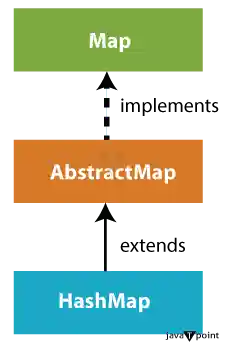
HashMap is a part of the Java Collection Framework. It extends the AbstractMap class and implements the Map interface.
The Map interface further extends other interfaces in the hierarchy, making HashMap a key component for storing key-value pairs in Java.
The following image shows the hierarchy of the HashMap class:
HashMap Class Declaration
Let's see the declaration for java.util.HashMap class.
HashMap Class Parameters
Let's see the Parameters for java.util.HashMap class.
- K: It is the type of keys maintained by this map.
- V: It is the type of mapped values.
Constructors of Java HashMap Class
Java HashMap class provides different constructors to create and initialize a HashMap.
1. HashMap()
It is used to construct a default HashMap.
Here is the syntax:
2. HashMap(Map m)
It is used to construct a HashMap containing the elements of the specified Map.
Here is the syntax:
3. HashMap(int capacity)
It is used to construct a HashMap with the specified initial capacity.
Here is the syntax:
4. HashMap(int capacity, float loadFactor)
It is used to construct a HashMap with the specified capacity and load factor.
Here is the syntax:
Methods of Java HashMap Class
The following table shows the commonly used methods of the HashMap class:
| Method | Description |
|---|---|
| void clear() | It is used to remove all of the mappings from this map. |
| boolean isEmpty() | It is used to return true if this map contains no key-value mappings. |
| Object clone() | It is used to return a shallow copy of this HashMap instance: the keys and values themselves are not cloned. |
| Set entrySet() | It is used to return a collection view of the mappings contained in this map. |
| Set keySet() | It is used to return a set view of the keys contained in this map. |
| V put(Object key, Object value) | It is used to insert an entry in the map. |
| void putAll(Map map) | It is used to insert the specified map in the map. |
| V putIfAbsent(K key, V value) | It inserts the specified value with the specified key in the map only if it is not already specified. |
| V remove(Object key) | It is used to delete an entry for the specified key. |
| boolean remove(Object key, Object value) | It removes the specified values with the associated specified keys from the map. |
| V compute(K key, BiFunction<? super K,? super V,? extends V> remappingFunction) | It is used to compute a mapping for the specified key and its current mapped value (or null if there is no current mapping). |
| V computeIfAbsent(K key, Function<? super K,? extends V> mappingFunction) | It is used to compute its value using the given mapping function, if the specified key is not already associated with a value (or is mapped to null), and enters it into this map unless null. |
| V computeIfPresent(K key, BiFunction<? super K,? super V,? extends V> remappingFunction) | It is used to compute a new mapping given the key and its current mapped value if the value for the specified key is present and non-null. |
| boolean containsValue(Object value) | This method returns true if some value equal to the value exists within the map, else return false. |
| boolean containsKey(Object key) | This method returns true if some key equal to the key exists within the map, else return false. |
| boolean equals(Object o) | It is used to compare the specified Object with the Map. |
| void forEach(BiConsumer<? super K,? super V> action) | It performs the given action for each entry in the map until all entries have been processed or the action throws an exception. |
| V get(Object key) | This method returns the object that contains the value associated with the key. |
| V getOrDefault(Object key, V defaultValue) | It returns the value to which the specified key is mapped, or defaultValue if the map contains no mapping for the key. |
| boolean isEmpty() | This method returns true if the map is empty; returns false if it contains at least one key. |
| V merge(K key, V value, BiFunction<? super V,? super V,? extends V> remappingFunction) | If the specified key is not already associated with a value or is associated with null, associates it with the given non-null value. |
| V replace(K key, V value) | It replaces the specified value for a specified key. |
| boolean replace(K key, V oldValue, V newValue) | It replaces the old value with the new value for a specified key. |
| void replaceAll(BiFunction<? super K,? super V,? extends V> function) | It replaces each entry's value with the result of invoking the given function on that entry until all entries have been processed or the function throws an exception. |
| Collection<V> values() | It returns a collection view of the values contained in the map. |
| int size() | This method returns the number of entries in the map. |
Creating a Simple HashMap
A HashMap is used to store key-value pairs. We can add elements using the put() method and traverse them using entrySet().
Example
In this example, we are creating a HashMap, adding elements, and traversing it.
Output:
Iterating Hashmap...
1 Mango
2 Apple
3 Banana
4 Grapes
Handling Duplicate Keys in HashMap
HashMap does not allow duplicate keys. If a duplicate key is added, the old value is replaced with the new value.
Example
In this example, we are adding a duplicate key, which replaces the previous value.
Output:
1 Grapes
2 Apple
3 Banana
Adding Elements in HashMap
Elements can be added using methods like put(), putIfAbsent(), and putAll().
Example
In this example, we are adding elements using different methods like put(), putIfAbsent(), and putAll().
Output:
100 Amit
101 Vijay
102 Rahul
103 Gaurav
104 Ravi
Removing Elements from HashMap
Elements can be removed using remove() methods based on key or key-value pair.
Example
In this example, we are removing elements using remove() methods.
Output:
Replacing Elements in HashMap
We can replace values using replace() and replaceAll() methods.
Example
In this example, we are replacing values using replace() and replaceAll() methods.
Output:
100 Ajay
101 Ajay
102 Ajay
Difference Between HashSet and HashMap
HashSet stores only values, whereas HashMap stores key-value pairs (entries). The following table shows the main differences between HashSet and HashMap based on the different aspects:
| Feature | HashSet | HashMap |
|---|---|---|
| Contains | Only values | Key-value pairs (entries) |
| Data Structure | Implements Set interface | Implements Map interface |
| Usage | Used for storing unique elements | Used for storing key-value pairs |
| Null Elements | Allows one null element | Allows one null key and multiple null values |
| Ordering | Unordered | Unordered |
| Retrieval | Direct access by value | Access by key |
| Implementation | Implemented using HashMap internally | Implemented using HashTable internally |
| Performance | Typically offers better performance | It might have a slightly lower performance |
| Memory Overhead | Lower due to storing only values | >Higher due to storing both keys and values |
| Iteration | Iterating over elements is straightforward | Iterating over entries is less intuitive |
| Use Cases | Checking for presence, maintaining uniqueness | Associating values with keys, efficient value retrieval |
| Concurrency | Not synchronised, not suitable for concurrent access without external synchronisation | Can be synchronised or use ConcurrentHashMap for concurrent access |
| API Differences | Methods for adding, removing, and checking containment | Methods for getting/setting values based on keys, additional operations for managing key-value pairs |