Java Operators
Last Updated : 17 Mar 2025
Operators are an essential part of any programming language. In Java, operator is a symbol that is used to perform operations. For example: +, -, *, / etc. These are essential for performing different types of operations on variables and values. In this section, we will discuss different types of operators used in Java programming.

There are mainly eight types of operators in Java:
- Unary Operator
- Arithmetic Operator
- Relational Operator
- Ternary Operator
- Assignment Operator
- Bitwise Operator
- Logical Operator
- Shift Operator
Java Unary Operator
The Java unary operators require only one operand. Unary operators are used to perform various operations i.e. incrementing/decrementing a value by one, negating an expression and inverting the value of a Boolean. Observe the following table.
| Operator | Name | Description |
|---|---|---|
| + | Unary Plus | Unary plus operator; indicates positive value (numbers are positive without this, however) |
| - | Unary Minus | The Unary Minus operator can be used to make a positive value negative. |
| ! | Logical Complement Operator | The Not operator is used to convert a boolean value. In other words, it is used to reverse the logical state of an operand. |
| ++ | Increment | It is used to increase the value of an operand by one. It can be done in two possible ways. One is post-increment (operand++) and other is pre-increment (++operand). In post-increment, the value of the operand is used first, then its value is increased by one. In pre-increment, the value of the operand is incremented first by one, then the incremented value of the operand is used. |
| -- | Decrement | It is used to decrease the value of an operand by one. It can be done in two possible ways. One is post-decrement (operand--) and other is pre-decrement (--operand). In post-decrement, the value of the operand is used first, then its value is decreased by one. In pre-increment, the value of the operand is decrement first by one, then the decremented value of the operand is used. |
Java Unary Operator Example: ++ and --
Example
Output:
10
-10
Java Unary Operator Example: Pre-increment and Post-increment
Example
Output:
10
12
Java Unary Operator Example: Pre-decrement and Post-decrement
Example
Output:
10
8
Java Unary Operator Example: Logical Complement Operator and Negation
Example
Output:
-11
9
false
true
To read more: Unary Operators in Java
Java Arithmetic Operators
Java arithmetic operators are used to perform addition, subtraction, multiplication, division, and modulo operation. They act as basic mathematical operations.
| Operator | Name | Description |
|---|---|---|
| + | Addition | Adds two numbers. |
| - | Subtraction | Subtracts one number from another number. |
| * | Multiplication | Multiplies two numbers. |
| / | Division | Divides one number by another number. |
| % | Modulus | Divides and returns the remainder of two numbers. |
Java Arithmetic Operator Example
Example
Output:
15
5
50
2
0
Java Arithmetic Operator Example: Expression
Example
Output:
21
To read more: Arithmetic Operators in Java
Java Shift Operators
Java shift operator works on the bits of the data. It shifts the bits of the number from left to right or right to left. The following table shows the types of shift operator in Java.
| Operator | Operator Name | Description |
|---|---|---|
| << | Left Shift Operator (Signed) | All of the bits shift to left by a given number using this operator. |
| >> | Right Shift Operator (Signed) | All of the bits shift to right by a given number using this operator. |
| >>> | Unsigned Right Shift Operator | It is similar to the right shift operator (signed). However, the vacant leftmost position is occupied with 0 in place of the signed bit |
Java Left Shift Operator
The Java left shift operator << is used to shift all of the bits in a value to the left side of a specified number of times.
Java Left Shift Operator Example
Example
Output:
40
80
80
240
Java Right Shift Operator
The Java right shift operator >> is used to move the value of the left operand to right by the number of bits specified by the right operand.
Java Right Shift Operator Example
Example
Output:
2
5
2
Java Shift Operator Example: >> vs >>> (Unsigned Shift)
Example
Output:
5
5
-5
1073741819
To read more: Shift Operators in Java
Java Relational Operators
Java relational or conditional operators are used to check relationship between two operands such as less than, less than or equal to, greater than, greater than or equal to, equal to and not equal to. It is also known as equality operator. These operators return Boolean values either true or false.
| Operator | Name | Description |
|---|---|---|
| < | Less Than | If the value of the first operand is lesser than the value of the second operand, the Less Than operator returns true, otherwise false. |
| > | Greater Than | If the value of the first operand is greater than the value of the second operand, the Greater Than operator returns true, otherwise false. |
| <= | Less Than or Equal to | When the value of the first operand is lesser than or equal to the value of the second operand, the Less Than or Equal to operator returns true, otherwise false. |
| >= | Greater Than or Equal to | When the value of the first operand is greater than or equal to the value of the second operand, the Greater Than or Equal to operator returns true, otherwise false. |
| == | Equal to | Equal to operator checks whether the given operands are equal or not. If they are equal, they return true otherwise false. |
| != | Not Equal to | Not Equal to operator works just opposite to Equal to operator. It returns false if the operands are equal in value, otherwise true. |
Java Relational Operator Example
Example
Output:
(a < b) : true
(a > b) : false
(a <= b) : true
(a >= b) : false
(a == b) : false
(a != b) : true
To read more: Relational Operators in Java
Java Bitwise Operators
Java bitwise operators are used to perform the manipulation of individual bits of a number and with any of the integer types. They are used when performing update and query operations of the Binary indexed trees.
| Operator | Operator Name | Description |
|---|---|---|
| | | Bitwise OR | It is a binary operator which gives OR of the input values bit by bit. |
| & | Bitwise AND | It is a binary operator which gives AND of the input values bit by bit. |
| ^ | Bitwise XOR | It is a binary operator which gives XOR of the input values bit by bit. |
| ~ | Bitwise Complement | The Bitwise Complement operator is also a unary operator. It makes every bit 0 to 1, and 1 to 0. |
Java Bitwise OR (|) Operator Example
Example
Output:
The value of a | b is: 15
Java Bitwise AND (&) Operator Example
Example
Output:
The value of a & b is: 1
Java Bitwise XOR (^) Operator Example
Example
Output:
The value of a ^ b is: 14
Java Bitwise Complement Operator Example
Example
Output:
The value of ~a is: -6
To read more: Bitwise Operators in Java
Java Logical Operators
Logical operators are used extensively in various programming languages to perform Logical NOT, OR and AND operations whose functionality is similar to OR gate and AND gate in the world of digital electronics.
| Operator | Name | Description |
|---|---|---|
| && | Conditional AND Operator | The logical && operator does not check the second condition if the first condition is false. It checks the second condition only if the first one is true. |
| || | Conditional OR Operator | The logical || operator does not check the second condition if the first condition is true. It checks the second condition only if the first one is false. |
| ! | Bitwise Complement | The NOT operator is used to reverse the value of a Boolean expression. |
Java Logical AND (&&) Operator Example
Example
Output:
else block is executed.
The value of a is: 10
Java Logical OR (||) Operator Example
Example
Output:
true
The value of a is: 10
true
The value of a is: 11
Java Logical NOT or Bitwise Complement (!)Operator Example
Example
Output:
false
true
To read more: Logical Operators in Java
Java Ternary Operator
Java Ternary operator is used as one line replacement for if-then-else statement and used a lot in Java programming. It is the only conditional operator which takes three operands.
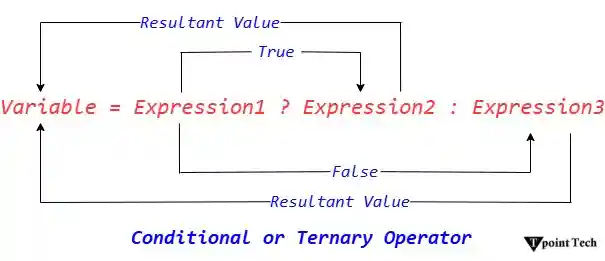
Java Ternary Operator Example
The following example checks the maximum between two numbers.
Example
Output:
2
Let's see another example.
The following example illustrates to find the maximum between three numbers using ternary operator. Note that it uses the nesting of ternary operators.
Example
Output:
The maximum between the three numbers 10, 15, 13 is: 15
Note: Though writing code using ternary operator takes less amount of code as compared to if-else statements, it is not always a good way to write code using ternary operator. Usually in complex logic or conditions, if-else statements take precedence over the ternary operator. Using ternary operator in complex logic makes the code difficult to understand.
To read more: Ternary Operators in Java
Java Assignment Operator
Java assignment operator is one of the most common operators. It is used to assign the value on its right to the operand on its left. The left operand has to be a variable and right operand contains value. Note that the data type of both the operands has to be of the same type. If not, an error will be raised by the compiler. The associativity of the assignment operators is form right to left, which means values on the right side of the operator is assigned to the left side.
Types of Assignment Operator
There are two types of assignment operators. They are:
- Simple Assignment operator: The simple assignment operator where only (=) is used.
- Compound Assignment operator: The compound assignment operator is used where -,+,/,* are used along with (=) operator.
The following table illustrates the working of the different assignment operators.
| Types | Operator | Description |
|---|---|---|
| Single Assignment Operator | = | It is the simplest assignment operator that assigns the value of the right side to the variable of the left side. |
| Compound Assignment Operator | += | It is a compound assignment operator which consists of + and =. It first adds the current value of the variable present on the left side to the value on the right side and then assign the result to the variable on the left side. |
| *= | It is a compound assignment operator which consists of * and =. It first multiplies the current value of the variable present on the left side to the value on the right side and then assign the result to the variable on the left side. | |
| /= | It is a compound assignment operator which consists of / and =. It first divides the current value of the variable present on the left side to the value on the right side and then assign the quotient to the variable on the left side. | |
| %= | It is a compound assignment operator which consists of % and =. It first divides the current value of the variable present on the left side to the value on the right side and then assign the remainder to the variable on the left side. |
Java Assignment Operator Example
Example
Output:
13
9
18
9
0
Note: In Java, the compound assignment operator performs implicit typecasting. The following program illustrates the same.
Java Assignment Operator Example: Adding Short
In this example, we have used the compound operator +=. Similarly, we can do for the other compound operators.
Example
Output:
Compile time error
After Type Cast:
Example
Output:
20
To read more: Assignment Operators in Java
Java Operator Precedence
| Operator Type | Precedence |
|---|---|
| Unary | expr++ expr-- |
| prefix | ++expr --expr +expr -expr ~ ! |
| Arithmetic | * / % |
| additive | + - |
| Shift | << >> >>> |
| Relational | < > <= >= instanceof |
| equality | == != |
| Bitwise AND | & |
| Bitwise exclusive OR | ^ |
| Bitwise inclusive OR | I |
| Logical AND | && |
| Logical OR | || |
| Ternary | ? : |
| Assignment | = += -= *= /= %= &= ^= |= <<= >>= >>>= |
Conclusion
Operators are a fundamental part of Java programming, enabling developers to perform various tasks ranging from simple arithmetic to complex bitwise operations. Understanding the different types of operators and their precedence is crucial for writing efficient and effective Java code. The section provides a comprehensive overview and practical examples to help you get started with using operators in Java.
Multiple Choice Questions
1) The output of relational operators is _______________.
- Double
- Characters
- Integer
- Boolean
Answer: d) Boolean
Explanation: Relational operators return a Boolean value.
2) Choose the odd one out of from the following.
- |
- &
- -
- ^
Answer: c) -
Explanation: In the given options, only - is the unary operator. The remaining three are the bitwise operators.
3) What will be the output of the following print statement?
System.out.println("The output is: " + (1 || true));
- The output is: 1
- The output is: true
- Error
- The output is: false
Answer: c) Error
Explanation: In OR (II) operator, both the operands have to be a Boolean value. In the print statement, the first operand is of type int. Hence, it will give error.
4) What will be the output of 5 << 2 in Java?
- 1
- 20
- 5
- None of these
Answer: b) 20
Explanation: The number 5 in binary representation is 00101. When we apply the right shift operator with the value 2, we get 10100, and the decimal representation of 10100 is 20.
5) Which operator one will choose to identify whether a number is even or odd using bitwise operations only?
- &
- |
- ^
- ~
Answer: a) &
Explanation: All the odd numbers have the leftmost bit 1. All the even numbers have the leftmost bit 0. If we perform number & 1 and get 0, then that number is even. If we get 1, then that number is odd
Next TopicJava Keywords