Python Dictionary
Python Dictionaries
Last Updated : 3 Jan 2026
A Python Dictionary is one of the built-in data types used to store data in 'key: value' pairs. The dictionary is an unordered, mutable and indexed collection where each key is unique and maps to a value. It is often used to store related data, like information associated with a particular entity or object, where we can easily get value on the basis of its key.
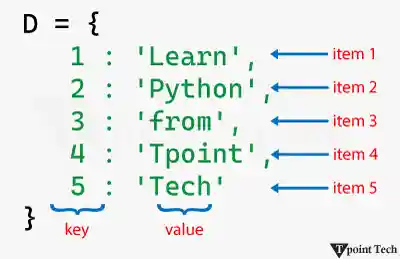
Let us take a look at a simple example of a dictionary.
Example
Output:
{1: 'Learn', 2: 'Python', 3: 'from', 4: 'Tpoint', 5: 'Tech'}Explanation:
In the above example, we have created a simple dictionary consisting of multiple 'key: value' pairs.
As we can observe, a dictionary in Python is a mapping data type where the value of one object maps to another. In order to establish the mapping between a key and a value, we have used the colon ':' symbol between the two.
Characteristics of Python Dictionary
A dictionary in Python is a data type with the following characteristics:
- Mutable: Dictionaries can be modified after initialization allowing us to add, remove or update 'key: value' pairs.
- Unordered: Python dictionary does not follow a particular order to store items. However, starting from Python 3.7, the feature for the dictionary to maintain the insertion order of the items was added.
- Indexed: Unlike lists or tuples, which are indexed by position, dictionaries use keys to access values, offering faster and more readable data retrieval.
- Unique Keys: Each key in a dictionary must be unique. If we try to assign a value to an existing key, the old value will be replaced by the new one.
- Heterogeneous: Keys and values in a dictionary can be of any type.
Creating a Dictionary
In Python, we can create a dictionary by enclosing the sequence of 'key: value' pairs with curly braces separated by commas. As an alternate option, we can use the Python's built-in dict() function.
Python Example to Create a Dictionary
Here is a simple example showing both ways of creating a dictionary in Python.
Example
Output:
Empty Dictionary: {}
Dictionary 1 (created using {}): {'name': 'Lucy', 'age': 19, 'city': 'New Jersey'}
Dictionary 2 (created using dict()): {'name': 'John', 'age': 21, 'city': 'Havana'}
Explanation:
The above example shows different ways to create dictionaries in Python. We have also seen how to create an empty dictionary.
Note: The dict() function can also be used to transform an existing data type into a dictionary.
Accessing Dictionary Items
In Python, we can access the value of a dictionary item by enclosing that particular key with square brackets '[]'. Another way to access dictionary items is by the use of the get() method.
Python Example to Access a Dictionary
The following is a simple example showing the ways to access dictionary items in Python.
Example
Output:
Person's Details
Name: Sachin
Age: 18
Gender: male
Profession: student
Explanation:
Here, we have accessed the different values of the dictionary items using the square brackets and get() method.
Adding Items to a Dictionary
The dictionary is a mutable data type that allows us to add an item to it. This can be done by assigning a value to a new key.
Python Example to Add Items to a Dictionary
Let us take a look at a simple example showing how to add items to a Python dictionary.
Example
Output:
Given Dictionary: {'name': 'Sachin', 'age': 18, 'gender': 'male', 'profession': 'student'}
Updated Dictionary: {'name': 'Sachin', 'age': 18, 'gender': 'male', 'profession': 'student', 'country': 'India'}
Explanation:
In this example, we have added a new 'key: value' pair to the dictionary using the assignment operator.
Removing Items from a Dictionary
Python offers multiple ways to remove items from a given dictionary, such as:
- del: This keyword is used to remove an item by key.
- pop(): This method is used to remove an item by key. It also returns the value of the removed item.
- popitem(): This method removes and returns the last 'key: value' pair.
- clear(): This method is used to remove all items from the dictionary.
Python Example to Remove Items from a Dictionary Using Different Methods
Here is an example showing the use of different methods to remove items from a Python dictionary.
Example
Output:
Given Dictionary: {'name': 'Sachin', 'age': 18, 'gender': 'male', 'profession': 'student', 'country': 'India'}
Updated Dictionary (Removed 'age'): {'name': 'Sachin', 'gender': 'male', 'profession': 'student', 'country': 'India'}
Updated Dictionary (Removed 'gender'): {'name': 'Sachin', 'profession': 'student', 'country': 'India'}
Popped Value: male
Updated Dictionary (Removed last item): {'name': 'Sachin', 'profession': 'student'}
Popped Item: ('country', 'India')
Update Dictionary (Removed all items): {}
Explanation:
In this example, we are given a dictionary. We have used several methods like del keyword, pop(), popitem(), and clear() methods to remove the items from the dictionary.
Changing Dictionary Items
In Python, we can change the values of an item in the dictionary by referring to its key.
Python Example to Change Dictionary Items
Let us take a simple example to understand how to change dictionary items in Python.
Example
Output:
Given Dictionary: {'name': 'Sachin', 'age': 18, 'gender': 'male', 'profession': 'student', 'country': 'India'}
Updated Dictionary: {'name': 'Sachin', 'age': 20, 'gender': 'male', 'profession': 'developer', 'country': 'India'}
Explanation:
In this example, we have used the assignment operator to change the value of existing keys in the given dictionary. As a result, the dictionary items are updated.
Iterating Through a Dictionary
Starting from Python 3.7, a dictionary is an ordered collection of items; therefore, it maintains the order of its items. We can iterate through dictionary keys using the 'for' loop, as shown in the following example.
Example
Output:
Items in Dictionary:
Name -> Sachin
Age -> 18
Gender -> Male
Profession -> Student
Country -> India
Explanation:
In the above example, we have used the 'for' loop to iterate through the keys in dictionary and accessed the value for each key.
Finding Length of a Dictionary
In order to find the length of a dictionary, we can use Python's built-in function called len(). This function will return the total number of 'key: value' pairs present in a dictionary, allowing us to determine the size of the dictionary efficiently.
Python Example to Find the Length of a Dictionary
Let us see the following example showing the use of the len() function in determining the length of a Python dictionary.
Example
Output:
Given Data: {'John': 'Sr. Software Developer', 'Irfan': 'UI/UX Designer', 'Lucy': 'Human Resource Manager', 'Peter': 'Team Lead', 'Johnson': 'Business Developer'}
Size of Data: 5
Explanation:
In the above example, we have used the len() function in order to find out how many items are in the given dictionary.
Dictionary Membership Test
We can use the 'in' or 'not in' operators in order to check whether a key exists in a dictionary. Here's a simple example that shows how to see if a specified key is part of a dictionary in Python.
Example
Output:
Is 'fruit' a member of 'dict_y'?: True
Is 'beverage' a member of 'dict_y'?: False
Is 'beverage' NOT a member of 'dict_y'?: True
Explanation:
In this example, we have used the 'in' and 'not in' operators to check if the specified keys are present in the given dictionary. The 'in' operator returns the Boolean value after checking if the key exists in the dictionary, whereas the 'not in' operator returns the Boolean value after checking if the key does not exist in it.
Dictionary Methods in Python
Python offers several dictionary methods in order to manipulate the data of a dictionary. These methods are commonly used to add, update, delete, and return elements from the dictionaries. Some of these methods are as follows:
| Dictionary Method | Description |
|---|---|
| get() | This method returns the value associated with a specific key. |
| update() | This method is utilized to add a new item to the dictionary or update the value of an existing key. |
| copy() | This method is utilized to return a copy of the dictionary. |
| pop() | This method removes the item with the given key from the dictionary. |
| popitem() | This method is utilized to return the last inserted key and value as a tuple. |
| clear() | This method removes all items from the dictionary. |
| keys() | This method returns all the keys in the dictionary. |
| values() | This method is utilized to return all the values in the dictionary. |
Conclusion
Python dictionaries are a fundamental and highly flexible data type that allow us to store, access, and manipulate data using 'key: value' pairs. They are optimized for fast lookups and can handle everything from simple mappings to complex nested data. Whether we are managing configuration files, processing JSON, or building data-driven applications, mastering dictionaries is essential for writing efficient and clean line of codes in real-world scenarios.
Next TopicPython Dictionary Methods